





























































Using future versions of .NET with this book
Microsoft is expected to release .NET 11 at the .NET Conf 2026 on Tuesday, November 10, 2026. Many readers will want to use this book with .NET 11 and future versions of .NET, so this section explains how.
.NET 11 is likely to be available in preview from February 2026, or you can wait for the final version in November 2026.
Warning! Once you install a .NET 11 SDK, it will be used by default for all .NET projects unless you override it using a global.json file. You can learn more about doing this at the following link: https://learn.microsoft.com/en-us/dotnet/core/tools/global-json.
You can easily continue to target the .NET 10 runtime while installing and using future C# compilers, as shown in Figure 1.17 and illustrated in the following list:
- November 2025 onward: Install .NET SDK 10.0.100 or later and use it to build projects that target .NET 10 and use the C# 14 compiler by default. Every month, update to .NET 10 SDK patches on the development computer and update to .NET 10 runtime patches on any deployment computers.
- February to October 2026: Optionally, install .NET SDK 11 previews each month to explore the new C# 15 language and .NET 11 library features. Note that you won’t be able to use new library features while targeting .NET 10.
- November 2026 onward: Install .NET SDK 11.0.100 or later and use it to build projects that continue to target .NET 10 and use the C# 15 compiler for its new features. You will be using a fully supported SDK and a fully supported runtime. You can also use new features in EF Core 11 because it will continue to target .NET 10.
- February to October 2027: Optionally, install .NET 12 previews to explore new C# 16 language and .NET 12 library features. Start planning if any new libraries and ASP.NET Core features in .NET 11 and .NET 12 can be applied to your .NET 10 projects when you are ready to migrate.
- November 2027 onward: Install .NET 12.0.100 SDK or later and use it to build projects that target .NET 10 and use the C# 16 compiler.
- You could migrate your .NET 10 projects to .NET 12 since .NET 12 is an LTS release. You have until November 2028 to complete the migration when .NET 10 reaches end-of-life.
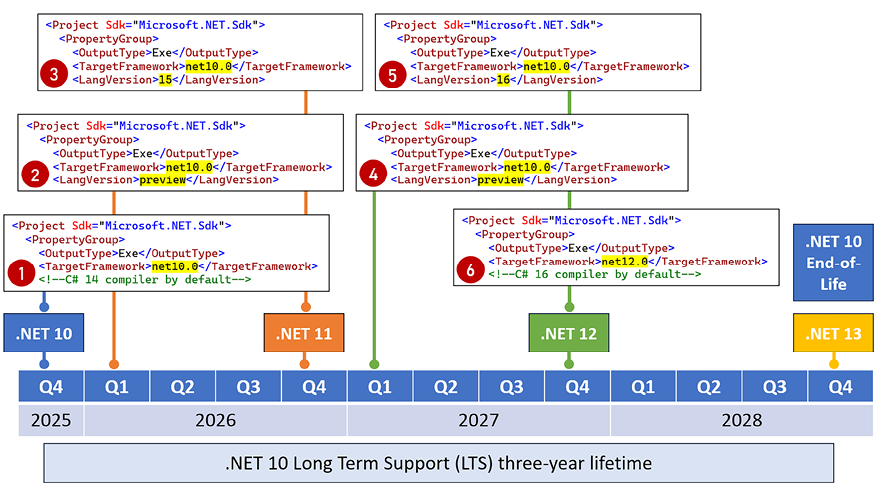
Figure 1.17: Targeting .NET 10 for long-term support while using the latest C# compilers
When deciding to install a .NET SDK, remember that the latest is used by default to build any .NET projects. Once you’ve installed a .NET 11 SDK preview, it will be used by default for all projects, unless you force the use of an older, fully supported SDK version like 10.0.100 or a later patch.
To gain the benefits of whatever new features are available in C# 15, while still targeting .NET 10 for long-term support, modify your project file, as shown highlighted in the following markup:
<Project Sdk="Microsoft.NET.Sdk">
  <PropertyGroup>
    <OutputType>Exe</OutputType>
    <TargetFramework>net10.0</TargetFramework>
    <LangVersion>15</LangVersion> <!--Requires .NET 11 SDK GA-->
    <ImplicitUsings>enable</ImplicitUsings>
    <Nullable>enable</Nullable>
  </PropertyGroup>
</Project>
Good practice: Use a GA SDK release like .NET 11 to use new compiler features while still targeting older but longer supported versions of .NET like .NET 10.














