

Adding Jenkins slaves – standalone Linux machine/VMs
In the following section, we will try to add a standalone Linux machine as a Jenkins slave. Make sure you have Java installed on your soon-to-be Jenkins slave machine. Follow the given steps:
- From the Jenkins dashboard, click on
Manage Jenkins|Manage Nodes. - From the left-hand side menu, click on
New Node. On the resultant page you will be asked to provide a name for your node and choose the type, as shown in the following screenshot:
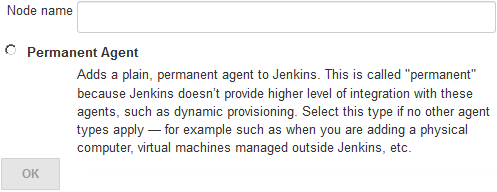
Adding a name and choosing the agent type (type of slave)
- Add a meaningful name under the
Node namefield and choose the agent type. For now, there is only one type of agent to choose from: that is,Permanent Agent. These are the types of agents that are mainly physical machines and VMs. - Click on the
OKbutton to proceed.
- On the resultant page, you will see the following options to configure, as shown in the following screenshot:
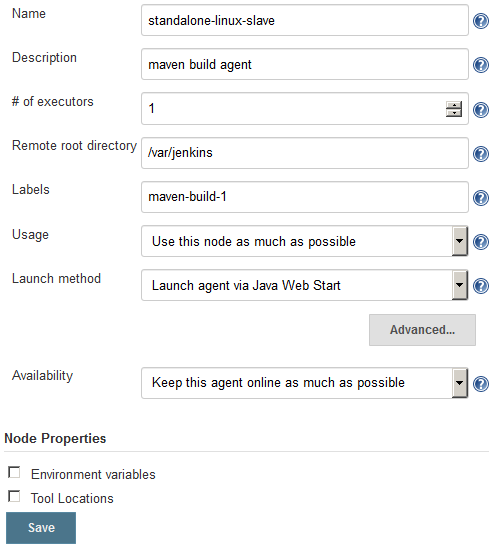
Jenkins slave configuration
Let's see them one by one:
- We already used the
Namefield...