

 Download code from GitHub
Connecting to Sources and Transforming Data with M
This chapter follows up on the dataset planning process described in the previous chapter by implementing M queries in a new Power BI Desktop file to retrieve the required fact and dimension tables. Parameters and variables are used to access a set of SQL views reflecting the data warehouse tables inside a SQL Server database and the Annual Sales Plan data contained in an Excel workbook. Additional M queries are developed to support relationships between the sales plan and dimension tables and to promote greater usability and manageability of the dataset.
Three examples of implementing data transformations and logic within M queries, such as the creation of a dynamic customer history segment column, are included. Finally, tools for editing and managing M queries, such as extensions for Visual Studio and Visual Studio Code, are...
Query design per dataset mode
Many common M queries can be written for both import and DirectQuery datasets, but with widely different implications for the source system resources utilized and the performance of the analytical queries from Power BI. It's essential that the mode of the dataset (import or DirectQuery) has been determined in advance of the development of the data access queries and that this decision is reflected in the M queries of the dataset.
The M queries supporting a Power BI dataset import mode should exclude, or possibly split, columns with many unique values, such as a Transaction Number column, as these columns consume relatively high levels of memory. A standard design technique for import mode models is to exclude derived fact table columns with relatively more unique values when these values can be computed via simple DAX measure expressions based...
Data sources
Data source connectivity is one of the strengths of Power BI, due to the vast list of standard data source connectors included in Power BI Desktop, in addition, to support for Open Database Connectivity (ODBC) and Object Linking and Embedding, Database (OLE DB) connections. The breadth of data connectivity options is further bolstered by the ability for developers to create custom Power BI data connectors for a specific application, service, or data source. Custom data connectors, the data retrieval processes created for all data sources for Power BI, and other Microsoft applications are developed with the M language.
Power BI's data connectors are consistently extended and improved with each monthly release of Power BI Desktop. New data sources are commonly added as a preview or beta release feature and previous beta connectors are moved from beta to general...
SQL views
As described in the Dataset planning section of Chapter 1, Planning Power BI Projects, a set of SQL views should be created within the data source and these objects, rather than the database tables, should be accessed by the Power BI dataset. Each fact and dimension table required by the Power BI dataset should have its own SQL view and its own M query within the dataset that references this view. The SQL views should preferably be assigned to a dedicated database schema and identify the dimension or fact table represented as shown in the following screenshot:

M queries
With the SQL views created, the data sources configured, and the Power BI Desktop environment options applied, the dataset designer can finally develop the data retrieval queries and parameters of the dataset.
Within the Power Query Editor of Power BI Desktop, group folders can be used to organize M queries into common categories such as Data Source Parameters, Staging Queries, Fact table Queries, Dimension Table Queries, and Bridge Table Queries as shown in the following screenshot:
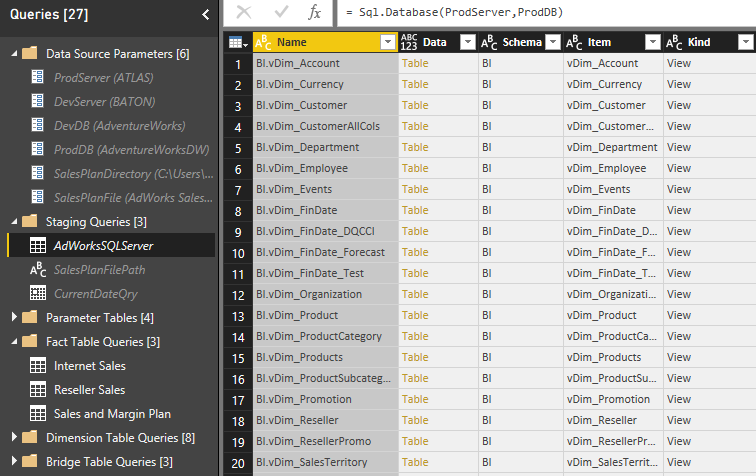
The parameters and queries displayed with a gray font are included in the refresh process of the dataset but not loaded to the data modeling layer. For example, the AdWorksSQLServer query displayed in the preceding image merely exposes the objects of the SQL Server database via the Sql.Database() M function for other queries to reference...
Query folding
Query folding is one of the most powerful and important capabilities of the M language as it translates M expressions into SQL statements that can be executed by the source system. With query folding, M serves as an abstraction layer to implement both common and complex data cleansing and transformation operations while still leveraging source system resources. When implementing any remaining logic or data transformations via M functions, a top priority of the dataset designer is to ensure that these operations are folded to the data source.
In the following M query, a Table.RemoveColumns() M function is applied against the SQL view for the Internet Sales fact table to exclude three columns that are not needed for the dataset:

The additional step is translated to a SQL query that simply doesn't select the three columns...
M Query examples
The M query language includes hundreds of functions and several books have been written about to its application. The greater purpose of this chapter is to understand M queries in the context of a corporate Power BI solution that primarily leverages an IT-managed data warehouse. As shown in the examples shared in the M Queries section earlier, the combination of a mature data warehouse and a layer of SQL view objects within this source may eliminate any need for further data transformations. However, Power BI Dataset designers should still be familiar with the fundamentals of M queries and their most common use cases, as it's often necessary to further extend and enhance source data.
The following sections demonstrate three common data transformation scenarios that can be implemented in M. Beyond retrieving the correct results, the M queries also generate...
M editing tools
Power BI Desktop stores the M code for queries created via the Power Query Editor graphical interface or the Advanced Editor within M documents for repeatable execution. Similar to other languages and project types, code editing tools are available to support the development, documentation, and version control of M queries. Dataset designers can use Visual Studio or Visual Studio Code to author and manage the M queries for Power BI and other Microsoft projects. These tools include common development features, such as IntelliSense, syntax highlighting, and integrated source control.
Advanced Editor
In Power BI Desktop, the M code for each query can be accessed from the Advanced Editor window within the Power...
Summary
In this chapter, we've covered all components of the data retrieval process used to support the dataset for this project as described in Chapter 1, Planning Power BI Projects. This includes the layer of SQL views within a database source, source connectivity parameters in Power BI Desktop, and the M queries used to define and load the dimension and fact tables of the dataset. In constructing a data access layer and retrieval process for a dataset, we've also discussed the design considerations relative to import and DirectQuery datasets, Power BI Desktop configuration options, and data source privacy levels. Additionally, we've reviewed core concepts of the M language, including query folding, item access, and data types. Moreover, we've reviewed three examples of efficiently implementing impactful data transformation logic via M queries as well as...