Search icon CANCEL
Subscription
0
Cart icon
Your Cart (0 item)
Close icon
You have no products in your basket yet
Save more on your purchases! discount-offer-chevron-icon
Savings automatically calculated. No voucher code required.
Arrow left icon
Explore Products
Best Sellers
New Releases
Books
Videos
Audiobooks
Learning Hub
Newsletter Hub
Free Learning
Arrow right icon
timer SALE ENDS IN
0 Days
:
00 Hours
:
00 Minutes
:
00 Seconds
Arrow up icon
GO TO TOP
Learning Pentesting for Android Devices

You're reading from   Learning Pentesting for Android Devices Android's popularity makes it a prime target for attacks, which is why this tutorial is so essential. It takes you from security basics to forensics and penetration testing in easy, user-friendly steps.

Arrow left icon
Product type Paperback
Published in Mar 2014
Publisher
ISBN-13 9781783288984
Length 154 pages
Edition Edition
Languages
Tools
Arrow right icon
Author (1):
Arrow left icon
Aditya Gupta Aditya Gupta
Author Profile Icon Aditya Gupta
Aditya Gupta
Arrow right icon
View More author details
Toc

Table of Contents (18) Chapters Close

Learning Pentesting for Android Devices
Credits
Foreword
About the Author
Acknowledgments
About the Reviewers
www.PacktPub.com
Preface
1. Getting Started with Android Security FREE CHAPTER 2. Preparing the Battlefield 3. Reversing and Auditing Android Apps 4. Traffic Analysis for Android Devices 5. Android Forensics 6. Playing with SQLite 7. Lesser-known Android Attacks 8. ARM Exploitation 9. Writing the Pentest Report Index

HTTPS Proxy interception


The preceding method will work in the normal traffic interception of application and browser when they are communicating via the HTTP protocol. In HTTPS, we will get an error due to the certificate mismatch, and thus we won't be able to intercept the traffic.

However, in order to solve the challenge, we will be creating our own certificate or Burp/PortSwigger and installing it on the device. In order to create our own certificate, we will need to set up a proxy in Firefox (or any other browser or global proxy):

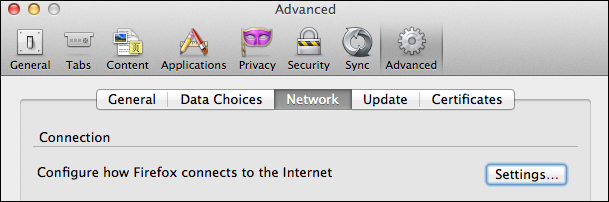
  1. To set up a proxy in Firefox, go to Options present in Tools (Firefox | Preferences on Mac) and go to the Advanced tab. Under the Advanced tab, we will click on the Network option.
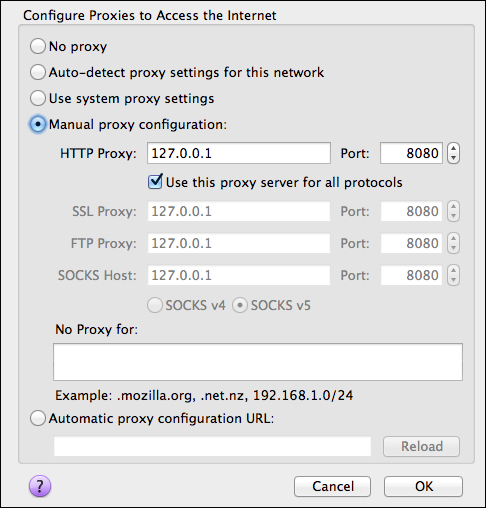
  2. Once in the Network tab, we need to click on Settings in order to configure the proxy with Firefox.
  3. Once done, go to the HTTPS website on our system browser of which we would want to intercept the traffic on our device. Here we will receive a The Network is Untrusted message. Click...

lock icon The rest of the chapter is locked
CONTINUE READING
83
Tech Concepts
36
Programming languages
73
Tech Tools
Icon Unlimited access to the largest independent learning library in tech of over 8,000 expert-authored tech books and videos.
Icon Innovative learning tools, including AI book assistants, code context explainers, and text-to-speech.
Icon 50+ new titles added per month and exclusive early access to books as they are being written.
Learning Pentesting for Android Devices
Register for a free Packt account to unlock a world of extra content!
A free Packt account unlocks extra newsletters, articles, discounted offers, and much more. Start advancing your knowledge today.
Unlock this book and the full library FREE for 7 days
Get unlimited access to 7000+ expert-authored eBooks and videos courses covering every tech area you can think of
Renews at $19.99/month. Cancel anytime
Modal Close icon
Modal Close icon