



























































Navigation and page flow
It is always good to outline the main pages within an application, and how they fit together. This will help us quickly identify some needed Yii controllers, actions and views as well as help to set everyone's expectations as to what we'll be building towards at the onset of our development.
The figure below shows the basic idea of the application flow from logging in, through the project details listing:
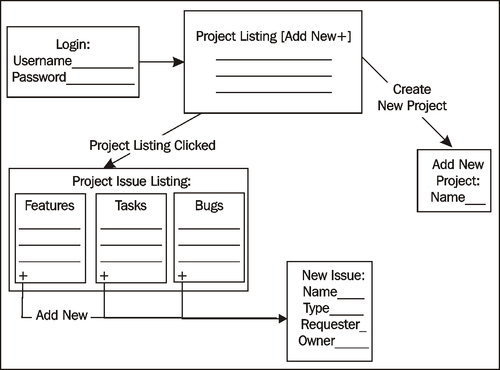
When users first come to the application, they must log in to authenticate themselves before accessing any functionality. Once successfully logged-in, they will be presented with a list of his current projects along with the option to create a new project. Choosing a specific project will take them to the project details page. The project details page will present a list of the issues by type. There will also be the option to add a new issue as well as edit any of the listed issues.
This is all pretty basic functionality, but the figure gives us a little more information...














