Search icon CANCEL
Subscription
0
Cart icon
Your Cart (0 item)
Close icon
You have no products in your basket yet
Arrow left icon
Explore Products
Best Sellers
New Releases
Books
Events
Videos
Audiobooks
Packt Hub
Free Learning
Arrow right icon
timer SALE ENDS IN
0 Days
:
00 Hours
:
00 Minutes
:
00 Seconds
Practical C Programming

Practical C Programming: Solutions for modern C developers to create efficient and well-structured programs

eBook
€22.49 €24.99
Paperback
€30.99
eBook + Subscription
€24.99 Monthly

What do you get with eBook?

Product feature icon Instant access to your Digital eBook purchase
Product feature icon Download this book in EPUB and PDF formats
Product feature icon Access this title in our online reader with advanced features
Product feature icon DRM FREE - Read whenever, wherever and however you want
Product feature icon AI Assistant (beta) to help accelerate your learning
Modal Close icon
Payment Processing...
tick Completed

Billing Address

Table of content icon View table of contents Preview book icon Preview Book

Practical C Programming

Managing Strings

Strings are nothing but arrays that store characters. Since strings are character arrays, they utilize less memory and lead to efficient object code, making programs run faster. Just like numerical arrays, strings are zero-based, that is, the first character is stored at index location 0. In C, strings are terminated by a null character, \0.

The recipes in this chapter will enhance your understanding of strings and will acquaint you with string manipulation. Strings play a major role in almost all applications. You will learn how to search strings (which is a very common task), replace a string with another string, search for a string that contains a specific pattern, and more. 

In this chapter, you will learn how to create the following recipes using strings: 

  • Determining whether the string is a palindrome 
  • Finding the occurrence of the first repetitive character in a string
  • Displaying the count of each character in a string
  • Counting the vowels and consonants in a string
  • Converting the vowels in a sentence to uppercase

Determining whether the string is a palindrome 

A palindrome is a string that reads the same regardless of whether it is in a forward or backwards order. For example, the word radar is a palindrome because it reads the same way forwards and backwards.

How to do it…

  1. Define two 80-character strings called str and rev(assuming your string will not exceed 79 characters). Your string can be of any length, but remember that the last position in the string is fixed for the null character \0:
char str[80],rev[80];
  1. Enter characters that will be assigned to the str string:
printf("Enter a string: ");
scanf("%s",str);
  1. Compute the length of the string using the strlen function and assign this to the n variable:
n=strlen(str);
  1. Execute a for loop in reverse order to access the characters in the str string in reverse order, and then assign them to the rev string:
for(i=n-1;i >=0;  i--)
{
rev[x]=str[i];
x++;
}
rev[x]='\0';
  1. Compare the two strings, str and rev, using strcmp
if(strcmp(str,rev)==0)
  1. If str and rev are the same, then the string is a palindrome.
In C, the functionality of specific built-in functions is specified in the respective libraries, also known as header files. So, while writing C programs, whenever built-in functions are used, we need to use their respective header files in the program at the top. The header files usually have the extension .h. In the following program, I am using a built-in function called strlen, which finds out the length of a string. Therefore, I need to use its library, string.h, in the program.

The palindrome.c program for finding out whether the specified string is a palindrome is as follows:

#include<stdio.h>  
#include<string.h>
void main()
{
char str[80],rev[80];
int n,i,x;
printf("Enter a string: ");
scanf("%s",str);
n=strlen(str);
x=0;
for(i=n-1;i >=0; i--)
{
rev[x]=str[i];
x++;
}
rev[x]='\0';
if(strcmp(str,rev)==0)
printf("The %s is palindrome",str);
else
printf("The %s is not palindrome",str);
}

Now, let's go behind the scenes to understand the code better.

How it works...

To ensure that a string is a palindrome, we first need to ensure that the original string and its reverse form are of the same length.

Let's suppose that the original string is sanjay and it is assigned to a string variable, str. The string is a character array, where each character is stored individually as an array element and the last element in the string array is a null character. The null character is represented as \0 and is always the last element in a string variable in C, as shown in the following diagram:

Figure 2.1

As you can see, the string uses zero-based indexing, that is, the first character is placed at index location str[0], followed by the second character at str[1], and so on. In regards to the last element, the null character is at str[6].

Using the strlen library function, we will compute the length of the entered string and assign it to the n variable. By executing the for loop in reverse order, each of the characters of the str string is accessed in reverse orderthat is, from n-1 to 0, and assigned to the rev string.

Finally, a null character, \0, is added to the rev string to make it a complete string. Therefore, rev will contain the characters of the str string, but in reverse order:

Figure 2.2

Next, we will run the strcmp function. If the function returns 0, it means that the content in the str and rev strings is exactly the same, which means that str is a palindrome. If the strcmp function returns a value other than 0, it means that the two strings are not the same; hence, str is not a palindrome. 

Let's use GCC to compile the palindrome.c program, as follows:

D:\CBook>gcc palindrome.c -o palindrome

Now, let's run the generated executable file, palindrome.exe, to see the output of the program:

D:\CBook>./palindrome
Enter a string: sanjay
The sanjay is not palindrome

Now, suppose that str is assigned another character string, sanas. To ensure that the word in str is a palindrome, we will again reverse the character order in the string.

So, once more, we will compute the length of str, execute a for loop in reverse order, and access and assign each character in str to rev. The null character \0 will be assigned to the last location in rev, as follows:

Figure 2.3

Finally, we will invoke the strcmp function again and supply both strings. 

After compiling, let's run the program again with the new string:

D:\CBook>palindrome
Enter a string: sanas
The sanas is palindrome

Voilà! We have successfully identified whether our character strings are palindromes. Now, let's move on to the next recipe!

Finding the occurrence of the first repetitive character in a string

In this recipe, you will learn how to create a program that displays the first character to be repeated in a string. For example, if you enter the string racecar, the program should give the output as The first repetitive character in the string racecar is c. The program should display No character is repeated in the string if a string with no repetitive characters is entered.

How to do it…

  1. Define two strings called str1 and str2. Your strings can be of any length, but the last position in the string is fixed for the null character \0:
char str1[80],str2[80];
  1. Enter characters to be assigned to str1. The characters will be assigned to the respective index locations of the string, beginning with str1[0]:
printf("Enter a string: ");
scanf("%s",str1);
  1. Compute the length of str1 using the strlen library function. Here, the first character of str1 is assigned to str2:
n=strlen(str1);
str2[0]=str1[0];
  1. Use a for loop to access all of the characters of str1 one by one and pass them to the ifexists function to check whether that character already exists in str2. If the character is found in str2, this means it is the first repetitive character of the string, and so it is displayed on the screen:
for(i=1;i < n; i++)
{
if(ifexists(str1[i], str2, x))
{
printf("The first repetitive character in %s is %c", str1,
str1[i]);
break;
}
}
  1. If the character of str1 does not exist in str2, then it is simply added to str2:
else
{
str2[x]=str1[i];
x++;
}

The repetitive.c program for finding the occurrence of the first repetitive character in a string is as follows::

#include<stdio.h>  
#include<string.h>
int ifexists(char u, char z[], int v)
{
int i;
for (i=0; i<v;i++)
if (z[i]==u) return (1);
return (0);
}

void main()
{
char str1[80],str2[80];
int n,i,x;
printf("Enter a string: ");
scanf("%s",str1);
n=strlen(str1);
str2[0]=str1[0];
x=1;
for(i=1;i < n; i++)
{
if(ifexists(str1[i], str2, x))
{
printf("The first repetitive character in %s is %c", str1,
str1[i]);
break;
}
else
{
str2[x]=str1[i];
x++;
}
}
if(i==n)
printf("There is no repetitive character in the string %s", str1);
}

Now, let's go behind the scenes to understand the code better.

How it works...

Let's assume that we have defined a string, str1, of some length, and have entered the following characters—racecar.

Each of the characters of the string racecar will be assigned to the respective index locations of str1, that is, r will be assigned to str1[0]a will be assigned to str1[1], and so on. Because every string in C is terminated by a null character, \0, the last index location of str1 will have the null character \0, as follows:

Figure 2.4

Using the library function strlen, the length of str1 is computed and a for loop is used to access all of the characters of str1, one by one, except for the first character. The first character is already assigned to str2, as shown in the following diagram:
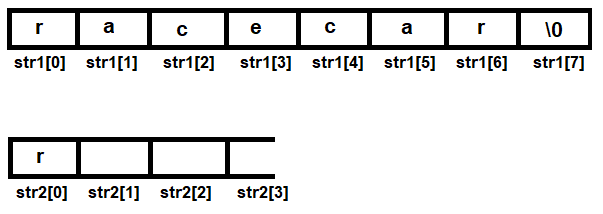
Figure 2.5

Each character that is accessed from str1 is passed through the ifexists function. The ifexists function will check whether the supplied character already exists in str2 and will return a Boolean value accordingly. The function returns 1, that is, true, if the supplied character is found in str2. The function returns 0, that is, false, if the supplied character is not found in str2.

If ifexists returns 1, this means that the character is found in str2, and hence, the first repetitive character of the string is displayed on the screen. If the ifexists function returns 0, this means that the character does not exist in str2, so it is simply added to str2 instead.

Since the first character is already assigned, the second character of str1 is picked up and checked to see if it already exists in str2. Because the second character of str1 does not exist in str2, it is added to the latter string, as follows:
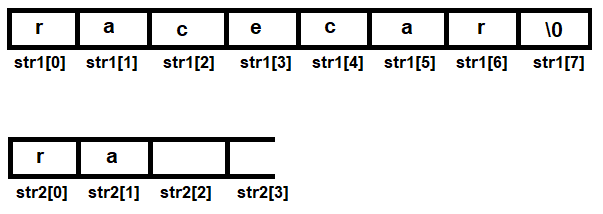
Figure 2.6

The procedure is repeated until all of the characters of str1 are accessed. If all the characters of str1 are accessed and none of them are found to exist in str2, this means that all of the characters in str1 are unique and none of them are repeated.

The following diagram shows strings str1 and str2 after accessing the first four characters of str1. You can see that the four characters are added to str2, since none of them already exist in str2:
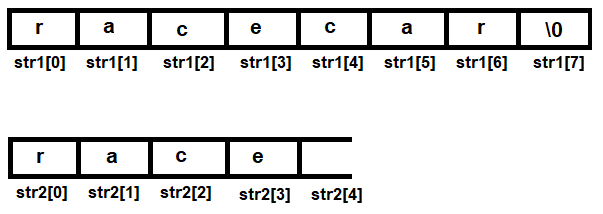
Figure 2.7

The next character to be accessed from str1 is c. Before adding it to str2, it is compared with all the existing characters of str2 to determine if it already exists there. Because the c character already exists in str2, it is not added to str2 and is declared as the first repeating character in str1, as follows:
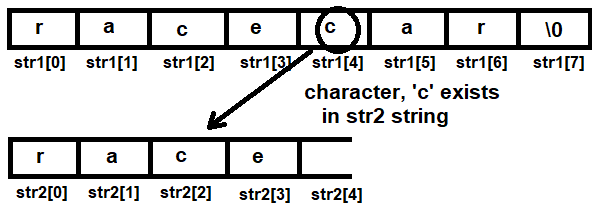
Figure 2.8

Let's use GCC to compile the repetitive.c program, as follows:

D:\CBook>gcc repetitive.c -o repetitive

Let's run the generated executable file, repetitive.exe, to see the output of the program:

D:\CBook>./repetitive
Enter a string: education
There is no repetitive character in the string education

Let's run the program again:

D:\CBook>repetitive
Enter a string: racecar
The first repetitive character in racecar is c

Voilà! We've successfully found the first repeating character in a string. 

Now, let's move on to the next recipe!

Displaying the count of each character in a string

In this recipe, you will learn how to create a program that displays the count of each character in a string in a tabular form. 

How to do it…

  1. Create a string called str. The last element in the string will be a null character, \0
  2. Define another string called chr of matching length, to store the characters of str:
char str[80],chr[80];

  1. Prompt the user to enter a string. The entered string will be assigned to the str string:
printf("Enter a string: ");
scanf("%s",str);
  1. Compute the length of the string array, str, using strlen:
n=strlen(str);
  1. Define an integer array called count to display the number of times the characters have occurred in str:
int count[80];
  1. Execute chr[0]=str[0] to assign the first character of str to chr at index location chr[0].
  2. The count of the character that's assigned in the chr[0] location is represented by assigning 1 at the count[0] index location:
chr[0]=str[0];
count[0]=1;
  1. Run a for loop to access each character in str:
for(i=1;i < n;  i++)
  1. Run the ifexists function to find out whether the character of str exists in the chr string or not. If the character does not exist in the chr string, it is added to the chr string at the next index location and the respective index location in the count array is set to 1:
if(!ifexists(str[i], chr, x, count))
{
x++;
chr[x]=str[i];
count[x]=1;
}
  1. If the character exists in the chr string, the value in the respective index location in the count array is incremented by 1 in the ifexists function. The p and q arrays in the following snippet represent the chr and count arrays, respectively, since the chr and count arrays are passed and assigned to the p and q parameters in the ifexists function:
if (p[i]==u)
{
q[i]++;
return (1);
}

The countofeach.c program for counting each character in a string is as follows::

#include<stdio.h>
#include<string.h>
int ifexists(char u, char p[], int v, int q[])
{
int i;
for (i=0; i<=v;i++)
{
if (p[i]==u)
{
q[i]++;
return (1);
}
}
if(i>v) return (0);
}
void main()
{
char str[80],chr[80];
int n,i,x,count[80];
printf("Enter a string: ");
scanf("%s",str);
n=strlen(str);
chr[0]=str[0];
count[0]=1;
x=0;
for(i=1;i < n; i++)
{
if(!ifexists(str[i], chr, x, count))
{
x++;
chr[x]=str[i];
count[x]=1;
}
}
printf("The count of each character in the string %s is \n", str);
for (i=0;i<=x;i++)
printf("%c\t%d\n",chr[i],count[i]);
}

Now, let's go behind the scenes to understand the code better.

How it works...

Let's assume that the two string variables you have defined, str and chr, are of the size 80 (you can always increase the size of the strings if you wish).

We will assign the character string racecar to the str string. Each of the characters will be assigned to the respective index locations of str, that is, r will be assigned to index location str[0]a will be assigned to str[1], and so on. As always, the last element in the string will be a null character, as shown in the following diagram:

Figure 2.9

Using the strlen function,  we will first compute the length of the string. Then, we will use the string array chr for storing characters of the str array individually at each index location. We will execute a for loop beginning from 1 until the end of the string to access each character of the string.

The integer array we defined earlier, that is, count, will represent the number of times the characters from str have occurred, which is represented by the index locations in the chr array. That is, if r is at index location chr[0], then count[0] will contain an integer value (1, in this case) to represent the number of times the r character has occurred in the str string so far:

Figure 2.10

One of the following actions will be applied to every character that's accessed from the string:

  • If the character exists in the chr array, the value in the respective index location in the count array is incremented by 1. For example, if the character of the string is found at the chr[2] index location, then the value in the count[2] index location is incremented by 1.
  • If the character does not exist in the chr array, it is added to the chr array at the next index location, and the respective index location is found when the count array is set to 1. For example, if the character a is not found in the chr array, it is added to the chr array at the next available index location. If the character a is added at the chr[1] location, then a value of 1 is assigned at the count[1] index location to indicate that the character shown in chr[1] has appeared once up until now.

When the for loop completes, that is when all of the characters in the string are accessed. The chr array will have individual characters of the string and the count array will have the count, or the number of times the characters represented by the chr array have occurred in the string. All of the elements in the chr and count arrays are displayed on the screen.

Let's use GCC to compile the countofeach.c program, as follows:

D:\CBook>gcc countofeach.c -o countofeach

Let's run the generated executable file, countofeach.exe, to see the output of the program:

D:\CBook>./countofeach
Enter a string: bintu
The count of each character in the string bintu is
b 1
i 1
n 1
t 1
u 1

Let's try another character string to test the results:

D:\CBook>./countofeach
Enter a string: racecar
The count of each character in the string racecar is
r 2
a 2
c 2
e 1

Voilà! We've successfully displayed the count of each character in a string.

Now, let's move on to the next recipe!

Counting vowels and consonants in a sentence

In this recipe, you will learn how to count the number of vowels and consonants in an entered sentence. The vowels are a, e, i, o, and u, and the rest of the letters are consonants. We will use ASCII values to identify the letters and their casing:

Figure 2.11

The blank spaces, numbers, special characters, and symbols will simply be ignored. 

How to do it…

  1. Create a string array called str to input your sentence. As usual, the last character will be a null character:
char str[255];
  1. Define two variables, ctrV and ctrC:
int  ctrV,ctrC;
  1. Prompt the user to enter a sentence of your choice:
printf("Enter a sentence: ");
  1. Execute the gets function to accept the sentence with blank spaces between the words:
gets(str);

  1. Initialize ctrV and ctrC to 0. The ctrV variable will count the number of vowels in the sentence, while the ctrC variable will count the number of consonants in the sentence:
ctrV=ctrC=0;
  1. Execute a while loop to access each letter of the sentence one, by one until the null character in the sentence is reached.
  2. Execute an if block to check whether the letters are uppercase or lowercase, using ASCII values. This also confirms that the accessed character is not a white space, special character or symbol, or number. 
  3. Once that's done, execute a nested if block to check whether the letter is a lowercase or uppercase vowel, and wait for the while loop to terminate:
while(str[i]!='\0')
{
if((str[i] >=65 && str[i]<=90) || (str[i] >=97 && str[i]<=122))
{
if(str[i]=='A' ||str[i]=='E' ||str[i]=='I' ||str[i]=='O'
||str[i]=='U' ||str[i]=='a' ||str[i]=='e' ||str[i]=='i'
||str[i]=='o'||str[i]=='u')
ctrV++;
else
ctrC++;
}
i++;
}

The countvowelsandcons.c program for counting vowels and consonants in a string is as follows:

#include <stdio.h>
void main()
{
char str[255];
int ctrV,ctrC,i;
printf("Enter a sentence: ");
gets(str);
ctrV=ctrC=i=0;
while(str[i]!='\0')
{
if((str[i] >=65 && str[i]<=90) || (str[i] >=97 && str[i]<=122))
{
if(str[i]=='A' ||str[i]=='E' ||str[i]=='I' ||str[i]=='O'
||str[i]=='U' ||str[i]=='a' ||str[i]=='e' ||str[i]=='i'
||str[i]=='o'||str[i]=='u')
ctrV++;
else
ctrC++;
}
i++;
}
printf("Number of vowels are : %d\nNumber of consonants are :
%d\n",ctrV,ctrC);
}

Now, let's go behind the scenes to understand the code better.

How it works...

We are assuming that you will not enter a sentence longer than 255 characters, so we have defined our string variable accordingly. When prompted, enter a sentence that will be assigned to the str variable. Because a sentence may have blank spaces between the words, we will execute the gets function to accept the sentence. 

The two variables that we've defined, that is, ctrV and ctrC, are initialized to 0. Because the last character in a string is always a null character, \0, a while loop is executed, which will access each character of the sentence one by one until the null character in the sentence is reached.

Every accessed letter from the sentence is checked to confirm that it is either an uppercase or lowercase character. That is, their ASCII values are compared, and if the ASCII value of the accessed character is a lowercase or uppercase character, only then it will execute the nested if block. Otherwise, the next character from the sentence will be accessed.

Once you have ensured that the accessed character is not a blank space, any special character or symbol, or a numerical value, then an if block will be executed, which checks whether the accessed character is a lowercase or uppercase vowel. If the accessed character is a vowel, then the value of the ctrV variable is incremented by 1. If the accessed character is not a vowel, then it is confirmed that it is a consonant, and so the value of the ctrC variable is incremented by 1.

Once all of the characters of the sentence have been accessed, that is, when the null character of the sentence is reached, the while loop terminates and the number of vowels and consonants stored in the ctrV and ctrC variables is displayed on the screen.

Let's use GCC to compile the countvowelsandcons.c program, as follows:

D:\CBook>gcc countvowelsandcons.c -o countvowelsandcons

Let's run the generated executable file, countvowelsandcons.exe, to see the output of the program:

D:\CBook>./countvowelsandcons
Enter a sentence: Today it might rain. Its a hot weather. I do like rain
Number of vowels are : 18
Number of consonants are : 23

Voilà! We've successfully counted all of the vowels and consonants in our sentence.

Now, let's move on to the next recipe!

Converting the vowels in a sentence to uppercase

In this recipe, you will learn how to convert all of the lowercase vowels in a sentence to uppercase. The remaining characters in the sentence, including consonants, numbers, special symbols, and special characters, are simply ignored and will be left as they are.
Converting the casing of any letter is done by simply changing the ASCII value of that character, using the following formulas:

  • Subtract 32 from the ASCII value of a lowercase character to convert it to uppercase
  • Add 32 to the ASCII value of an uppercase character to convert it to lowercase
The following diagram shows the ASCII values of the uppercase and lowercase vowels:

Figure 2.12

The ASCII value of the uppercase letters is lower than that of lowercase letters, and the difference between the values is 32.

How to do it…

  1. Create a string called str to input your sentence. As usual, the last character will be a null character:
char str[255];
  1. Enter a sentence of your choice:
printf("Enter a sentence: ");
  1. Execute the gets function to accept the sentence with blank spaces between the words, and initialize the i variable to 0, since each character of the sentence will be accessed through i:
gets(str);
i=0
  1. Execute a while loop to access each letter of the sentence one by one, until the null character in the sentence is reached:
while(str[i]!='\0')
{
{ …
}
}
i++;
  1. Check each letter to verify whether it is a lowercase vowel. If the accessed character is a lowercase vowel, then the value 32 is subtracted from the ASCII value of that vowel to convert it to uppercase:
if(str[i]=='a' ||str[i]=='e' ||str[i]=='i' ||str[i]=='o' ||str[i]=='u')
str[i]=str[i]-32;
  1. When all of the letters of the sentence have been accessed, then simply display the entire sentence.

The convertvowels.c program for converting the lowercase vowels in a sentence to uppercase is as follows:

#include <stdio.h>
void main()
{
char str[255];
int i;
printf("Enter a sentence: ");
gets(str);
i=0;
while(str[i]!='\0')
{
if(str[i]=='a' ||str[i]=='e' ||str[i]=='i' ||str[i]=='o'
||str[i]=='u')
str [i] = str [i] -32;
i++;
}
printf("The sentence after converting vowels into uppercase
is:\n");
puts(str);
}

Now, let's go behind the scenes to understand the code better.

How it works...

Again, we will assume that you will not enter a sentence longer than 255 characters. Therefore, we have defined our string array, str , to be of the size 255. When prompted, enter a sentence to assign to the str array. Because a sentence may have blank spaces between the words, instead of scanf, we will use the gets function to accept the sentence.

To access each character of the sentence, we will execute a while loop that will run until the null character is reached in the sentence. After each character of the sentence, it is checked whether it is a lowercase vowel. If it is not a lowercase vowel, the character is ignored and the next character in the sentence is picked up for comparison.

If the character that's accessed is a lowercase vowel, then a value of 32 is subtracted from the ASCII value of the character to convert it to uppercase. Remember that the difference in the ASCII values of lowercase and uppercase letters is 32. That is, the ASCII value of lowercase a is 97 and that of uppercase A is 65. So, if you subtract 32 from 97, which is the ASCII value of lowercase a, the new ASCII value will become 65, which is the ASCII value of uppercase A.

The procedure of converting a lowercase vowel to an uppercase vowel is to first find the vowel in a sentence by using an if statement, and then subtract the value 32 from its ASCII value to convert it to uppercase.

Once all of the characters of the string are accessed and all of the lowercase vowels of the sentence are converted to uppercase, the entire sentence is displayed using the puts function.

Let's use GCC to compile the convertvowels.c program, as follows:

D:\CBook>gcc convertvowels.c -o convertvowels

Let's run the generated executable file, convertvowels.exe, to see the output of the program:

D:\CBook>./convertvowels
Enter a sentence: It is very hot today. Appears as if it might rain. I like rain
The sentence after converting vowels into uppercase is:
It Is vEry hOt tOdAy. AppEArs As If It mIght rAIn. I lIkE rAIn

Voilà! We've successfully converted the lowercase vowels in a sentence to uppercase.

Left arrow icon Right arrow icon
Download code icon Download Code

Key benefits

  • Tackle various challenges in C programming by making the most of its latest features
  • Understand the workings of arrays, strings, functions, pointers, advanced data structures, and algorithms
  • Become well-versed with process synchronization during multitasking and server-client process communication

Description

Used in everything from microcontrollers to operating systems, C is a popular programming language among developers because of its flexibility and versatility. This book helps you get hands-on with various tasks, covering the fundamental as well as complex C programming concepts that are essential for making real-life applications. You’ll start with recipes for arrays, strings, user-defined functions, and pre-processing directives. Once you’re familiar with the basic features, you’ll gradually move on to learning pointers, file handling, concurrency, networking, and inter-process communication (IPC). The book then illustrates how to carry out searching and arrange data using different sorting techniques, before demonstrating the implementation of data structures such as stacks and queues. Later, you’ll learn interesting programming features such as using graphics for drawing and animation, and the application of general-purpose utilities. Finally, the book will take you through advanced concepts such as low-level programming, embedded software, IoT, and security in coding, as well as techniques for improving code performance. By the end of this book, you'll have a clear understanding of C programming, and have the skills you need to develop robust apps.

Who is this book for?

This intermediate-level book is for developers who want to become better C programmers by learning its modern features and programming practices. Familiarity with C programming is assumed to get the most out of this book.

What you will learn

  • Discover how to use arrays, functions, and strings to make large applications
  • Perform preprocessing and conditional compilation for efficient programming
  • Understand how to use pointers and memory optimally
  • Use general-purpose utilities and improve code performance
  • Implement multitasking using threads and process synchronization
  • Use low-level programming and the inline assembly language
  • Understand how to use graphics for animation
  • Get to grips with applying security while developing C programs

Product Details

Country selected
Publication date, Length, Edition, Language, ISBN-13
Publication date : Feb 14, 2020
Length: 616 pages
Edition : 1st
Language : English
ISBN-13 : 9781838647988
Category :
Languages :

What do you get with eBook?

Product feature icon Instant access to your Digital eBook purchase
Product feature icon Download this book in EPUB and PDF formats
Product feature icon Access this title in our online reader with advanced features
Product feature icon DRM FREE - Read whenever, wherever and however you want
Product feature icon AI Assistant (beta) to help accelerate your learning
Modal Close icon
Payment Processing...
tick Completed

Billing Address

Product Details

Publication date : Feb 14, 2020
Length: 616 pages
Edition : 1st
Language : English
ISBN-13 : 9781838647988
Category :
Languages :

Packt Subscriptions

See our plans and pricing
Modal Close icon
€18.99 billed monthly
Feature tick icon Unlimited access to Packt's library of 7,000+ practical books and videos
Feature tick icon Constantly refreshed with 50+ new titles a month
Feature tick icon Exclusive Early access to books as they're written
Feature tick icon Solve problems while you work with advanced search and reference features
Feature tick icon Offline reading on the mobile app
Feature tick icon Simple pricing, no contract
€189.99 billed annually
Feature tick icon Unlimited access to Packt's library of 7,000+ practical books and videos
Feature tick icon Constantly refreshed with 50+ new titles a month
Feature tick icon Exclusive Early access to books as they're written
Feature tick icon Solve problems while you work with advanced search and reference features
Feature tick icon Offline reading on the mobile app
Feature tick icon Choose a DRM-free eBook or Video every month to keep
Feature tick icon PLUS own as many other DRM-free eBooks or Videos as you like for just €5 each
Feature tick icon Exclusive print discounts
€264.99 billed in 18 months
Feature tick icon Unlimited access to Packt's library of 7,000+ practical books and videos
Feature tick icon Constantly refreshed with 50+ new titles a month
Feature tick icon Exclusive Early access to books as they're written
Feature tick icon Solve problems while you work with advanced search and reference features
Feature tick icon Offline reading on the mobile app
Feature tick icon Choose a DRM-free eBook or Video every month to keep
Feature tick icon PLUS own as many other DRM-free eBooks or Videos as you like for just €5 each
Feature tick icon Exclusive print discounts

Frequently bought together


Stars icon
Total 111.97
Learn C Programming
€36.99
Practical C Programming
€30.99
Extreme C
€43.99
Total 111.97 Stars icon

Table of Contents

19 Chapters
Working with Arrays Chevron down icon Chevron up icon
Managing Strings Chevron down icon Chevron up icon
Exploring Functions Chevron down icon Chevron up icon
Preprocessing and Compilation Chevron down icon Chevron up icon
Deep Dive into Pointers Chevron down icon Chevron up icon
File Handling Chevron down icon Chevron up icon
Implementing Concurrency Chevron down icon Chevron up icon
Networking and Inter-Process Communication Chevron down icon Chevron up icon
Sorting and Searching Chevron down icon Chevron up icon
Working with Graphs Chevron down icon Chevron up icon
Advanced Data Structures and Algorithms Chevron down icon Chevron up icon
Creativity with Graphics Chevron down icon Chevron up icon
Using MySQL Database Chevron down icon Chevron up icon
General-Purpose Utilities Chevron down icon Chevron up icon
Improving the Performance of Your Code Chevron down icon Chevron up icon
Low-Level Programming Chevron down icon Chevron up icon
Embedded Software and IoT Chevron down icon Chevron up icon
Applying Security in Coding Chevron down icon Chevron up icon
Other Books You May Enjoy Chevron down icon Chevron up icon

Customer reviews

Rating distribution
Full star icon Full star icon Half star icon Empty star icon Empty star icon 2.5
(2 Ratings)
5 star 0%
4 star 50%
3 star 0%
2 star 0%
1 star 50%
Maxwell O. Massa Jul 07, 2023
Full star icon Full star icon Full star icon Full star icon Empty star icon 4
In reviewing books like this, it's important to hash out the reader's background first so others will be able to judge from what perspective he viewed the work. I am a beginner-level C developer, working on my own outside of any formal instruction, and this was the second book I've worked through (the first one was "Learn C Programming" by Jeff Szuhay (ISBN: 978-1801078450), also published by Packt). Given that profile, I found "Practical C Programming" by B. M. Harwarni to be an amazing "post-introduction" text that really thrust me into world of *possibilities* that C offers, while also offering some decent review of earlier content from Szuhay's lessons.To characterize the general feeling of this work, it provides a high-speed, almost violent acquaintance with a huge array of C's features and possibilities. It is critical to understand that this book lacks depth: most of the material in here is presented relatively briefly over the course of a chapter and then put down again, never to be reconsidered. Now, for someone like me who's working on his own and is trying to find a way to orient towards a project that might be bridge I need towards real competence, this was WONDERFUL: Jeff Szuhay's book did a good job of providing a structured, comprehensive introduction to the rudiments of the language, but - at the end of it all - I wasn't left with enough to begin imagining possibilities. Harwani fills that need by dragging me through such disparate topics as OpenGL integration, graph theory, MySQL structures and operations, Internet of Things (IoT) projects, and x86 assembly... among others. The first six chapters of the book (and parts of Chapters 11 and 14) also serve as a review of much of the ground covered in "Learn C Programming", which I actually found positive, but it would have been nice if this was done formally and deliberately.None of the new content is handled more than suggestively and superficially, but - as a result - the reader ends the book with the feeling that he has been dumped at a bewildering crossroads of possibilities, yet with an understanding of where each road would lead *if* he were to pursue it. I personally think that people teaching themselves would benefit particularly from this title: after reading Harwani's book, I realized that learning how C and MariaDB interact would be a critical next step for me, so I now know where I'm headed next. This is very valuable for people working on their own."Practical C Programming" has, of course, its flaws: they are tolerable, but should be mentioned. First of all, as a Packt title, is required by law to contain a large number of bizarre typos; while these are nowhere near as heinous as those that afflicted Szuhay's text, they're still really bad, particularly on pp. 291 and 410, where the prose description of the example code don't actually match the code itself, as presented. Secondly, and more importantly, the book is very Windows-oriented: people working in Linux, like myself, will be forced find workarounds for some of the units, particularly Chapter 6 (Linux does not distinguish between sequential and random files) and Chapter 17 (the Keil IDE used in this chapter is a Windows-only application). Finally, in spite of the fact that author urges the student to never use gets() in his or her code on page 562 because "it always creates a vulnerability", the book is otherwise full of gets() calls. Most modern compilers utterly refuse to process code that contains this function, so a certain amount of spot revision on-the-fly is needed on the part of the reader, which can get a little laborious. None of these issues are terrible in their own right, but they are irritations that could be effectively addressed in a second edition.In summary: it's a good book for what it is, assuming you're the sort of person who needs what it offers. I, personally, found myself very grateful for Mr. Harwani's work by the time I reached the end, but I would not endorse it without qualification. Think about what's good and bad here, and then make a carefully weighted decision with your eyes open. C is very important, but it is not easy. Personally, I am happy to take something imperfect, if it can help me make it to the next stage.
Amazon Verified review Amazon
Amazon Customer Dec 01, 2020
Full star icon Empty star icon Empty star icon Empty star icon Empty star icon 1
there is nothing practical like thing in this book. price is too high compare to content in book. normal c linux program with lengthy story.
Amazon Verified review Amazon
Get free access to Packt library with over 7500+ books and video courses for 7 days!
Start Free Trial

FAQs

How do I buy and download an eBook? Chevron down icon Chevron up icon

Where there is an eBook version of a title available, you can buy it from the book details for that title. Add either the standalone eBook or the eBook and print book bundle to your shopping cart. Your eBook will show in your cart as a product on its own. After completing checkout and payment in the normal way, you will receive your receipt on the screen containing a link to a personalised PDF download file. This link will remain active for 30 days. You can download backup copies of the file by logging in to your account at any time.

If you already have Adobe reader installed, then clicking on the link will download and open the PDF file directly. If you don't, then save the PDF file on your machine and download the Reader to view it.

Please Note: Packt eBooks are non-returnable and non-refundable.

Packt eBook and Licensing When you buy an eBook from Packt Publishing, completing your purchase means you accept the terms of our licence agreement. Please read the full text of the agreement. In it we have tried to balance the need for the ebook to be usable for you the reader with our needs to protect the rights of us as Publishers and of our authors. In summary, the agreement says:

  • You may make copies of your eBook for your own use onto any machine
  • You may not pass copies of the eBook on to anyone else
How can I make a purchase on your website? Chevron down icon Chevron up icon

If you want to purchase a video course, eBook or Bundle (Print+eBook) please follow below steps:

  1. Register on our website using your email address and the password.
  2. Search for the title by name or ISBN using the search option.
  3. Select the title you want to purchase.
  4. Choose the format you wish to purchase the title in; if you order the Print Book, you get a free eBook copy of the same title. 
  5. Proceed with the checkout process (payment to be made using Credit Card, Debit Cart, or PayPal)
Where can I access support around an eBook? Chevron down icon Chevron up icon
  • If you experience a problem with using or installing Adobe Reader, the contact Adobe directly.
  • To view the errata for the book, see www.packtpub.com/support and view the pages for the title you have.
  • To view your account details or to download a new copy of the book go to www.packtpub.com/account
  • To contact us directly if a problem is not resolved, use www.packtpub.com/contact-us
What eBook formats do Packt support? Chevron down icon Chevron up icon

Our eBooks are currently available in a variety of formats such as PDF and ePubs. In the future, this may well change with trends and development in technology, but please note that our PDFs are not Adobe eBook Reader format, which has greater restrictions on security.

You will need to use Adobe Reader v9 or later in order to read Packt's PDF eBooks.

What are the benefits of eBooks? Chevron down icon Chevron up icon
  • You can get the information you need immediately
  • You can easily take them with you on a laptop
  • You can download them an unlimited number of times
  • You can print them out
  • They are copy-paste enabled
  • They are searchable
  • There is no password protection
  • They are lower price than print
  • They save resources and space
What is an eBook? Chevron down icon Chevron up icon

Packt eBooks are a complete electronic version of the print edition, available in PDF and ePub formats. Every piece of content down to the page numbering is the same. Because we save the costs of printing and shipping the book to you, we are able to offer eBooks at a lower cost than print editions.

When you have purchased an eBook, simply login to your account and click on the link in Your Download Area. We recommend you saving the file to your hard drive before opening it.

For optimal viewing of our eBooks, we recommend you download and install the free Adobe Reader version 9.

Modal Close icon
Modal Close icon