



























































Configuring a CORS policy to expose pagination metadata
In this recipe, we will allow clients to access pagination metadata from the server response by configuring a special CORS policy that exposes pagination metadata.
Getting ready
This recipe picks up exactly where the preceding recipe ended. If you are jumping around in the book, you can begin this recipe following along at https://github.com/PacktPublishing/ASP.NET-9-Web-API-Cookbook/tree/main/start/chapter01/CORS.
How to do it…
- Register a new CORS policy that allows clients to consume your X-Pagination data.
- Navigate to the
Program.csfile and place the following code right after where you register yourProductServicebut beforevar app =builder.Build();:builder.Services.AddCors(options => { options.AddPolicy("CorsPolicy", builder => builder.AllowAnyOrigin() .AllowAnyMethod() .AllowAnyHeader() .WithExposedHeaders("X-Pagination")); }); - Right before
app.MapControllers(), enable the CORS policy, like so:app.UseCors("CorsPolicy"); app.MapControllers(); app.Run(); - Run your API with the new CORS policy:
dotnet run
- One way to confirm that CORS is allowing our response headers to be displayed is simply via the Network tab in our browser:
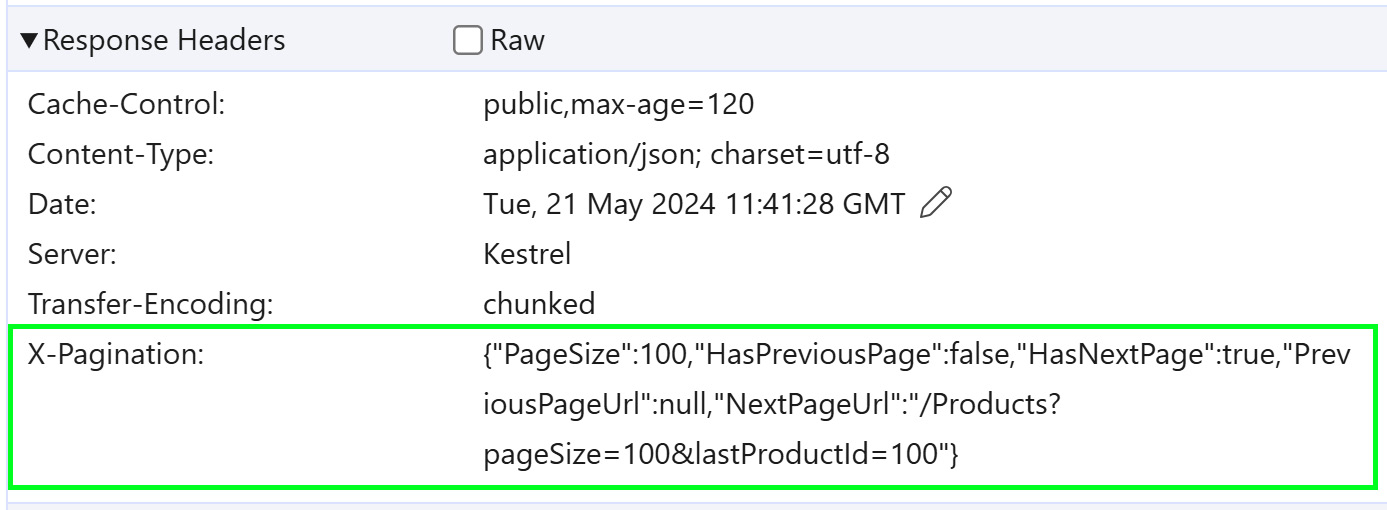
Figure 1.4: Note HasPreviousPage and HasNextPage in the X-Pagination header
Important note
Keep in mind that, when testing on localhost, a CORS policy is more lenient and you will probably see these headers regardless. You might not see the full impact of CORS during local development. This recipe is critical when deploying your web API and allowing a variety of clients to consume your API.
How it works…
We applied a CORS policy that allows requests from any origin, AllowAnyOrigin. When the client consuming our API is hosted on a different origin than the API, we have to start thinking about CORS policies. We added the WithExposedHeaders("X-Pagination") policy to ensure that the header that contains our pagination data is accessible to the client.













