

Using the Firebug Console
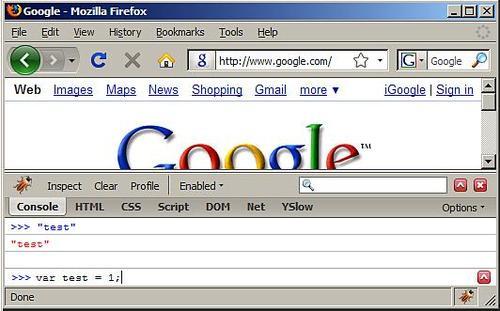
You can type code directly into the Firebug console, and when you press Enter, the code is evaluated and executed. The return value of the code is printed in the console. The code is executed in the context of the currently-loaded page, so for example if you type document.location.href it will return the URL of the current page.
The console also has an auto-complete feature. It works similarly to the normal command line prompt in your operating system. If, for example, you type docu and hit the Tab key, docu will be auto-completed to document. Then if you type . (the dot operator), you can press Tab several times and it will iterate through all the available properties and methods you can call on the document object.
By using the UP and DOWN arrow keys, you can go through the list of already-executed commands and bring them back in the console.
The console gives you only one line to type in, but you can execute several JavaScript statements by separating them with semi-colons. If you need more space or more lines, you can open the console in a multi-line mode, by clicking the upward-facing arrow on the far right of the input line. An example of multi-line mode is shown in the next screenshot.
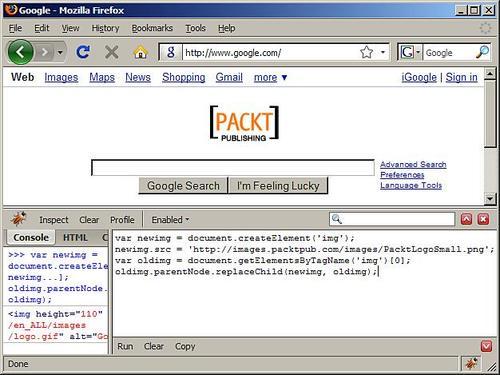
This example shows how you can use the console to type in some code that swaps the logo on the google.com home page with an image of your choice. As you see, you can test your JavaScript code live on any page.
One configuration option you should set in Firefox is the strictness of JavaScript warnings you will see in the console. This will help you make sure that the code you write is of better quality. Although warnings are not errors, you should aim at writing code that doesn't throw any warnings. For example using an undeclared variable is not an error, but it's not a good idea, so Firefox's JavaScript engine will generate a warning, which will be displayed in the console if the strict setting is turned on. To set the "strict" setting, do this:
- Type about:config in Firefox's address bar.
- Search for strict by typing it in the Filter field and pressing Enter.
- Double-click the line that says javascript.options.strict. This should set its Value to true.