




















































Search icon CANCEL
Subscription
0
Cart icon
Your Cart (0 item)
Close icon
You have no products in your basket yet
Save more on your purchases! discount-offer-chevron-icon
Savings automatically calculated. No voucher code required.
Arrow left icon
Explore Products
Best Sellers
New Releases
Books
Videos
Audiobooks
Learning Hub
Newsletter Hub
Free Learning
Arrow right icon
timer SALE ENDS IN
0 Days
:
00 Hours
:
00 Minutes
:
00 Seconds
Arrow up icon
GO TO TOP
Oracle SQL Developer 2.1

You're reading from   Oracle SQL Developer 2.1 Design and Develop Databases using Oracle SQL Developer and its feature-rich, powerful user-extensible interface with this book and eBook

Arrow left icon
Product type Paperback
Published in Dec 2009
Publisher Packt
ISBN-13 9781847196262
Length 496 pages
Edition 1st Edition
Languages
Arrow right icon
Author (1):
Arrow left icon
Susan Harper Susan Harper
Author Profile Icon Susan Harper
Susan Harper
Arrow right icon
View More author details
Toc

Table of Contents (19) Chapters Close

Oracle SQL Developer 2.1
Credits
About the Author
1. Acknowledgement
About the Reviewers
2. Preface
1. Getting Started with SQL Developer FREE CHAPTER 2. Browsing and Editing Database Objects and Data 3. Working with the SQL Worksheet 4. The Power of SQL Reports 5. Working with PL/SQL 6. SQL and PL/SQL Tuning Tools 7. Managing Files 8. Importing, Exporting, and Working with Data 9. Database Connections and JDBC Drivers 10. Introducing SQL Developer Data Modeler 11. Extending SQL Developer 12. Working with Application Express 13. Working with SQL Developer Migrations

Integration with Oracle SQL Developer


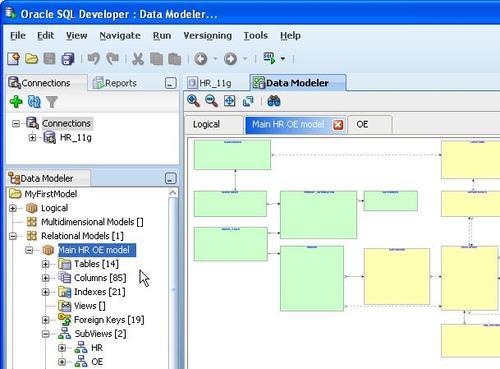
SQL Developer 2.1 includes the Data Modeler Viewer extension. This viewer provides users with the option of opening existing SQL Developer Data Modeler diagrams or creating models based on the database connection. To open the Data Modeler in SQL Developer, select Tools | Data Modeler. This opens the Logical and Relational model tabs. Once open, you can open any data model created in the Data Modeler. To review the details of the model in the navigator, select View | Data Modeler | Browser.

You can open any Data Modeler model in SQL Developer 2.1 by selecting File | Open Data Modeler Design. Once you have the model and the Data Modeler browser open, you can browse and review all of the model properties. The model and properties are all read-only:
Creating a new model

The Data Modeler Viewer extension to SQL Developer also allows you to create models of the tables, views, and constraints in the database connections you have access to. To create a new model...

lock icon The rest of the chapter is locked
CONTINUE READING
83
Tech Concepts
36
Programming languages
73
Tech Tools
Icon Unlimited access to the largest independent learning library in tech of over 8,000 expert-authored tech books and videos.
Icon Innovative learning tools, including AI book assistants, code context explainers, and text-to-speech.
Icon 50+ new titles added per month and exclusive early access to books as they are being written.
Oracle SQL Developer 2.1
Register for a free Packt account to unlock a world of extra content!
A free Packt account unlocks extra newsletters, articles, discounted offers, and much more. Start advancing your knowledge today.
Unlock this book and the full library FREE for 7 days
Get unlimited access to 7000+ expert-authored eBooks and videos courses covering every tech area you can think of
Renews at €18.99/month. Cancel anytime
Modal Close icon
Modal Close icon









