






























































1.3 Objects and classes
An object is a collection of data that defines an internal state with associated behaviors. How do we differentiate between categories of objects? Apples and oranges are both objects, but it is a common adage that they cannot be compared. Apples and oranges aren’t modeled very often in computer programming, but let’s pretend we’re creating an inventory application for a fruit farm.
One of the earliest things we learn in our analysis is that apples go in barrels and oranges go in baskets. The problem domain we’ve uncovered so far has four kinds or categories or varieties of objects: apples, oranges, baskets, and barrels. In object-oriented modeling, the preferred term used for a kind of object is class. We seem to have four classes of objects.
It’s important to understand the difference between an object and a class. The idea is that objects can be classified based on common states or behaviors. Classes describe related objects. A class definition is like a blueprint for creating individual objects. You might have three oranges sitting on the table in front of you. Each orange is a distinct object, but all three have the attributes and behaviors associated with one class: the general class of oranges.
The relationship between the four classes of objects in our inventory system can be described using the Unified Modeling Language (invariably referred to as UML, because three-letter acronyms never go out of style). Specifically, using a UML class diagram. Figure 1.1 is our first class diagram:
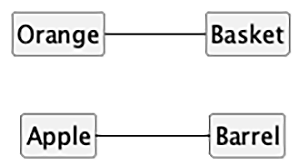
This class diagram shows that instances of the Orange class (usually called “oranges”) are somehow associated with a Basket. It also shows how instances of the Apple class (“apples”) are also somehow associated with a Barrel. Association is the most basic way for objects (instances of classes) to be related. By limiting ourselves to vague associations, we’re avoiding assumptions. An association will often need further clarification. We could, for example, clutter the model with additional attributes — color, size, or any of a large number of other aspects. The diagram helps narrow the discussion to fruit categories and containers.
The syntax of a UML diagram is generally pretty obvious; you don’t have to read a tutorial to (mostly) understand what is going on when you see one. UML is also fairly easy to draw. After all, many people, when describing classes and their relationships, will naturally draw boxes with lines between them. Having a standard based on these intuitive diagrams makes it easy for programmers to communicate with designers, product owners, and each other.
Note that the UML diagram generally depicts the class definitions; we often need to describe attributes of the objects. UML diagrams can show a class with attributes and methods; it also allows us to elide details. The diagram shows the class of Apple and the class of Barrel, telling us that any given apple is in some specific barrel. While we can use UML to depict individual objects, that’s rarely necessary. Showing the class relationships in a diagram tells us some important details about the objects that are members of each class. It doesn’t tell us everything; the model serves to highlight selected details of the overall problem domain.
Some programmers disparage UML as a waste of time. Citing iterative development, they will argue that formal specifications done up in fancy UML diagrams are going to be redundant before they’re implemented. Further, they complain that maintaining these formal diagrams will only waste time and not benefit anyone.
Every programming team consisting of more than one person will occasionally have to sit down and hash out the details of the components being built. The higher-performing the team — as a whole — the more often this kind of information is shared. UML is extremely useful for ensuring quick, easy, and consistent communication. Even those organizations that scoff at formal class diagrams tend to use some informal version of UML in their design meetings or team discussions.
Furthermore, the most important person you will ever have to communicate with is your future self. We all think we can remember the design decisions we’ve made, but there will always be Why did I do that? moments hiding in our future. If we keep the scraps of papers we did our initial diagramming on, when we started a design, we’ll eventually find them to be a useful reference.
This chapter, however, is not meant to be a tutorial on UML. There are many of those available on the internet, as well as numerous books on the topic. UML covers far more than class and object diagrams; it also has a syntax for use cases, deployment, state changes, and activities. We’ll be dealing with some common class diagram syntax in this discussion of object-oriented design. You can pick up the structure by example, and then you’ll subconsciously choose the UML-inspired syntax in your own team or personal design notes.
Our initial diagram, while correct, does not remind us that apples go in barrels or how many barrels a single apple can go in. It only tells us that apples are somehow associated with barrels. Sometimes the association between classes is obvious and needs no further explanation. Often, we have to add further clarification.
The beauty of UML is that most things are optional. We only need to specify as much information in a diagram as makes sense for the current situation. In a quick whiteboard session, we might just draw simple lines between boxes. In a more formal, permanent document, we might go into more detail.
In the case of apples and barrels, we can be fairly confident that the association is many apples go in one barrel. To make sure nobody confuses the association with one apple spoils one barrel, we can enhance the diagram.
Figure 1.2 (next page) shows more detail.
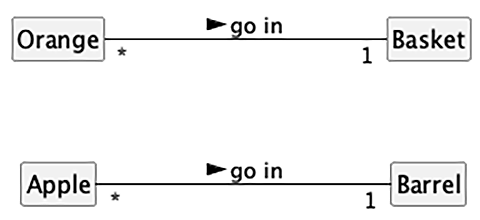
This diagram tells us that oranges go in baskets, with a little arrow showing what goes in what. Reading it the other way, a basket contains oranges; this is the foundational “has-a” relationship that we see almost everywhere. There are numerous other kinds of relationships, but we’ll focus on this relationship because it’s common and easy to visualize. The diagram also tells us the number of an object that can be used in the association on both sides of the relationship. One Basket object can contain many Orange objects, represented by annotating the line with a *. Any one Orange can go in exactly one Basket. This number is referred to as the multiplicity of the association, which specifies how many instances of one class can be linked to another. While multiplicity is sometimes confused with cardinality, the latter defines an exact count of items. In a UML context, multiplicity is how we define the allowed range of concrete cardinality values. A “more-than-one instance” feature of a relationship is better described as the multiplicity.
We may sometimes forget which end of the relationship line is supposed to have which multiplicity annotation. The multiplicity annotation nearest to a class represents how many objects of that class can be associated with any one object at the other end of the association. For the apple goes in a barrel association, reading from left to right, many instances of the Apple class (that is, many Apple objects) can go in any one Barrel object. Reading from right to left, exactly one Barrel can be associated with any one Apple.
We’ve seen the basics of classes, and how they can specify relationships among objects. Now, we need to talk about the attributes that define an object’s state, and the behaviors of an object that may involve state change or interaction with other objects.
Readers with experience in object-oriented design will note that we haven’t described any common features of the Barrel or Basket classes of objects. We’re intentionally avoiding the search from common features for a moment. A premature leap into searching for commonality can sometimes obscure more nuanced distinctions among classes of objects.











