





























































Testing JavaScript code with Jasmine
Maintaining complex JavaScript codebases is challenging due to the dynamic nature of the language and the lack of built-in module support (up until ES6). Applying unit testing practices helps alleviate these issues and JavaScript as a language benefits from a large number of unit testing frameworks, libraries, and tools.
We will now add tests for the previous example found in the underscore.map.reduce-with-local-dependencies folder from the source code for this chapter. To implement these tests we will use Jasmine, a popular test framework.
Jasmine is a
behavior-driven development (BDD) framework that contains extensive built-in functionality to define and execute tests for JavaScript code. A BDD framework differs from other test frameworks such as QUnit by defining tests as a desired behavior, where the test outcome is specified first followed by the actual test assertion. Jasmine uses a describe/it syntax to define test specifications, while other BDD frameworks use a given/when/then syntax. Using BDD tests produces output similar to a specification document and these types of tests are usually called
specs. Other advantages of using Jasmine are that it does not rely on any other library, it has a rich functionality for defining tests and tests assertions, and it has great documentation available at http://jasmine.github.io.
Jasmine introduction
A typical Jasmine test that asserts the result of a trivial JavaScript operation will have the following code (with the Jasmine specific functions highlighted):
describe("A basic JavaScript add operation", function() {
  it("should be correct", function() {
    var result = 1 + 1;
    expect(result).toEqual(2);
  });
});
When running the test, its output should read A basic JavaScript add operation should be correct, forming a meaningful statement about the value delivered by the code being tested. The describe call is a Jasmine global function that will group one or more test specifications that are defined by the it function (which is also another Jasmine global function). Both functions have a test-related description as the first argument. The second argument is a function that defines the test suite in its body with the test specification (or the spec) defined in the it function. Test assertions use the Jasmine global function expect, which is chained with a helper function called
matcher that will facilitate the test result evaluation.
There are a couple of built-in matcher functions available, such as toBe(), which checks whether the test assertion object and the expected object are the same; toEqual(), which checks whether the two objects are equivalent; and toBeDefined(), which checks whether the test assertion object is not undefined. You can also define your own custom matchers for more complex expectation checks. Jasmine allows you to set up and tear down data before and after a spec is executed through the global functions beforeEach() and afterEach().
Adding tests using the default Jasmine infrastructure
Before creating the tests, we need to modify the awardAgeCalculator.js file that contains the code under test (or SUT—system under test) and ensure it is testable. A SUT is testable if it allows swapping out its dependencies, if it can be tested in isolation and does not depend on a shared or global application state.
For our example, we need to test that the two global accessible (or public) functions of the awardAgeCalculator object (the SUT) are producing the expected results when executed against specific data sets. Currently, we cannot easily swap out the default array of people used in the example and we need to change it by making the getPeople() function public and changing the rest of the functions to accept an input array as highlighted in the next code snippet:
var awardAgeCalculator = (function() {
  "use strict";

  var getPeople = function() {
    return [{
      name: "Herta Muller",
      birthYear: 1953,
      awardYear: 2009
    }, {
      ...
    }, {
      name: "Patrick Modiano",
      birthYear: 1945,
      awardYear: 2014
    }];
  };

  return {
    getPeople: getPeople,
    calculateAwardAgeForPeople: function(people) {
      return _.map(people, function(person) {
        return {
          name: person.name,
          awardAge: person.awardYear - person.birthYear
        };
      });
    },
    getAverageAwardAgeForPeople: function(people) {
      var peopleWithAwardAge = this.calculateAwardAgeForPeople(people);
      return _.reduce(peopleWithAwardAge, function(memo, person) {
        return memo + person.awardAge;
      }, 0) / peopleWithAwardAge.length;
    }
  };
}());
We also exposed the getPeople() function to the global scope for convenient access to the default data set. By making these changes, we have created a testable SUT where we can alter the input data for the two functions we plan to test. We can now write the tests by creating a spec\awardAgeCalculatorSpec.js file and using the following code:
describe("Given awardAgeCalculator", function() {
  describe(
    "when calling calculateAwardAgeForPeople()",
    function() {
      var people;
      var peopleWithAwardAge;
      beforeEach(function() {
        people = awardAgeCalculator.getPeople();
        peopleWithAwardAge = awardAgeCalculator.calculateAwardAgeForPeople(people);
      });
      it(
        "then the award age for the first person should be correct",
        function() {
          expect(peopleWithAwardAge[0].name).toEqual("Herta Muller");
          expect(peopleWithAwardAge[0].awardAge).toEqual(56);
        });
      it(
        "then the award age of the last person should be correct",
        function() {
          expect(peopleWithAwardAge[peopleWithAwardAge.length - 1].name).toEqual("Patrick Modiano");
          expect(peopleWithAwardAge[peopleWithAwardAge.length - 1].awardAge).toEqual(69);
        });
    });
  describe(
    "when calling getAverageAwardAgeForPeople()",
    function() {
      var people;
      var aveargeAwardAge;
      beforeEach(function() {
        people = awardAgeCalculator.getPeople();
        aveargeAwardAge = awardAgeCalculator.getAverageAwardAgeForPeople(people);
      });
      it("then the average award age should be correct", function() {
        expect(Math.floor(aveargeAwardAge)).toEqual(69);
      });
    });
});
The tests are defined within two nested describe functions and we used a beforeEach function to avoid code duplication when exercising the SUT. The expectations for the first set of tests are verifying that the person name and the award age are correct.
To execute these tests, we need to add Jasmine support to our example. We will use Bower to install Jasmine as a development package (a package that can be omitted when the current project is deployed to a target environment) through the following command:
bower install jasmine#2.3.4 --save-dev
We will change the default SpecRunner.html file provided with the standalone Jasmine distribution at http://bit.ly/1EhdgHT to reference the files from the Bower package together with the SUT file (the code file) and the test file as highlighted in the following code:
<!DOCTYPE HTML>
<html>
<head>
  <meta http-equiv="Content-Type" content="text/html; charset=UTF-8">
  <title>Jasmine Spec Runner v2.3.4</title>
  <link rel="shortcut icon" type="image/png" href="bower_components/jasmine/images/jasmine_favicon.png">
  <link rel="stylesheet" type="text/css" href="bower_components/jasmine/lib/jasmine-core/jasmine.css">
  <script type="text/javascript" src="bower_components/jasmine/lib/jasmine-core/jasmine.js"></script>
  <script type="text/javascript" src="bower_components/jasmine/lib/jasmine-core/jasmine-html.js"></script>
  <script type="text/javascript" src="bower_components/jasmine/lib/jasmine-core/boot.js"></script>

  <!-- include source files here... -->
  <script src="bower_components/underscore/underscore.js"></script>
  <script type="text/javascript" src="awardAgeCalculator.js"></script>
  <!-- include spec files here... -->
  <script type="text/javascript" src="spec/awardAgeCalculatorSpec.js"></script>
</head>
<body>
</body>
</html>
Notice that we referenced Underscore as a SUT dependency and we don't need any special test output code to display the results other than ensuring that all required JavaScript files are referenced in the SpecRunner.html file. You can find the example in the underscore.map.reduce-with-jasmine folder from the source code for this chapter.
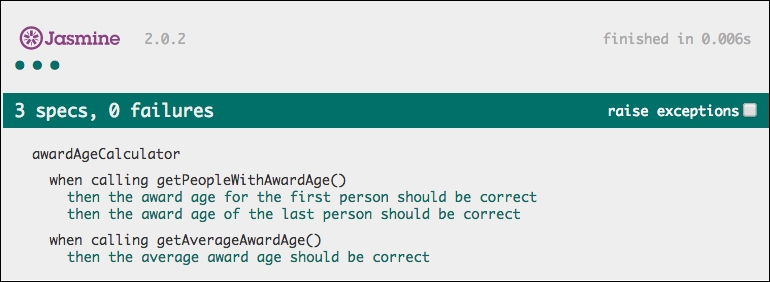
To run the tests, we just need to open the SpecRunner.html file in a browser and we should see this output:
Jasmine tests can also be executed automatically through test runners such as Karma (http://karma-runner.github.io/) or Node.js build tools such as Grunt or Gulp. We will discuss these topics in Chapter 5, Using Underscore.js in the Browser, on the Server, and with the Database and Chapter 6, Related Underscore.js Libraries and ECMAScript Standards.














