Search icon CANCEL
Subscription
0
Cart icon
Your Cart (0 item)
Close icon
You have no products in your basket yet
Save more on your purchases! discount-offer-chevron-icon
Savings automatically calculated. No voucher code required.
Arrow left icon
Explore Products
Best Sellers
New Releases
Books
Events
Videos
Audiobooks
Packt Hub
Free Learning
Arrow right icon
timer SALE ENDS IN
0 Days
:
00 Hours
:
00 Minutes
:
00 Seconds
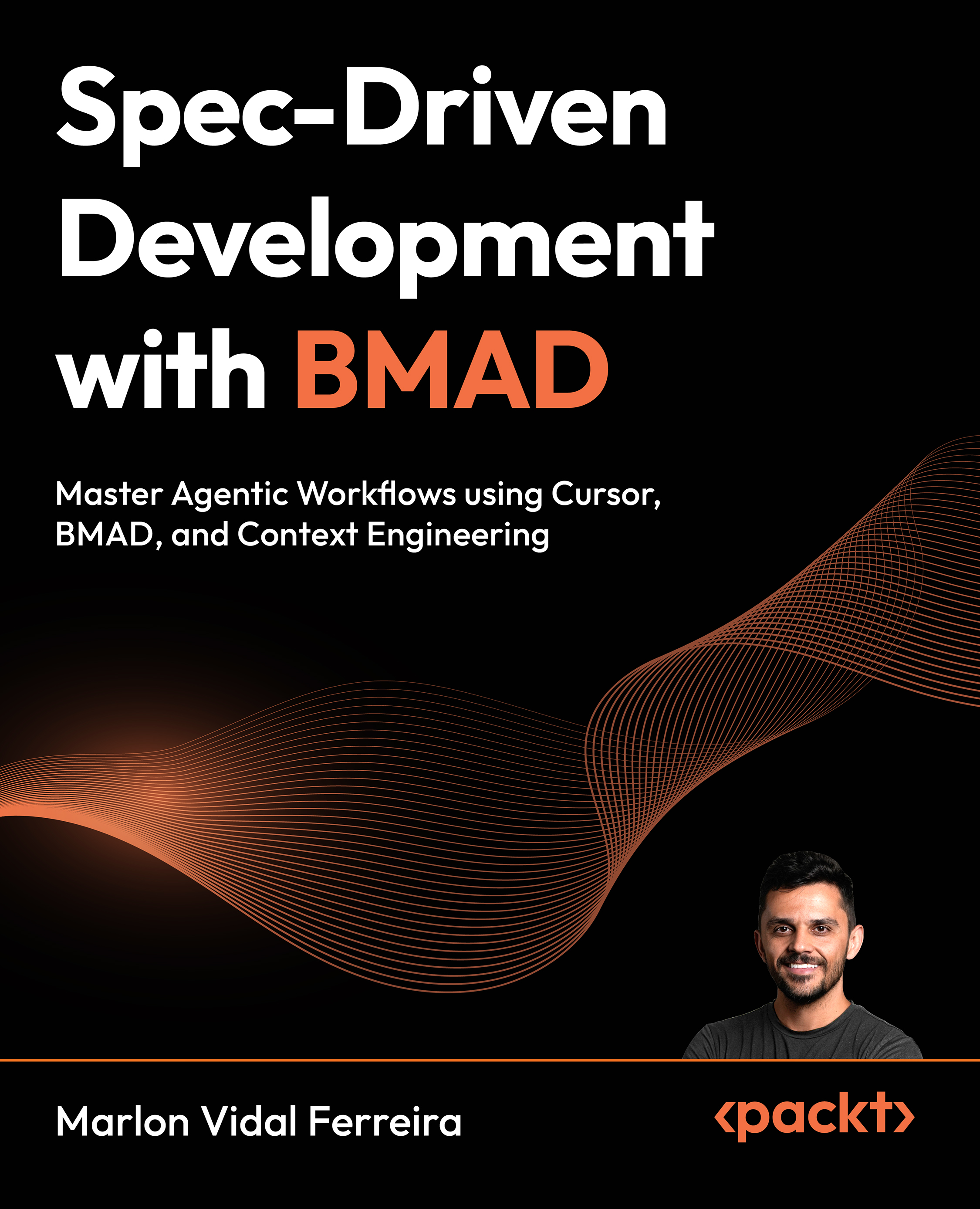
Spec-Driven Development with BMAD

Spec-Driven Development with BMAD: Master Agentic Workflows using Cursor, BMAD, and Context Engineering

Arrow left icon
Profile Icon Marlon Vidal Ferreira
Arrow right icon
€26.99
Paperback Aug 2026 200 pages 1st Edition
eBook
€18.89 €20.99
Paperback
€26.99
Arrow left icon
Profile Icon Marlon Vidal Ferreira
Arrow right icon
€26.99
Paperback Aug 2026 200 pages 1st Edition
eBook
€18.89 €20.99
Paperback
€26.99
eBook
€18.89 €20.99
Paperback
€26.99

What do you get with Print?

Product feature icon Instant access to your digital copy whilst your Print order is Shipped
Product feature icon Paperback book shipped to your preferred address
Product feature icon Redeem a companion digital copy on all Print orders
Product feature icon Access this title in our online reader with advanced features
Product feature icon DRM FREE - Read whenever, wherever and however you want
Modal Close icon
Payment Processing...
tick Completed

Shipping Address

Billing Address

Shipping Methods
Table of content icon View table of contents Preview book icon Preview Book

Spec-Driven Development with BMAD

1

Introducing Spec-Driven Development and BMAD Method

The way we build software is changing rapidly with the adoption of AI-assisted development tools. However, as many teams are already experiencing, simply prompting large language models (LLMs) with vague instructions is not enough to build reliable and scalable systems. As projects grow in complexity, the lack of structured context leads to inconsistent implementations, architectural problems, missing requirements, and significant rework.

In this chapter, we go through spec-driven development as a practical approach to solving those problems and present the BMAD method as a framework for implementing this methodology in real projects. Instead of relying on improvised prompts and reactive development, we will focus on creating structured specifications that provide AI agents with the necessary context to generate higher-quality outputs throughout the software lifecycle.

We will explore the philosophy behind BMAD, understand the difference between upstream and downstream development processes, and learn how specialized AI agents collaborate to support planning, architecture, implementation, and quality assurance. We will also cover the fundamentals of context engineering and understand why defining the who, why, and what of a project is essential before thinking about implementation details.

We will cover the following main topics:

  • Why Spec-Driven Development (SDD) is the future of development
  • Introducing the BMAD method
  • Understanding the BMAD philosophy
  • Understanding the BMAD workflow
  • Context engineering: the foundation of good specs
  • The three pillars of upstream context
  • Building a full feature using the complete BMAD cycle
  • Configuring BMAD in the Project
  • What is new in v6
  • BMAD Agile and TEA workflows
  • The importance of project‑context.md
  • Installing v6 and updating from v4
  • Recommended workflow for getting started

By the end of this chapter, we will understand the limitations of vibe coding, learn the foundations of spec-driven development, explore the BMAD workflow and its agents, and see how context engineering helps us create clearer and more reliable AI-assisted development processes.

Download the code bundle and the PDF version of this book

Your purchase includes a DRM-free PDF copy of this book, the code bundle, and a range of exclusive benefits. To unlock everything, follow the Free benefits with your book section in the Preface.

Technical requirements

To get started with BMAD, there are a few essential technical prerequisites you must have installed on your machine. Your environment will need Node.js version 20.12 or higher to run the core framework installer (npx bmad‑method install), along with Python 3.10 or higher. You'll also need to have uv (the fast Python package installer and resolver) installed. Once your local environment meets these requirements, BMAD integrates seamlessly into your workflow via your preferred AI-powered IDE.

At the time this book is written, the current BMAD version is 6.8.0 and the BMAD Test Architect module is at version 1.19.0.

While Cursor is a popular choice (and our examples in this book will use Cursor), BMAD is highly flexible and can be used with a wide variety of AI IDEs, including Claude Code, Codex, GitHub Copilot, Cline, Gemini, Google Antigravity, Kiro, OpenCode, Windsurf and another 30 tools available in the market, allowing you to build and plan without being locked into a single editor.

Why SDD is the future of development

In this section, we discuss why spec-driven development is the future of AI development and why the current approach of vibe coding creates significant problems in real-world software engineering.

For those familiar with tools such as Cursor and Claude Code, vibe coding is usually described as asking an LLM for what we want and allowing it to generate a solution based on the provided prompt. Most of the time, the generated code is of high quality. However, as the scenarios become more complex, vague prompts no longer provide enough context for the AI assistants to fully understand the problem. Instead of delivering solutions and moving to the next feature, we end up fixing problems introduced by missing context.

This is why specifications as the source of truth become the solution to the vibe coding problem. With AI, we can create highly detailed product and technical specifications. Spec-driven development states that if something is not present in the specifications, the code will not reflect the intended behavior.

This becomes a game changer because development is now driven by specifications. We always have the latest version of what the system needs to do, and the documentation accurately reflects what the code must implement.

This approach addresses one of the most common complaints in software engineering: outdated or missing documentation. By generating specifications from both business and technical perspectives, we can provide AI agents with precise context. The likelihood that they misunderstand requirements or miss important constraints decreases significantly, which reduces the number of errors introduced into the codebase.

Within this approach, we spend much more time sharpening the axe. That means thinking deeply about what we need to deliver instead of immediately jumping into implementation. Many times, teams only discover architectural flaws or design problems after reaching a major milestone, which forces them to rewrite code that was already delivered or nearly completed.

This is an extremely important shift in mindset.

In general, spec-driven development improves both the upstream and downstream process because we think through the entire lifecycle, from ideation to software delivery. We work through every stage intentionally instead of reacting to problems during implementation.

This is where the BMAD method comes into play and why it matters to software developers, engineers, managers, and other technical roles.

Looking at the BMAD method

BMAD known as Breakthrough Method of Agile AI-Driven Development or Build More Architect Dreams is a framework that implements the spec-driven development approach. Spec-driven development should be viewed as a new programming paradigm in the same way we think about functional programming or object-oriented programming (OOP). It represents a different way of solving problems using technology.

BMAD method was created by Brian Madison as an open-source project (https://github.com/bmad-code-org/BMAD-METHOD). The main idea behind the implementation is simulating an agile way of working. Each stage of the process is handled by a specialized AI agent that acts in a specific professional role.

For example:

  • A product manager agent
  • A software architect agent
  • A developer agent

Each agent has its own role and domain knowledge. These agents provide insights and perform specialized work so we can explore problems deeply, provide the necessary context, and receive highly professional outputs that support the development process.

BMAD helps implement spec-driven development because it eliminates inconsistencies in planning and reduces context loss, which is currently one of the main problems when working with large language models.

BMAD can be used inside IDEs/CLIs such as Claude Code, Codex, Cursor, GitHub Copilot, Cline, Gemini, Google Antigravity, Kiro, OpenClaw, OpenCode, Windsurf and another 30 tools available in the market. Let's now dive deep into the BMAD philosophy.

Understanding the BMAD workflows

Despite having specialized agents, BMAD is also structured in different workflows that represent the work each phase should execute during a project, without the need to load an agent definition to execute a specific task, simulating an agile team development process. These are the most important ones:

Figure 1.1 – BMAD workflows

Figure 1.1 – BMAD workflows

Understanding BMAD modules

BMAD is powerful out of the box, but its true scalability lies in its official add-on modules. Designed to extend beyond the built-in core and BMM (the ones we'll cover in this book), these modules provide specialized agents, workflows, and tasks tailored for specific domains.

Whether you are extending the framework itself, brainstorming new products, developing a video game, or building enterprise-grade testing strategies, there is a dedicated module for the job. Below is a breakdown of the official BMAD modules and when they should be utilized in your projects.

BMAD Builder

BMAD Builder is the meta-module of the ecosystem. It provides guided assistance for creating custom agents, structured workflows, and domain-specific modules. It features interactive setup capabilities using YAML configuration and seamless npm publishing support.

When to use it: You should use the BMAD Builder when you need to extend the BMAD framework itself. If your team requires highly specialized AI agents with custom expertise, bespoke decision-point workflows, or if you want to package and share your own custom module with the wider community, this is your starting point.

Creative Intelligence Suite (CIS)

The Creative Intelligence Suite (CIS) is a collection of AI-powered tools designed to facilitate structured creativity, ideation, and innovation. It comes equipped with specialized agents like Innovation Strategist, Design Thinking Coach, and Storyteller, employing proven frameworks such as SCAMPER and reverse brainstorming.

When to use it: Deploy CIS during the early stages of product development. It is the ideal module when you are facing complex problem-solving hurdles, need lateral thinking exercises, are drafting narratives and pitches, or require a structured environment to brainstorm and refine abstract ideas.

Game Dev Studio (GDS)

Game Dev Studio (GDS) is a highly specialized module providing structured game development workflows adapted for major engines like Unity, Unreal, Godot, and custom builds. It handles everything from rapid prototyping in Quick Dev mode to epic-driven production sprints.

When to use it: As the name implies, GDS is designed for game developers. You should use it when you need to generate comprehensive Game Design Documents (GDDs), establish world-building and character dialog, or need engine-specific architecture guidance across various game types.

Test enterprise architect (TEA)

TEA brings enterprise-grade test strategy, automation guidance, and release gate decision-making to the table. This module goes far beyond standard QA by offering risk-based prioritization, requirements traceability, and nine distinct structured workflows.

When to use it: You should integrate TEA when software quality, test design, and automated testing are paramount. It is built for teams that need strict non-functional requirement (NFR) assessments, CI setup assistance, Acceptance Test-Driven Development (ATDD) workflows, and rigorous P0-P3 bug prioritization.

Moving forward: our focus on quality

While BMAD Builder, the CIS, and Game Dev Studio offer incredible value for their respective niches, testing and quality assurance remain the universal bottlenecks for most development teams.

For that reason, we're going to cover TEA in this book, not the others. In the upcoming chapters, we will dive deep into the TEA module and how it is associated in both upstream and downstream phases. We will explore how to collaborate with the TEA agent, set up requirements traceability, and leverage TEA's structured workflows to ensure your next release is robust, automated, and deployment-ready.

Context engineering: the foundation of good specs

Before moving into practice, we need to understand what makes a good specification. This is where context engineering becomes essential.

The context gap challenge

When working on a project, developers naturally possess the full project context:

  • Business goals
  • Historical decisions
  • Implicit constraints
  • Domain knowledge

AI agents do not have this context. LLMs are trained on generic datasets, which means we must explicitly provide the necessary information for them to generate accurate solutions.

Without this bridge, most AI-assisted projects fail. This relates directly to the vibe coding problem we discussed earlier.

Context drift

Providing too much information can also create problems. When context becomes excessively large, AI systems may begin compacting or shrinking previous information. This phenomenon is commonly known as context drift.

As new prompts are added, the model continually reprocesses earlier context, which increases the chance of losing important details.

What is context engineering?

Context engineering is the systematic process of structuring information to constrain the AI's creative space before implementation begins. This differs from prompt engineering. Prompt engineering focuses on writing better instructions for a single query or conversation.

Context engineering builds a persistent knowledge base that AI agents consult before processing requests.

This is what enables consistent and reliable output. The purpose of context engineering is to create boundaries of truth that the AI cannot cross.

This becomes the foundation of successful upstream planning.

The three pillars of upstream context

To build effective specifications, we must clearly define:

  • Who are we targeting?
  • Why are we building the solution?
  • What are we building?

The upstream process intentionally ignores the how. Technology decisions are not discussed at this stage.

The architect agent only becomes involved later. The upstream process primarily relies on the analyst and product manager agents because they focus on the following three pillars.

The first pillar: the who

The main question is: Who is the software for?

Specificity matters. Saying that we are targeting "users" is vague. Instead, define a persona such as the following:

A senior financial analyst who needs high-contrast data visualization and hates scrolling.

It provides the AI model with meaningful context.

This specificity influences:

  • UI density
  • Accessibility standards
  • Workflow complexity
  • UX decisions

When the UX agent receives this information, it can generate significantly better guidance.

The second pillar: the why

The next question is: Why are we building this?

Many failed projects originate from poorly defined business value. To answer this correctly, we need to define success metrics. For example:

  • Reducing support tickets by 20%
  • Enabling checkout completion in under 30 seconds

These metrics influence engineering trade-offs, including the following:

  • Performance priorities
  • Aesthetic priorities
  • MVP scope

They also help AI agents prioritize features during conflicts.

The third pillar: the what

The final question is: What are we building?

Equally important is defining what is out of scope. This prevents scope creep and unnecessary overengineering.

We must clearly define:

  • Required features
  • Hard constraints
  • Explicit exclusions

Examples include:

  • Google authentication
  • CSV export
  • No social features

This creates negative constraints that help prevent unnecessary complexity. The goal is to deliver software that solves the current business problem while allowing future incremental improvements.

A real-world context example

A vague prompt to any LLM, such as the following: Build a to-do list app, will usually produce a generic application using React suitable for no specific audience.

Using BMAD, the existing workflows will guide you to gather more context, and this will become much more precise. Let's look at an engineering context with BMAD:

  • The Who: Busy freelance designers
  • The Why: Track billable hours per task to increase revenue
  • The What: A Kanban board with an integrated timer and no social features

The result becomes a tailored product that is much closer to a market-ready solution.

Building a full feature using the complete BMAD cycle

In this book, we will build a to-do list application. However, the primary goal is not the technology or business complexity. The objective is to understand the BMAD process from upstream planning to downstream implementation.

The same workflow can then be applied to larger projects. BMAD is most useful for medium- to high-complexity tasks. It is not intended to replace UI-oriented prompt tools such as Lovable or V0 for simple implementations. For simpler work, plan modes in Cursor or Claude are often sufficient.

BMAD becomes valuable when:

  • The feature has significant business impact
  • The implementation complexity is high
  • Existing users may be affected
  • Architectural thinking is required

Applying the context engineering principles discussed earlier, the project in this book would include the following:

  • The Who: Busy freelancers
  • The Why: Track billable hours per task to increase revenue
  • The What:
    • A Kanban board
    • Integrated timers
    • A web-based application
    • No social features
    • Local storage persistence instead of database complexity

The book compares two versions of the same application using the same PRD:

  • A version generated in Lovable, with too much context injected at once and keeping important features out of scope without user consensus. Here is a screenshot of the project:
    Figure 1.2 – Project built on Lovable

    Figure 1.2 – Project built on Lovable

  • A version generated using the BMAD method, following all functional and non-functional requirements the user wants. Here is a screenshot of the BMAD version:
    Figure 1.3 – Application built with BMAD

    Figure 1.3 – Application built with BMAD

The BMAD implementation includes:

  • Onboarding flows
  • Filters
  • Revenue dashboards
  • Task tracking
  • Rich Kanban interactions

Both applications were built from the same PRD, but the BMAD implementation contains substantially more detail and product depth.

Throughout the book, we explore each phase of the application's construction and treat the project as an existing application to demonstrate how BMAD can be applied to brownfield projects.

The focus remains on the process itself and how BMAD improves software delivery, accelerates development, and creates higher-quality implementations. We will also see how to apply BMAD to greenfield projects, making sure that our application starts correctly from business, product, and technology perspectives.

Configuring BMAD in the project

Before implementing BMAD in a project, one important consideration is that BMAD is an evolving open-source framework, and this book might contain outdated info depending on the time you're reading it, because Brian Madison and the open-source community continuously update the project.

For this book, we will use v6 of the BMAD method because it is the latest version and it's already stable and production-ready. The workflow covered throughout the chapter is based entirely on BMAD v6, and we'll have some comparisons between v4 and v6 to explicitly point out the differences.

With that said, we will install BMAD in Cursor. To install BMAD, run the following command in the CLI:

npx bmad-method install

Following is what we get after using the command:

Figure 1.4 – Result of the installation command

Figure 1.4 – Result of the installation command

During installation, BMAD asks a series of configuration questions. First, we select the installation path for the project.

You can type . for the current directory.

After selecting the installation location, we choose the BMAD modules that will be installed in the same folder. This is where you will select BMAD Method and TEA modules, the ones we'll cover through this book. You can navigate up and down with keyboard arrows and press space to select them. Feel free to select other modules and explore them further, but we'll not focus on them in this book.

Figure 1.5 – Module selection

Figure 1.5 – Module selection

Right after, we select the IDE integrations that BMAD should support. BMAD can integrate with multiple tools simultaneously, including Cursor, Claude Code, among others. In this implementation, the workflow focuses on Cursor:

Figure 1.6 – IDE configuration

Figure 1.6 – IDE configuration

Then it will ask your name, the project name, which language should agents use when chatting with you and which language the output documents should be written in. Localization for both conversation and output documents was a highly requested feature since v4 to allow people who don't know English to use BMAD at its maximum performance.

To finish, you should select where the output files generated by the method will be placed. I strongly suggest using the default _bmad‑output folder for organizational purposes.

Concluding the process, lots of files will be created (depending on the IDE you chose) to define how the agents behave, how workflows will execute, and how BMAD interprets the commands throughout the development process.

If multiple IDE integrations are selected during installation, BMAD creates separate folders for each supported tool, since for v6 all workflows and agents are skills for easy maintenance and to adhere to industry standards. For example, the skills can be created in the following folders depending on the IDE you choose:

  • .agents
  • .claude
  • .opencode

From this point forward, we'll learn about the agents and the workflows BMAD offers to us. But in a real-world scenario, most of the time we'll use workflows and not the agents (they are loaded under the scenes when you select a workflow). Use these learnings as references to understand the bigger picture.

The _bmad-output folder

Every artifact produced during the BMAD workflow is written to a dedicated folder at the root of the project: _bmad‑output. This is where the results of all agent sessions land: brainstorming notes, project context files, planning artifacts, implementation readiness reports, and any other document generated across the workflow phases. Rather than scattering outputs across the project or relying on the user to organize them manually, BMAD writes each artifact to a predictable, consistent location.

The folder uses subfolders to separate artifacts by type, so a brainstorming session lands in _bmad‑output/brainstorming/ while planning documents land in _bmad‑output/planning‑artifacts/. This structure makes it straightforward to locate any artifact at any point in the process. As the project progresses through phases, the _bmad‑output folder becomes the accumulated record of what the workflow has produced and the foundation from which downstream agents draw their context.

Differences between v4 and v6

As of April 2026, BMAD has reached v6, and the gap between this release and v4 is significant enough to warrant a dedicated review. The most important shift is flexibility: v6 is far less rigid than v4. Until that date, v4 was the latest stable version, and BMAD had increased its popularity.

In v4, working with BMAD requires following a strict methodology and a defined set of workflows to produce specifications and drive implementation. That overhead makes sense for large, complex projects, but for small projects or simple features, v4 is overkill. V6 changes the underlying model entirely.

The core architectural change is this: in v6, workflows can be run without loading agents. v4 centers on agent interaction, you activate an agent, and from that agent you execute workflows. In v6, workflows are first-class citizens. You can invoke a workflow directly without worrying about which agent to load first. The agent definition is pulled in behind the scenes when needed. This makes it significantly easier to track where you are in the BMAD process and to call the appropriate workflow for the moment.

The architect role has also been relaxed. In v4, creating architecture documents requires filling out a considerable amount of detail, which can be challenging for those without a strong technical background. v6 guides users through the process more naturally, while still supporting the creation of rich, detailed architecture documents for those who want that depth.

Quality assurance has been extracted into its own module, the TEA module, which we will cover in detail later in this book. I consider this one of the most meaningful improvements in v6.

v6 also removes the distinction between greenfield and brownfield workflow commands. In v4, you need to run specific commands depending on whether you are starting fresh or working on an existing codebase. In v6, running the workflow is enough; it automatically detects the project state and proceeds accordingly.

Finally, the file sharding mechanism from v4 is no longer required. As LLMs have matured, a technique called progressive disclosure has emerged that makes sharding unnecessary. We will examine this in the next section.

Progressive disclosure

Progressive disclosure is one of the fundamental changes in how language models process text, and it is the reason file sharding is no longer necessary in BMAD v6. The term originates from UX design, where it describes the principle that users should be able to discover what they need without being confronted with all options at once.

In the context of LLMs, and especially in IDEs like Cursor, progressive disclosure means the model can use grep-style commands to search a file based on intent and keywords, loading only the relevant sections into context rather than ingesting the entire file. The model searches for headers that are relevant to the current task and pulls in just that portion of the document.

In BMAD v4, PRD and architecture files can grow to thousands of lines. The sharding process exists specifically to break those long files into smaller chunks, with an index file BMAD uses to reference the right context when creating story files. Progressive disclosure replaces that mechanism. We can now maintain very long files and rely on the model to read only the appropriate sections when needed, saving tokens and keeping context focused.

What is new in v6

Beyond the changes described above, v6 introduces several new capabilities worth understanding before starting to work with the framework.

Modular architecture

The most impactful structural change is the reorganization around modules. In v4, BMAD ships as a monolith with a few add-ons like the game development module and the creative suite. In v6, the BMAD core is a standalone module that empowers all the others. Every extension to BMAD's functionality is built on top of that core.

Workflows without agents

As noted earlier, you no longer need to activate an agent to run a workflow. The agent definition is loaded in the background automatically. This is a meaningful quality-of-life improvement; instead of memorizing which agent corresponds to which workflow, you focus on the workflow itself.

QuickSpec workflow

V4 requires passing through all phases of the BMAD process—analysis, planning, solutioning—regardless of the scope of the task. For small, well-understood changes, that overhead is disproportionate. The QuickSpec workflow addresses this. You provide your intent, and BMAD generates a concise specification you can implement, guided by your project conventions. We will see live examples of this workflow later.

This is what makes BMAD v6 applicable to any size of project: small, medium, and large. V4 was effectively a framework for complex projects only.

BMAD Help

One of the friction points in v4 is knowing which workflow to trigger next. You need to understand the agents, their associated workflows, and the correct sequencing. The BMAD Help workflow solves this. Given your current status in the process, it tells you which workflow to run next and answers any questions about the framework.

I used BMAD Help extensively while working on this book. If anything in this material raises a question, BMAD Help is a reliable first reference, and you will likely get a very similar answer.

Party Mode

Party Mode loads all agents simultaneously, giving you multiple perspectives on the discussion you are having with the AI. This is particularly useful when finalizing a product requirements document or working through a broad architectural question. We will use it in specific scenarios throughout the book.

Project context

The project context is a new top-level concept in v6, and it is important enough to warrant its own dedicated section. It is the primary file BMAD loads into every workflow and agent definition, containing the conventions, tech stack, code standards, and product overview that all agents must follow. We will cover it in detail in The Importance of project-context.md section.

BMAD Agile and TEA workflows

With the structural changes understood, we can now walk through the full set of workflows v6 proposes. These span the BMAD Agile module and the TEA module. Here are the different phases:

Figure 1.7 – The different phases of BMAD v6

Figure 1.7 – The different phases of BMAD v6

Analysis phase

The analysis phase contains four workflows: Brainstorm, Market Research, Technical Research, and Domain Research. At this stage, we generate ideas through structured guidance to help us extract our best ideas and to make sure we are in the right direction. Each workflow is still associated with an agent; this is the inheritance from v4, but as established earlier, you do not need to activate the agent to run the workflow. You can activate the workflow directly or load the agent and run from there. Both paths are valid.

Planning phase

The planning phase contains two workflows:

  • PRD
  • UX

This is where we create the PRD, driven by the product manager (John) agent. If we have a new UI component, we can also run the UX workflow here; it generates comprehensive UX design specifications that feed into the later phases.

Solutioning phase

The solutioning phase contains three workflows:

  • Architecture
  • Epics and Stories
  • Check Implementation Readiness

This phase introduces an important structural change from v4. Previously, epics, and stories were created inside the PRD workflow itself. The problem was that significant architectural details discovered later were often absent from those epics and stories. In v6, the PRD and the architecture are decoupled. We first run the create‑architecture workflow to produce the architecture.md file, and only after we have the PRD, the architecture, and optionally the UX design do we create the epics and stories. This sequencing ensures implementation artifacts are informed by the full picture.

The solutioning phase ends with the Check Implementation Readiness workflow, an optional but strongly encouraged quality gate before moving into implementation. If everything passes, we proceed.

Implementation phase

The implementation phase contains six workflows:

  • Sprint planning
  • Create story
  • Develop story
  • Code review
  • Correct course
  • Retrospective

Tracking story status was difficult in v4. The Sprint Planning workflow addresses this by generating a sprint status file that shows the current state of every epic and story, making it straightforward to see what has been done and what still needs to be implemented.

For each story, the implementation loop works as follows: we draft the story, run the dev story workflow to implement it, then run the code review workflow. In v4, code review is performed by a dedicated quality assurance agent. In v6, the developer agent performs the code review itself. The purpose remains the same, validating acceptance criteria against the delivered code, but the agent responsible has changed.

The Correct Course workflow, provided by the product manager agent, handles mid-implementation scope changes. This was a point of confusion in v4, where Correct Course existed for both the product manager and the scrum master agent. The key concept here is timing: once implementation is underway, changing the PRD directly can have a disproportionate impact. Correct Course provides a controlled mechanism for adjusting a specific story without destabilizing the broader plan.

The implementation phase closes with the Retrospective workflow, which collects learning notes written by the developer inside the story files and uses them to improve the project context. This is how continuous improvement is built into the BMAD process.

TEA workflows

The TEA module works alongside the BMAD Agile workflows. Its workflows are organized into two groups: setup and per-story quality loops. Here is a diagram of the workflow:

Figure 1.8 – Diagram of TEA workflow

Figure 1.8 – Diagram of TEA workflow

Setup workflows:

  • Teach Me Testing: if automated testing is new territory, this is the recommended starting point. We will cover it to a degree in this book, but I recommend spending additional time with this workflow.
  • Framework: reads the repository and scaffolds the testing framework configuration that the TEA module will use going forward.
  • CI/CD Integration: integrates testing into the pipeline so that pushing to core branches triggers the test suite automatically

Per-story quality workflows (run alongside the dev story loop):

  • Test Design: evaluates which test scenarios should exist based on a priority scale, applicable at either the project or feature level.
  • ATDD: produces test-driven development steps following the red-green approach. All unit tests are written to fail first, and the code is written to make them pass. This ensures AI-generated code satisfies all acceptance criteria and that the tests themselves serve as a guide for how the code should be structured. This is particularly powerful in agentic development.
  • Automate: expands coverage after the unit tests pass. It creates end-to-end test features to guard against regression and verify that unit tests continue to hold

Quality gate workflows:

  • Test Reveal: verifies that all tests suggested by the framework are covered in the implementation, evaluated at a broad scope
  • Trace: similar to Test Reveal but focused on the feature level
  • NFR Assess: a dedicated workflow for validating non-functional requirements against their expected behavior

We will learn how to combine Agile and TEA workflows in practice throughout the rest of this book.

The importance of project-context.md

The project context is the heart of BMAD. It represents the link between the business, the product, and the technology. This file defines the conventions, the tech stack, the code standards, and the product overview for a given project, and it is the source that most workflows load when the product manager, architect, and developer agents are summoned.

Without this file, the major rules your project requires will not be taken into consideration by any of the agents. For existing projects, generating the project context should be the first action you take when onboarding BMAD. For new projects, it should be the immediate next step after creating the architecture document.

We will walk through the steps required to activate the workflow that generates this file. The workflow handles the heavy lifting; your job is to provide the input it needs.

It is worth clarifying the relationship between the project context and other rule files you may already be using. Files like agents.md, claude.md, and .cursorrules are always loaded by the language model regardless of what you are doing; they store general rules and standards the agent should follow universally. The project context is different. It applies only within BMAD workflows and can coexist with those files without conflict.

The project context is most consequential during the implementation phase. When the developer agent is invoked by the dev story workflow, it reads this file and uses it to ensure implementation details are followed precisely. This is what prevents agents from drifting from the established conventions and from hallucinating decisions that should already be settled.

Installing v6 and updating from v4

We will now look at how to install BMAD v6 and, if applicable, upgrade from v4. The examples here use Cursor, but the same process applies to other IDEs. VS Code works as well, and if you are using Claude Code, you can run everything from the terminal.

Prerequisites

Here are the prerequisites:

  • Cursor (or another supported IDE such as VS Code, or Claude Code via terminal)
  • Node.js version 20 or higher

Fresh installation

To install the latest version of BMAD (currently v6):

npx bmad-method install

This installs v6 with whatever patches and upgrades have been deployed. BMAD releases updates weekly, so the installed build will always reflect the latest stable state.

To install v4 specifically (the latest stable v4 build at the time of recording):

npx bmad-method@v4.44.2 install

Upgrading from v4 to v6

Running npx bmad‑method install from a repository that already has v4 will automatically detect the existing installation and walk you through the upgrade steps. The core change is architectural: in v6, everything is a skill, which means the framework is no longer tied to any specific vendor. The previous version stored configuration inside cursor rules or .claude/commands depending on the IDE — those files need to be removed before proceeding.

My strong recommendation: do not upgrade mid-work. If there is work in progress, finish it first. Upgrading while stories are active or workflows are partially complete is likely to break the current logic. Finish the current workflow, remove the old files, install v6, and then continue.

We will explore the practical usage of these commands in more depth when we get to the hands-on exercises later in the chapter.

Recommended workflow for getting started

Before jumping into the practice exercises, here are the module installation recommendations depending on your situation.

New projects

For projects starting from scratch, I recommend installing all three of the following:

  • Core — mandatory. Everything else depends on it.
  • Agile — for the full development workflow.
  • TEA — especially if you are a technical practitioner and want quality to be a first-class concern in your solution.

Existing projects

For existing codebases, install at a minimum:

  • Core — mandatory
  • Agile — to generate the project context, produce project documentation, and use the quick flows for smaller features

The TEA module is optional for existing projects, with one caveat: it uses Playwright and Cypress as its primary test tooling, covering unit tests, integration tests, and end-to-end tests. If your existing project uses a different testing framework, I have not personally worked through the TEA module with tools other than those two, so proceed with that in mind and evaluate whether it fits your setup.

With that, we are ready to move from theory into practice. The next section puts all of this to work.

Summary

In this chapter, we explored why spec-driven development is becoming essential for AI-assisted software engineering and how the BMAD method provides a structured, practical approach to implementing it. We discussed the limitations of vibe coding, the importance of upstream thinking and context engineering, and the role of BMAD agents throughout the software development lifecycle. We also examined the key improvements introduced in BMAD v6, including independent workflows, a modular architecture, progressive disclosure, and the project context file, which provides a shared set of conventions for all workflows and agents. With the core, Agile, and TEA modules installed and configured, you now have a solid foundation for applying BMAD to real-world projects.

In the next chapter, we will learn about the analysis phase.

Left arrow icon Right arrow icon
Download code icon Download Code

Key benefits

  • Master BMAD + TEA complete agentic workflow, from upstream planning to downstream code delivery
  • Apply Spec-Driven Development to both new and existing projects using BMAD v4 and v6
  • Build reliable AI-assisted software by engineering context with specs and architecture docs

Description

Most developers using AI assistants struggle not because of the tool, but because of poor context. When agents receive vague instructions, they produce unreliable code. Spec-Driven Development (SDD) solves this by requiring structured specifications before a single line of code is written. BMAD is an open-source agentic framework that organizes development into two phases: upstream (analysis, planning, and solutioning) and downstream (implementation and testing). Each phase is handled by specialized AI agents working in sequence, with clear inputs and outputs. You'll learn how BMAD v6 extends earlier versions through concepts such as Progressive Disclosure, improved context management, TEA integration, and the project-context.md file, which provides a persistent source of truth throughout development. You'll build complete features by orchestrating multiple agents and workflows, applying BMAD to both existing codebases and greenfield projects while running full sprint cycles from planning through implementation and retrospective. By the end, you'll have a repeatable, structured process for building software with AI that produces consistent, production-ready results regardless of project size or complexity.

Who is this book for?

This course is designed for software developers and engineers who want to build more effectively with AI coding assistants. It is ideal for developers already using tools like Cursor or GitHub Copilot who want to stop fighting hallucinations and start getting consistent, production-quality results. It also suits tech leads and engineering managers who want to introduce structured AI-assisted workflows into their teams. A basic understanding of software development is required; no prior experience with BMAD or prompt engineering is needed.

What you will learn

  • Master BMAD's upstream-to-downstream agentic workflow
  • Use Analyst, PM, and Architect agents to create specs
  • Implement and test code using the Dev and QA agents
  • Plan sprints and perform retrospectives with the Scrum Master agent
  • Build new projects end-to-end using the full BMAD cycle
  • Work with existing codebases for small and complex features
  • Engineer AI context with architecture docs and project-context.md
  • Run ATDD, Automate and Test Design using TEA module
Estimated delivery fee Deliver to Germany

Premium delivery 7 - 10 business days

€17.95
(Includes tracking information)

Product Details

Country selected
Publication date, Length, Edition, Language, ISBN-13
Publication date : Aug 25, 2026
Length: 200 pages
Edition : 1st
Language : English
ISBN-13 : 9781808086076
Concepts :
Tools :

What do you get with Print?

Product feature icon Instant access to your digital copy whilst your Print order is Shipped
Product feature icon Paperback book shipped to your preferred address
Product feature icon Redeem a companion digital copy on all Print orders
Product feature icon Access this title in our online reader with advanced features
Product feature icon DRM FREE - Read whenever, wherever and however you want
Modal Close icon
Payment Processing...
tick Completed

Shipping Address

Billing Address

Shipping Methods
Estimated delivery fee Deliver to Germany

Premium delivery 7 - 10 business days

€17.95
(Includes tracking information)

Product Details

Publication date : Aug 25, 2026
Length: 200 pages
Edition : 1st
Language : English
ISBN-13 : 9781808086076
Concepts :
Tools :

Packt Subscriptions

See our plans and pricing
Modal Close icon
€18.99 billed monthly
Feature tick icon Unlimited access to Packt's library of 7,000+ practical books and videos
Feature tick icon Constantly refreshed with 50+ new titles a month
Feature tick icon Exclusive Early access to books as they're written
Feature tick icon Solve problems while you work with advanced search and reference features
Feature tick icon Offline reading on the mobile app
Feature tick icon Simple pricing, no contract
€189.99 billed annually
Feature tick icon Unlimited access to Packt's library of 7,000+ practical books and videos
Feature tick icon Constantly refreshed with 50+ new titles a month
Feature tick icon Exclusive Early access to books as they're written
Feature tick icon Solve problems while you work with advanced search and reference features
Feature tick icon Offline reading on the mobile app
Feature tick icon Choose a DRM-free eBook or Video every month to keep
Feature tick icon PLUS own as many other DRM-free eBooks or Videos as you like for just €5 each
Feature tick icon Exclusive print discounts
€264.99 billed in 18 months
Feature tick icon Unlimited access to Packt's library of 7,000+ practical books and videos
Feature tick icon Constantly refreshed with 50+ new titles a month
Feature tick icon Exclusive Early access to books as they're written
Feature tick icon Solve problems while you work with advanced search and reference features
Feature tick icon Offline reading on the mobile app
Feature tick icon Choose a DRM-free eBook or Video every month to keep
Feature tick icon PLUS own as many other DRM-free eBooks or Videos as you like for just €5 each
Feature tick icon Exclusive print discounts

Table of Contents

9 Chapters
Chapter 1: Introducing Spec-Driven Development and BMAD Method Chevron down icon Chevron up icon
Chapter 2: Upstream Phase: Analysis, Planning and Solutioning Chevron down icon Chevron up icon
Chapter 3: Downstream Phase: Implementing and Sprinting Chevron down icon Chevron up icon
Chapter 4: Applying BMAD to an Existing Project Chevron down icon Chevron up icon
Chapter 5: Applying BMAD to a New Project Chevron down icon Chevron up icon
Chapter 6: BMAD in Practice: Answers to Real-World Questions Chevron down icon Chevron up icon
Chapter 7: Unlock the Code Bundle and the PDF Version Chevron down icon Chevron up icon
Other Books You May Enjoy Chevron down icon Chevron up icon
Index Chevron down icon Chevron up icon
Get free access to Packt library with over 7500+ books and video courses for 7 days!
Start Free Trial

FAQs

What is the digital copy I get with my Print order? Chevron down icon Chevron up icon

When you buy any Print edition of our Books, you can redeem (for free) the eBook edition of the Print Book you’ve purchased. This gives you instant access to your book when you make an order via PDF, EPUB or our online Reader experience.

What is the delivery time and cost of print book? Chevron down icon Chevron up icon

Shipping Details

USA:

'

Economy: Delivery to most addresses in the US within 10-15 business days

Premium: Trackable Delivery to most addresses in the US within 3-8 business days

UK:

Economy: Delivery to most addresses in the U.K. within 7-9 business days.
Shipments are not trackable

Premium: Trackable delivery to most addresses in the U.K. within 3-4 business days!
Add one extra business day for deliveries to Northern Ireland and Scottish Highlands and islands

EU:

Premium: Trackable delivery to most EU destinations within 4-9 business days.

Australia:

Economy: Can deliver to P. O. Boxes and private residences.
Trackable service with delivery to addresses in Australia only.
Delivery time ranges from 7-9 business days for VIC and 8-10 business days for Interstate metro
Delivery time is up to 15 business days for remote areas of WA, NT & QLD.

Premium: Delivery to addresses in Australia only
Trackable delivery to most P. O. Boxes and private residences in Australia within 4-5 days based on the distance to a destination following dispatch.

India:

Premium: Delivery to most Indian addresses within 5-6 business days

Rest of the World:

Premium: Countries in the American continent: Trackable delivery to most countries within 4-7 business days

Asia:

Premium: Delivery to most Asian addresses within 5-9 business days

Disclaimer:
All orders received before 5 PM U.K time would start printing from the next business day. So the estimated delivery times start from the next day as well. Orders received after 5 PM U.K time (in our internal systems) on a business day or anytime on the weekend will begin printing the second to next business day. For example, an order placed at 11 AM today will begin printing tomorrow, whereas an order placed at 9 PM tonight will begin printing the day after tomorrow.


Unfortunately, due to several restrictions, we are unable to ship to the following countries:

  1. Afghanistan
  2. American Samoa
  3. Belarus
  4. Brunei Darussalam
  5. Central African Republic
  6. The Democratic Republic of Congo
  7. Eritrea
  8. Guinea-bissau
  9. Iran
  10. Lebanon
  11. Libiya Arab Jamahriya
  12. Somalia
  13. Sudan
  14. Russian Federation
  15. Syrian Arab Republic
  16. Ukraine
  17. Venezuela
What is custom duty/charge? Chevron down icon Chevron up icon

Customs duty are charges levied on goods when they cross international borders. It is a tax that is imposed on imported goods. These duties are charged by special authorities and bodies created by local governments and are meant to protect local industries, economies, and businesses.

Do I have to pay customs charges for the print book order? Chevron down icon Chevron up icon

The orders shipped to the countries that are listed under EU27 will not bear custom charges. They are paid by Packt as part of the order.

List of EU27 countries: www.gov.uk/eu-eea:

A custom duty or localized taxes may be applicable on the shipment and would be charged by the recipient country outside of the EU27 which should be paid by the customer and these duties are not included in the shipping charges been charged on the order.

How do I know my custom duty charges? Chevron down icon Chevron up icon

The amount of duty payable varies greatly depending on the imported goods, the country of origin and several other factors like the total invoice amount or dimensions like weight, and other such criteria applicable in your country.

For example:

  • If you live in Mexico, and the declared value of your ordered items is over $ 50, for you to receive a package, you will have to pay additional import tax of 19% which will be $ 9.50 to the courier service.
  • Whereas if you live in Turkey, and the declared value of your ordered items is over € 22, for you to receive a package, you will have to pay additional import tax of 18% which will be € 3.96 to the courier service.
How can I cancel my order? Chevron down icon Chevron up icon

Cancellation Policy for Published Printed Books:

You can cancel any order within 1 hour of placing the order. Simply contact customercare@packt.com with your order details or payment transaction id. If your order has already started the shipment process, we will do our best to stop it. However, if it is already on the way to you then when you receive it, you can contact us at customercare@packt.com using the returns and refund process.

Please understand that Packt Publishing cannot provide refunds or cancel any order except for the cases described in our Return Policy (i.e. Packt Publishing agrees to replace your printed book because it arrives damaged or material defect in book), Packt Publishing will not accept returns.

What is your returns and refunds policy? Chevron down icon Chevron up icon

Return Policy:

We want you to be happy with your purchase from Packtpub.com. We will not hassle you with returning print books to us. If the print book you receive from us is incorrect, damaged, doesn't work or is unacceptably late, please contact Customer Relations Team on customercare@packt.com with the order number and issue details as explained below:

  1. If you ordered (eBook, Video or Print Book) incorrectly or accidentally, please contact Customer Relations Team on customercare@packt.com within one hour of placing the order and we will replace/refund you the item cost.
  2. Sadly, if your eBook or Video file is faulty or a fault occurs during the eBook or Video being made available to you, i.e. during download then you should contact Customer Relations Team within 14 days of purchase on customercare@packt.com who will be able to resolve this issue for you.
  3. You will have a choice of replacement or refund of the problem items.(damaged, defective or incorrect)
  4. Once Customer Care Team confirms that you will be refunded, you should receive the refund within 10 to 12 working days.
  5. If you are only requesting a refund of one book from a multiple order, then we will refund you the appropriate single item.
  6. Where the items were shipped under a free shipping offer, there will be no shipping costs to refund.

On the off chance your printed book arrives damaged, with book material defect, contact our Customer Relation Team on customercare@packt.com within 14 days of receipt of the book with appropriate evidence of damage and we will work with you to secure a replacement copy, if necessary. Please note that each printed book you order from us is individually made by Packt's professional book-printing partner which is on a print-on-demand basis.

What tax is charged? Chevron down icon Chevron up icon

Currently, no tax is charged on the purchase of any print book (subject to change based on the laws and regulations). A localized VAT fee is charged only to our European and UK customers on eBooks, Video and subscriptions that they buy. GST is charged to Indian customers for eBooks and video purchases.

What payment methods can I use? Chevron down icon Chevron up icon

You can pay with the following card types:

  1. Visa Debit
  2. Visa Credit
  3. MasterCard
  4. PayPal
What is the delivery time and cost of print books? Chevron down icon Chevron up icon

Shipping Details

USA:

'

Economy: Delivery to most addresses in the US within 10-15 business days

Premium: Trackable Delivery to most addresses in the US within 3-8 business days

UK:

Economy: Delivery to most addresses in the U.K. within 7-9 business days.
Shipments are not trackable

Premium: Trackable delivery to most addresses in the U.K. within 3-4 business days!
Add one extra business day for deliveries to Northern Ireland and Scottish Highlands and islands

EU:

Premium: Trackable delivery to most EU destinations within 4-9 business days.

Australia:

Economy: Can deliver to P. O. Boxes and private residences.
Trackable service with delivery to addresses in Australia only.
Delivery time ranges from 7-9 business days for VIC and 8-10 business days for Interstate metro
Delivery time is up to 15 business days for remote areas of WA, NT & QLD.

Premium: Delivery to addresses in Australia only
Trackable delivery to most P. O. Boxes and private residences in Australia within 4-5 days based on the distance to a destination following dispatch.

India:

Premium: Delivery to most Indian addresses within 5-6 business days

Rest of the World:

Premium: Countries in the American continent: Trackable delivery to most countries within 4-7 business days

Asia:

Premium: Delivery to most Asian addresses within 5-9 business days

Disclaimer:
All orders received before 5 PM U.K time would start printing from the next business day. So the estimated delivery times start from the next day as well. Orders received after 5 PM U.K time (in our internal systems) on a business day or anytime on the weekend will begin printing the second to next business day. For example, an order placed at 11 AM today will begin printing tomorrow, whereas an order placed at 9 PM tonight will begin printing the day after tomorrow.


Unfortunately, due to several restrictions, we are unable to ship to the following countries:

  1. Afghanistan
  2. American Samoa
  3. Belarus
  4. Brunei Darussalam
  5. Central African Republic
  6. The Democratic Republic of Congo
  7. Eritrea
  8. Guinea-bissau
  9. Iran
  10. Lebanon
  11. Libiya Arab Jamahriya
  12. Somalia
  13. Sudan
  14. Russian Federation
  15. Syrian Arab Republic
  16. Ukraine
  17. Venezuela
Modal Close icon
Modal Close icon