



























































Creating the Issue CRUD operations
Now that we have our AR classes in place, we can turn to building the functionality required to manage our project issues. As the CRUD operations on project issues are the main goal of this iteration, we'll again lean on the Gii code generation tool to help create the basics of this functionality. We did this in detail for the projects in Chapter 5. We'll remind you of the basic steps for issues again here.
Navigate to the Gii generator menu at http://localhost/tracks
tar/index.php?r=gii, and choose the Crud Generator link. Fill out the form using Issue as the value for the Model Class field. This will auto-populate the Controller ID to also be Issue. The Base Controller Class and Code Template fields can remain their predefined default values. Click the Preview button to get a list of all of the files that the Gii tool is proposing to create. The following screenshot shows this list of files:
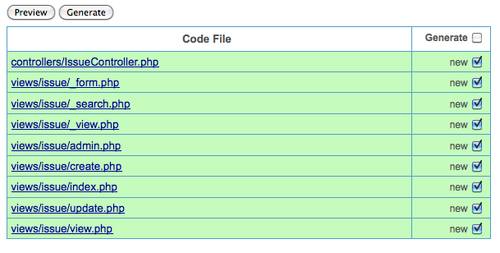
You can click each individual link to preview the code to be generated...














