Search icon CANCEL
Subscription
0
Cart icon
Your Cart (0 item)
Close icon
You have no products in your basket yet
Arrow left icon
Explore Products
Best Sellers
New Releases
Books
Events
Videos
Audiobooks
Packt Hub
Free Learning
Arrow right icon
timer SALE ENDS IN
0 Days
:
00 Hours
:
00 Minutes
:
00 Seconds
Arrow up icon
GO TO TOP
Angular 2 Components

You're reading from   Angular 2 Components Practical and easy-to-follow guide to Angular 2 Components

Arrow left icon
Product type Paperback
Published in Nov 2016
Publisher Packt
ISBN-13 9781785882340
Length 124 pages
Edition 1st Edition
Languages
Tools
Arrow right icon
Authors (2):
Arrow left icon
Nir Kaufman Nir Kaufman
Author Profile Icon Nir Kaufman
Nir Kaufman
Thierry Templier Thierry Thierry Templier Thierry
Author Profile Icon Thierry Templier Thierry
Thierry Templier Thierry
Arrow right icon
View More author details
Toc

Table of Contents (11) Chapters Close

Preface 1. Angular 2 Component Architecture FREE CHAPTER 2. Setting Up an Angular 2 Development Environment with angular-cli 3. The TypeScript Primer 4. Building a Basic Component 5. Building Dynamic Components 6. Component Communication 7. Putting It All Together 8. Integrating Third-Party Components 9. Angular 2 Directives Index

The shadow DOM


When we are creating a component in Angular 2, a shadow DOM is created and our template gets loaded into it (not by default). What is a shadow DOM? Shadow DOM refers to a subtree of DOM elements that renders as part of the document, but not into the main document DOM tree.

Let's see a well-known example of a shadow DOM, an HTML select, in action. Create a plain HTML file in your favorite text editor and create a select element in its body:

<!doctype html>
<html lang="en">
  <head>
    <meta charset="UTF-8">
    <title>Document</title>
  </head>
  <body>
    <select>
      <option>ONE</option>
      <option>TWO</option>
      <option>THREE</option>
    </select>
  </body>
</html>

Next, open it up in Chrome and right-click on the element, then choose Inspect Element from the pop-up menu:
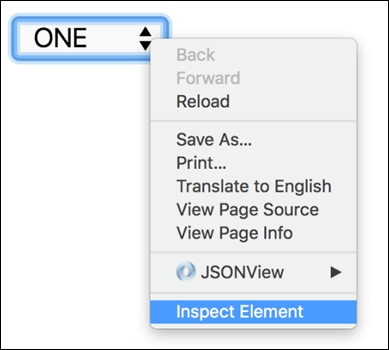
The Chrome DevTool will pop up, and we can inspect the select element in the Elements...

lock icon The rest of the chapter is locked
CONTINUE READING
83
Tech Concepts
36
Programming languages
73
Tech Tools
Icon Unlimited access to the largest independent learning library in tech of over 8,000 expert-authored tech books and videos.
Icon Innovative learning tools, including AI book assistants, code context explainers, and text-to-speech.
Icon 50+ new titles added per month and exclusive early access to books as they are being written.
Angular 2 Components
Register for a free Packt account to unlock a world of extra content!
A free Packt account unlocks extra newsletters, articles, discounted offers, and much more. Start advancing your knowledge today.
Unlock this book and the full library FREE for 7 days
Get unlimited access to 7000+ expert-authored eBooks and videos courses covering every tech area you can think of
Renews at €18.99/month. Cancel anytime
Modal Close icon
Modal Close icon