Search icon CANCEL
Subscription
0
Cart icon
Your Cart (0 item)
Close icon
You have no products in your basket yet
Save more on your purchases! discount-offer-chevron-icon
Savings automatically calculated. No voucher code required.
Arrow left icon
Explore Products
Best Sellers
New Releases
Books
Events
Videos
Audiobooks
Packt Hub
Free Learning
Arrow right icon
timer SALE ENDS IN
0 Days
:
00 Hours
:
00 Minutes
:
00 Seconds
Arrow up icon
GO TO TOP
Python Image Processing Cookbook

You're reading from   Python Image Processing Cookbook Over 60 recipes to help you perform complex image processing and computer vision tasks with ease

Arrow left icon
Product type Paperback
Published in Apr 2020
Publisher Packt
ISBN-13 9781789537147
Length 438 pages
Edition 1st Edition
Languages
Arrow right icon
Author (1):
Arrow left icon
Sandipan Dey Sandipan Dey
Author Profile Icon Sandipan Dey
Sandipan Dey
Arrow right icon
View More author details
Toc

Table of Contents (11) Chapters Close

Preface 1. Image Manipulation and Transformation 2. Image Enhancement FREE CHAPTER 3. Image Restoration 4. Binary Image Processing 5. Image Registration 6. Image Segmentation 7. Image Classification 8. Object Detection in Images 9. Face Recognition, Image Captioning, and More 10. Other Books You May Enjoy

Performing gradient blending

The goal of Poisson image editing is to perform seamless (gradient) blending (cloning) of an object or a texture from a source image (captured by a mask image) with a target image. We want to create a photomontage by pasting an image region onto a new background using Poisson image editing. The idea is from the SIGGRAPH 2003 paper, Poisson Image Editing, by Perez et al., which shows that blending using the image gradients produces much more realistic results.

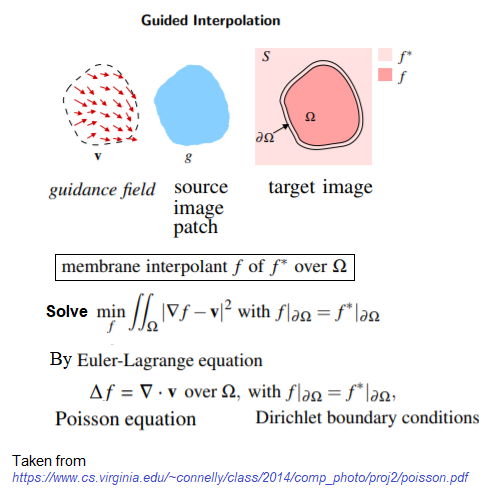
The gradient of the source and output images in the masked region will be the same after seamless cloning is done. Moreover, the intensity of the target image and the output image at the masked region boundary will be the same. The following diagram shows how a source image patch g is integrated seamlessly with a target image f* (over the region Ω), with a new image patch f (over the region Ω) obtained as a solution with a Poisson solver:
In this recipe, we will demonstrate seamless cloning with OpenCV-Python.
Getting ready

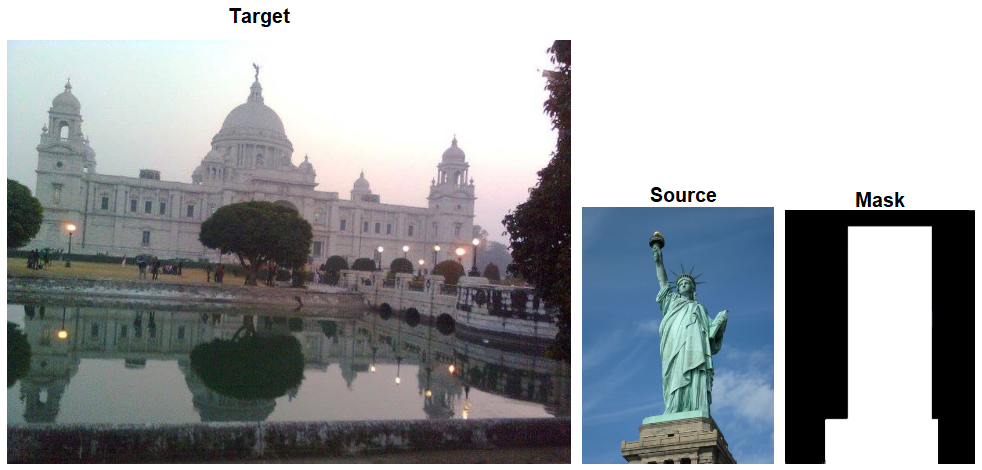
We will use an image of the Statue of Liberty as a source and an image of the Victoria Memorial Hall as the destination image. Let's start by importing the libraries. Make sure that the major version of OpenCV-Python is at least 3:

import cv2
import numpy as np
print(cv2.__version__)
# 3.4.2

How to do it...

The steps for this recipe are as follows:

  1. Read the source, destination, and mask images:
src = cv2.imread("images/liberty.png")
dst = cv2.imread("images/victoria.png")
src_mask = cv2.imread("images/cmask.png")
print(src.shape, dst.shape, src_mask.shape)
# (480, 698, 3) (576, 768, 3) (480, 698, 3)
  1. Run seamless cloning to blend the masked source around a center in the destination image and save the output image:
center = (275,250)
output = cv2.seamlessClone(src, dst, src_mask, center, \
cv2.MIXED_CLONE)
cv2.imwrite("images/liberty_victoria.png", output)

How it works...

The following screenshot shows the input and mask images used for gradient blending:

The cv2.seamlessClone() function was used with the flags parameter value as cv2.MIXED_CLONE, which is a classic method. This function implements Poisson image editing, using a Poisson solver to solve a system of (Poisson) equations, by keeping the gradients only at the edge locations (as Dirichlet boundary conditions).

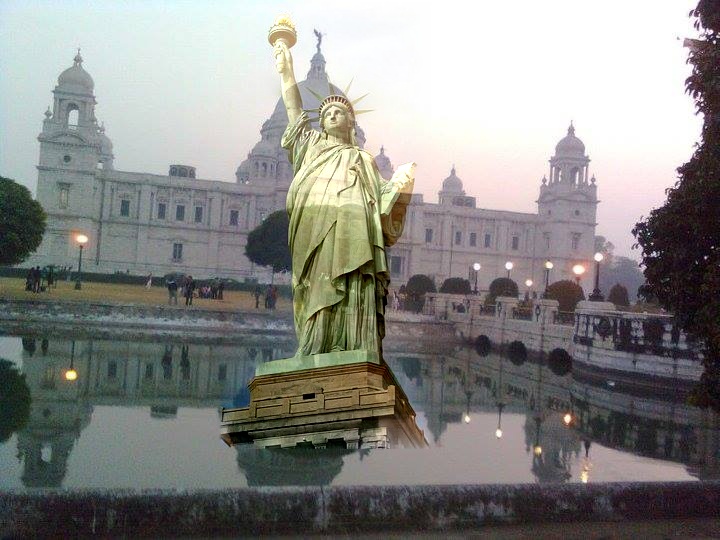
You will get an output image along the lines of the following if you run the preceding code snippets:

CONTINUE READING
83
Tech Concepts
36
Programming languages
73
Tech Tools
Icon Unlimited access to the largest independent learning library in tech of over 8,000 expert-authored tech books and videos.
Icon Innovative learning tools, including AI book assistants, code context explainers, and text-to-speech.
Icon 50+ new titles added per month and exclusive early access to books as they are being written.
Python Image Processing Cookbook
You have been reading a chapter from
Python Image Processing Cookbook
Published in: Apr 2020
Publisher: Packt
ISBN-13: 9781789537147
Register for a free Packt account to unlock a world of extra content!
A free Packt account unlocks extra newsletters, articles, discounted offers, and much more. Start advancing your knowledge today.
Unlock this book and the full library FREE for 7 days
Get unlimited access to 7000+ expert-authored eBooks and videos courses covering every tech area you can think of
Renews at $19.99/month. Cancel anytime
Modal Close icon
Modal Close icon