

Developing ASP.NET 4.5 applications as Windows Server Containers
In the earlier section, we learned how to run an ASP.NET Core application on Kestrel, packaged and deployed as a Windows Server Container image. In this section, we will be converting an existing ASP.NET 4.5 application as a Windows Server Container package which runs on IIS within the windows server core:
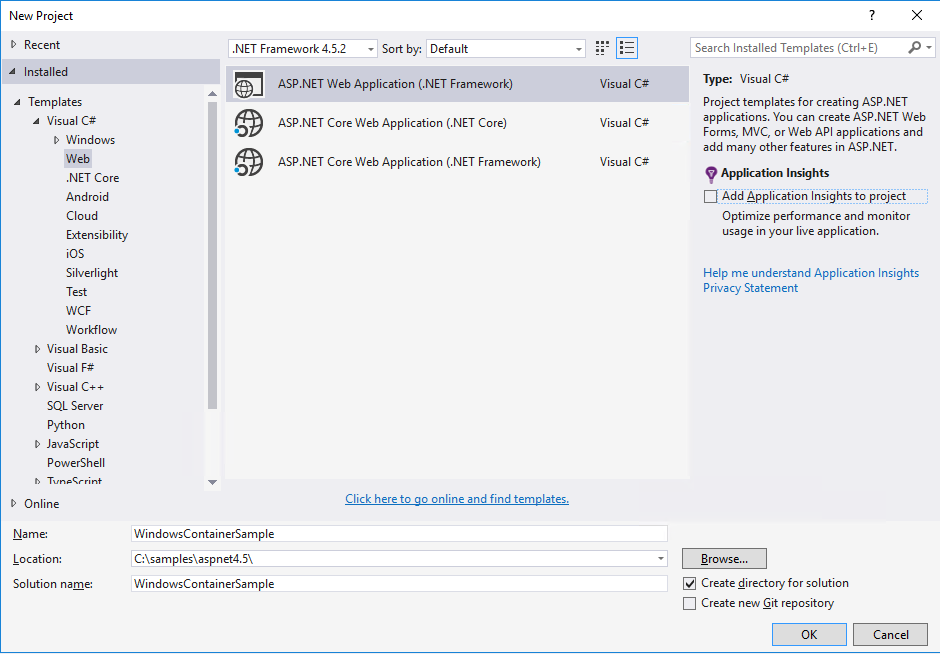
- Let us start with creating a basic ASP.NET 4.5 MVC application on Visual Studio 2015. Click on
File|New|Projector Ctrl + Shift + N from keyboard to create a new project.
- Select ASP.NET Web Application (.NET Framework) template. Ensure
.NET Framework 4.5.2is selected on the framework section on top. ClickOK. - Select
c:\samples\aspnet4.5\as the location for storing the project artifacts. Let us also name the project asWindowsContainerSample:
- Select
MVCtemplate fromASP.NET 4.5.2TemplatesChange Authenticationand selectNo Authentication. ClickOKon theChange Authenticationwindow and then clickOKon the...