Search icon CANCEL
Subscription
0
Cart icon
Your Cart (0 item)
Close icon
You have no products in your basket yet
Arrow left icon
Explore Products
Best Sellers
New Releases
Books
Events
Videos
Audiobooks
Packt Hub
Free Learning
Arrow right icon
timer SALE ENDS IN
0 Days
:
00 Hours
:
00 Minutes
:
00 Seconds
Learn Human-Computer Interaction

Learn Human-Computer Interaction: Solve human problems and focus on rapid prototyping and validating solutions through user testing

Arrow left icon
Profile Icon Christopher Reid Becker
Arrow right icon
₹3425.99
Full star icon Full star icon Full star icon Full star icon Full star icon 5 (6 Ratings)
Paperback Sep 2020 322 pages 1st Edition
eBook
₹999.99 ₹2740.99
Paperback
₹3425.99
Arrow left icon
Profile Icon Christopher Reid Becker
Arrow right icon
₹3425.99
Full star icon Full star icon Full star icon Full star icon Full star icon 5 (6 Ratings)
Paperback Sep 2020 322 pages 1st Edition
eBook
₹999.99 ₹2740.99
Paperback
₹3425.99
eBook
₹999.99 ₹2740.99
Paperback
₹3425.99

What do you get with Print?

Product feature icon Instant access to your digital copy whilst your Print order is Shipped
Product feature icon Paperback book shipped to your preferred address
Product feature icon Redeem a companion digital copy on all Print orders
Product feature icon Access this title in our online reader with advanced features
Product feature icon DRM FREE - Read whenever, wherever and however you want
Product feature icon AI Assistant (beta) to help accelerate your learning
Modal Close icon
Payment Processing...
tick Completed

Shipping Address

Billing Address

Shipping Methods
Table of content icon View table of contents Preview book icon Preview Book

Learn Human-Computer Interaction

Introducing HCI and UX Design

Learn Human-Computer Interaction is a starting place for considering and thinking about people (humans), technology (computers), and how we interact. We will discuss a wide set of Human-Computer Interaction (HCI) topics that address how to design, build (code), and test the vast amounts of software that ultimately run the world. Throughout this chapter, you will be introduced to the foundations of HCI, which will set the stage for growing your skills and joining HCI practitioners on software design teams.

The topics you will learn about in this chapter are as follows:

  • Prologue
  • Introducing HCI and UX design
  • Why HCI?
  • Exploring HCI jargon and their acronyms
  • Exploring the history of computers
  • Evolving from a T-person into a π person
  • The author's perspective
  • The HCI professions
  • Self-guided questions

Prologue

The core of this book covers three pillars:

  1. HCI skills, theory, and historical context:
    Use of stories, contextual examples, and some brief history of widening your HCI knowledge.
  2. HCI Activities and practical challenges:
    A series of hands-on methods to deepen your HCI understanding.

  1. HCI Community resources and source materials:
    A vast set of knowledge and experience that I could never surpass but am happy to share and grow with you as you read in the share your experience:

As the author of this book, my background comes from the Design point of view via user experience (UX)/graphic design/human-centered research into computers rather than via computer science, mathematics, engineering, or computer coding, however, I have gained much of this knowledge over time. Therefore, the content of the book will focus more on the human component of HCI over the computer component.

However, the framing of skills and considerations are designed to improve either side. So read on.

Since you have continued reading, you are along for the ride, and we will start out by considering HCI from the beginning and why HCI inside software has become successful.

HCI challenges

Throughout this book, you will be given a series of challenges designed to get you to practice the skills and knowledge necessary to apply HCI in the world. Each challenge will take between 10 min up to 2+ hours. I highly recommend you create a folder in Google Drive or on your computer to store your work and label all your files. Activities will combine physical making (paper, pen, pencil, sticky-notes, etc) to more digital executions (Google Docs, Adobe XD/Figma/InVision) and will combine together over time. Take the challenges seriously as they can be applied to your HCI portfolio as well as be tangible representations of the skills and experience outline in this book.

As you continue to grow your HCI skills, understand that there is a lot to take in and no one book will capture the entire field. I promise to help you establish a solid foundation but you must also take this information I am covering and run with it.

Do not be scared to mark up this book with your notes, sketches, doodles, and underlines. Dog-ear pages, take a highlighter to quotes, tear out pages as long as it helps you approach HCI. Learn HCI is a learn-by-doing document and should be treated that way. The goal is to gain new skills in HCI.

Introducing HCI and UX design

In the beginning, there was nothing but darkness, and then there was light, a binary relationship understood by all—zero (0) and one (1). Binary means related to or composed of two things. Binary relationships dictate a vast majority of our decisions: up or down, left or right, yes or no, like or don't like. Let's practice thinking about some binary concepts through a challenge. The challenges in this book are designed to get you to practice the HCI skills and knowledge necessary to function as an HCI practitioner in the real world. Each challenge will take between 10 minutes and 2 hours to complete.

Challenge 1 – Capturing conceptual relationships – binary and beyond

Setup:

  1. Get out a sheet of paper or a Google Doc/Word doc.

Part 1: Binary concepts:

  1. Think of some binary relationships in your own life.
  2. Write them down.

    Binary relationships:
    _______________________________ versus ___________________________
    ___

Part 2: Other relevant concepts:

  1. Think of other conceptual relationships (such as logic/emotion, frontend/backend, and so on).
  2. Write them down.

    Relevant concepts:
    _______________________________ + ______________________________

Part 3: Write a short paragraph (~300 words) on why "concepts" are valuable to HCI designers:

  • Lots of concepts are useful to HCI designers and the creation of great software.
  • Documenting these over time will help you use many of the concepts we will discuss in the future.

If you do not like writing in books, you can do the following instead:
1. Create a Google Drive/Computer folder in which to create docs to capture any challenge/activity issued throughout this book.
2. Follow along and label your docs with the book chapters and the challenge title, using something similar to the following syntax, for example, 01-Binary-Relationships.doc.

The binary relationship in computing is expressed in a system of numerical notation that has two digits (zero - 0 and one - 1) or ON and OFF. Binary is how a computer operates a transistor, where "0" represents no flow of electricity, and "1" represents electricity is allowed to flow. In this way, numbers are represented physically inside the computing device, permitting calculation. A computer processes 1s and 0s in the trillions allowing the creation of software to be possible which is deeply connected with the practice of HCI. Computers utilize this essential binary truth to create something entirely new: computation. Computation is the ability of a computing machine (comprising both software and hardware) to evaluate a binary logic to produce a variety of solutions based on the computational outcome. Binary is the root of all computer processing. Luckily for you and me, binary code has been made easier to program over time through computer programming languages including HTML, CSS, C++, JavaScript, and so on, and we will be discussing how an HCI designer can use tools and computer coding languages to build software solutions throughout this book.

At its core, a computer is just crunching away a bunch of 1s and 0s. When the software systems and user interfaces we use and design get more complicated, it's still just 1s and 0s. The computer in all its forms has limitations, and how we use this binary processing power is also constrained. The constraints of the computer are incredibly useful as they start to define what is possible and impossible with computer technology. We will discuss in greater detail some of these computing constraints, including size, modes of interaction, connectivity, and others, as we explore all the possibilities of designing technology as an HCI designer.

HCI is a vast field of multidisciplinary study, as shown in the following diagram:

The areas of study in the field of HCI include the following:

  • Computer science and engineering: The computer component, including the concepts, theories, and coding languages that allow us to build computer software.
  • Behavioral science and psychology: The human component, including the concepts, theories, behavior, and ways people think about systems.
  • Design and media (product design, visual design, and content): The design and interaction component including methodologies, theories, concepts, and best practices that make up the products that are used by people.
  • Human factors and ergonomics: The interaction component of HCI, including the concepts, best practice, form factors, and physical constraints of products so that people can use them without any injury.
  • Other professions: HCI also extends into professions such as information architecture, informatics, cultural anthropology, user research, education, and business, which all overlap with HCI.

HCI focuses on the design of computer technology and the interaction between humans and computer software systems. HCI is situated at the intersection of computer science and engineering, design and media, human factors and ergonomics, behavioral sciences and psychology, and several other fields of study and research.

Personal computing started turning up in homes and offices during the 1980s, as computer technology started to get smaller, faster, and cheaper. These sophisticated electronic systems started to become widely available to the general public for the first time. The explosion of the usefulness of computers, as well as the need to create human-computer interactions that are easy and meaningful, has lead to the adoption of HCI not just among academic institutions but generally by all of society.

HCI has been essential in propagating the idea of interaction between a user and a computer. HCI further investigates how the experience between a user and a computer should model human-to-human communication and foster an open-ended dialogue. We will discuss this in greater depth later in the book, but at its core, HCI believes in the computer as an extension of human empathy and our ability to infuse software solutions with human values to ultimately makes those solutions more valuable and scalable in our culture.

Following the leader – HCI pioneers

HCI has many thought leaders and academic institutions that continue to add to the canon of knowledge. Throughout the book, I will be referencing and pointing you to designers and authors to pay attention to. For example, John M. Carroll (https://jcarroll.ist.psu.edu/) is a faculty member at Penn State's College of Information Sciences and Technology, an author, and a founder of the field of HCI with many good things to say about how HCI design has come to develop and mature. I highly recommend reading some of his thinking and paying attention to the other founders of our field.

Operating in the HCI sandbox

HCI is a sandbox in which we get to play. The reality is that technology is not limitless; the HCI designer operates inside technological constraints. The constraints of the computer give us some rules and boundaries that we will define and help you define yourself. Your computer sandbox is made up of your HCI tools, your thoughts on HCI, your ideas for software, and the software you will create:

How you choose to manipulate these rules and technology constraints is where your creativity, ingenuity, and pure curiosity about humans and computers can thrive and influence people's lives and professional practices.

Learn Human-Computer Interaction will help you define your computer sandbox as you build your knowledge of HCI, your HCI tools, activities, understanding of your users, how the computer works, and more. An expectation as you continue to read this book is that you are willing and able to jump into the HCI computer sandbox. The edges of your sandbox are undefined at the moment, but we will start by defining some boundaries and then rolling around in the sand. I promise that while reading this book, we will not make you "comb the desert" to find what you are looking for, but it will require some effort on your part.

Watch Spaceballs, a Mel Brooks film, in order to gain context on the "comb the desert" reference: https://www.imdb.com/title/tt0094012/.

However, if you are willing to get your hands dirty, we will dig some holes in the sand and uncover many HCI skills. Some skills are right on the surface of your sandbox, and others will require some digging, but the outcome of your journey nonetheless will be to build your digging skills and improve yourself as an HCI designer.

Why HCI?

The profound impact of computing stands among humankind's greatest achievements alongside the wheel, refrigeration, and sliced bread. The publication of this book itself in both printed and digital formats would be rendered impossible without computation. The reality is that our world is full of technology run by computers. They are here to stay, so let's figure out how they impact our lives and how we can design with them and for them. A big part of understanding computers is that humans make them for other humans and, therefore, can be changed based on how humans evolve. Technology moves at an incredible speed, and the way it impacts our society, our behaviors, and our education are sometimes hard to understand; however, this is HCI's role. We will explore the vast set of opportunities that can come out of harnessing technology and how to keep up with the rapid change.

Documenting HCI jargon

HCI jargon is a collection of unique words or expressions that are used by people in our particular profession and are difficult for others to understand. Here are a few HCI terms to get you up to speed:

  • Operating System (OS)
  • The mouse
  • Windows
  • Graphical User Interface (GUI)
  • What You See Is What You Get (WYSIWYG)
If you want to learn more HCI jargon with some history, check out https://www.cs.cmu.edu/~amulet/papers/uihistory.tr.html.

There are hundreds of terms in HCI and if I listed them all here, you would be overwhelmed and bored out of your mind, as this is not a glossary book nor is it an almanack for HCI. I highly recommend reviewing the HCI community jargon and boning up on technical terms at https://www.interaction-design.org/literature/book/the-glossary-of-human-computer-interaction and https://uiuxtrend.com/ui-ux-glossary-jargon/.

Challenge 2 – Highlighting and collecting all HCI jargon

Setup:

  1. Get out materials and a highlighter or marker.

Part 1: Highlight the text:

  1. Use a highlighter and mark up words, terms, and technical content that you don't understand.

Part 2: Create a jargon collection:

  1. Use Google to search for these terms if you need more help and create a Word doc or spreadsheet and start adding the highlighted jargon.
  2. Collect the HCI jargon terms you encounter in a Google doc/Word doc that you can go back and review.
Being an expert will not happen overnight. You need to get practice with the technical jargon and HCI terminology. Help your memory out by making a list and highlighting terms throughout this book.

Part of learning HCI is "talking the talk," as well as "walking the walk," but for now, being able to understand that jargon will be essential to growing your skills. I encourage you to start using some HCI jargon in everyday descriptions of computers.

Exploring HCI jargon and their acronyms

This book contains technical jargon by nature. I will do my best to add resources and a glossary of terms, but some will be on you to figure out. I promise this book will not be a multithreaded annotation like David Foster Wallace's "Infinite Jest," but we will help you grow your HCI language.

The goals of HCI jargon are to do the following:

  1. Establish a shared language for building human-centered solutions.
  2. Build a shorthand for skills and industry terms.
  3. Identify and navigate the growing job market utilizing HCI skills.

This can also be seen in the following diagram:

Millions of people around the planet build computer hardware and software. As a group, we can create software with computers faster due to our shared vocabulary for describing, discussing, and ultimately building solutions. It is nerdy. HCI jargon is a way to introduce you to the community to give you a shared language and allow you to talk the talk as you walk the walk. The language we share is relatively new and revolves around technology and computer systems. Lean into your nerd self and know that as a group, it is us nerds that change the world through technology.

If you are new to technical jargon, we recommend using a highlighter to identify and recognize terms, make a personal list to help your memory, and try using them in your everyday discussions as you share what you are learning in this book with your friends, loved ones, or colleagues.

With this in mind, we'll take a quick look at the history of computers to establish where a majority of this jargon comes from. This will help us proceed toward growing our curiosity about computing and is essential for building your knowledge as well as your HCI credibility.

Exploring the history of computers

Without computers, HCI would not be a profession. Software that HCI designers work on is steeped in history and knowing the foundations will allow you to take steps into the future more confidently, therefore, let's rewind a bit and understand how we got here.

Very early history – the 17th century

Since the beginning of civilization, there is proof of human beings' ability to quantify and record their interactions. The computer is the outcome of millennia of knowledge, all now combined into handheld devices that allow us to quantify our existence. The long tail of human accomplishment and innovation that have brought us to today are too numerous to count, but we have been able to advance faster than any other time due to our ability to harness the accomplishments of our forefathers in computing history.

In the Enlightenment era, we had logician Gottfried Wilhelm Leibniz (a 17th/18th century German philosopher and mathematician) who invented and refined the binary number system, which is the foundation of all computers. Computers have a long history and are rooted in machines that can do mathematics.


For more history on Gottfried Wilhelm Leibniz, check out https://www.iep.utm.edu/leib-met/.

Early history – the 17th to 19th centuries

During the industrial revolution, we find an explosion of shared ideas accompanying banking, the stock market, and the industrialization of the workforce that led to the invention of many machines that helped increase productivity while decreasing the reliance on human capital to execute the work. Take mathematics; for example, it is tough to count large numbers and is a tedious process for any human being to do manually. Thus the invention of the mechanical calculator started with Wilhelm Schickard and Blaise Pascal during the 17th century.

During the 18th century, these adding machines were mechanical devices to help speed up bookkeepers' work. Adding machines and cash registers were the precursors to computers:

The preceding photo shows William S. Burroughs' (1855-1898) adding machine. The invention of the adding machines was aimed to accommodate human inability to memorize numbers and to take manually laborious tasks off our hands. In 1886, William S Burroughs founded the American Arithmometer Company. His first U.S. patent was a nine-digit keyboard and a printing mechanism that would print out the total of the computation, with the original model selling for $475. All machines were crank-operated until the first electric models were introduced in 1928. By 1935, the company produced 350 different models of adding machines, both electronic and non-electric. Adding machines and typewriters answered specific human tasks at the time that our computers have now fully taken off our hands through software programs and computation.

Moving through the 19th century, we arrive in the post-Depression era (the 1930s-40s). Machines continued to build on human limitations, but in 1934 the first programmable machine (a computer) was created by German Konrad Zuse - the Z1. The programmable computer is the foundation on which all computers today are rooted. A computer is transformed by the programs installed on each computer that execute a variety of different tasks. Programmable computers are connected to how we start thinking about what a computer can and cannot do. Today, there are millions of programs that do everything from help us write emails to managing computer networks. The software that is ubiquitous in our world is both generally used by all users such as word processing or internet browsers, to specialized software for specific users, such as 3D modeling or film editing software.

All computer programs are processed as bits. A bit is the smallest unit of data in a computer, a 0 or 1 of a transistor. See the following representation of 8 bits = 1 byte:

1 0 1 0 0 1 1 0
| | | |
y n y n n y y n

Transistors are organized in groups of 8, so each group can store a byte. All computer processing power and computer memory is a multiplication of 8. A kilobyte (KB) is 1,024 bytes, 1 MB is 1,024 kilobytes, and 1 GB is 1,024 MB, and so on. Computer storage, speed, and size have led to the proliferation of devices from personal computers to smartphones to smart TVs to internet-connected light bulbs. Now, why are binary logic and basic computer history important to this, you might be asking?

Since the 1930s, a lot of innovation has been directed into the production of computers, and we have become very reliant on them for some time. During World War II, computers were used by the Allies (USA, Britain, France, the Soviet Union, and Poland) to break German communication encryption codes. Alan Turing and his team helped break the Enigma code and helped the Allies win World War II. Computers allowed organizations to speed up human data processing skills.

Recent history – the 20th century

The post-World War II economies created many opportunities and the 1950s-1980s saw an explosion in computing technology and computer software creation. The movement of the computer out of specialized clubs and enthusiasts' groups and into the hands of the masses is not arbitrary. Computers are useful, and humans will spend money on valuable products. Just like the adding machine helped people execute math faster, the personal computer is that same idea times a thousand.

The computer was once used only by a small set of researchers, scientists, and academics. Luckily for us, computer enthusiasts broke down those ivory towers and democratized computer programs, which are useful for everyday people. For example, I am part of the generation that had computers in my classroom for the first time. I learned to type on a typewriter first before using word-processing software on a Macintosh IIci. My generation was one of the first to be taught 21st-century computing skills as part of my base education, including access to computers to learn to type, play games, learn math, and do art. The computer in my elementary classroom is the foundation of why I continue to work with computers to this day.

The addition of digital literacy in K-12 education is inseparable from computer software and its ability to permeate the systems we use and learn from impacts our own innovative skills. As computers came down in price and in size, their usability increased to the point where even school children could learn and execute a program interface without learning computer programming languages like MS-DOS. The use of the computer was made essential to operate in the modern world. The power of the computer in our society is nothing but remarkable. Still, you already know this because you are here attempting to grasp and manipulate how humans engage with technology.

When computers started being used, they were the size of entire rooms. Over time, they got smaller and faster. The Xerox Palo Alto Research Center (PARC) became a catalyst for many of the ideas that propelled computers into the homes of billions of users. The Xerox Alto systems pioneered the power of a GUI and were used for a variety of research purposes into the fields of human-computer interaction and computer usage:

Research computers at Xerox PARC inspired Steve Jobs and Steve Wozniak and others to design a GUI for Apple computers. Some HCI pioneers that came out of Xerox PARC are the following:

  • Butler Lampton (1943-present): A computer scientist and founding member of Xerox PARC who was instrumental in developing the Xerox Alto in 1973 with a three-button mouse and GUI.
  • Charles "Chuck" Patrick Thacker (1943-2017): A computer scientist who helped create an OS that allowed users to interface with a computer and a computer mouse through a GUI. The GUI was implemented by Steve Jobs and Steve Wozniak and their colleagues at Apple into the 1984 Macintosh.
  • Alan Kay (1940-present) is a pioneering computer scientist well known for his work on object-oriented programming and Windows-based user interfaces.
  • Mark Weiser (1952-1999) was the CTO at Xerox PARC and is considered the father of ubiquitous computing (ubicomp).

In September of 1991, Mark Weiser wrote The Computer and the 21st Century. At the precipice of the creation of the World Wide Web, these thinkers, engineers, and designers started to understand something profound about the computer. They began to see the potential of computers not just as useful tools but as drivers of culture. They would become the new drivers of the modern world.

As computers came down in size and started to use software that was more friendly and accessible, they quickly became instruments for education, business, and government. In the 1980s and 1990s, the personal computer took off and companies such as Microsoft, HP, Xerox, IBM, Apple, and so on started creating consumer-friendly hardware and software that could be portable in the form of laptops. Portability allowed users and workers to be unchained from their desks and move freely throughout the office or the world. This freedom was then augmented by being able to be connected at all times through the internet.

There is a robust history of all the factors and technologies that came together to produce the internet that we will quickly discuss to get us all on the same page.

The 21st century – the internet, smartphones, cloud computing, and IoT

The origins of the internet has its roots in Cold War government research going as far back as the 1960s and programs like DARPA but in 1991, Tim Berners Lee invented the World Wide Web and thus the consumer internet, allowing computers to communicate over a network through HyperText Transfer Protocol (HTTP). The world was then fundamentally altered. Using HTML (Hypertext Mark-Up Language), websites could publish their content for all the world to see through a web address. HTML was limited as a coding language and was then augmented by Cascading Style Sheets (CSS), which impacted the look and feel of a web page, and then JavaScript (JS), which impacted their behavior. This built the foundation for modern web pages that both function well and look good. The internet is loved by many because of a combination of standardized computer code (HTML/CSS/JS) plus a way to quickly deliver content around the globe through content delivery networks (CDNs):
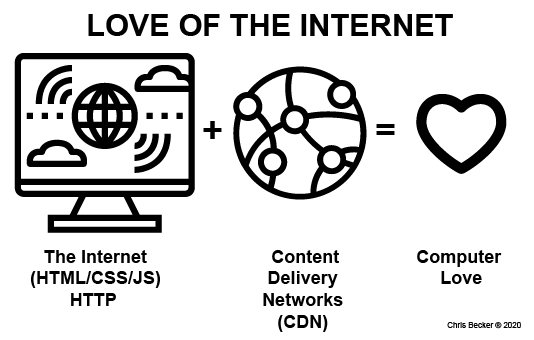
The internet fundamentally altered our existence. You could write a library of books on the impact the internet has made on the world, so I won't go into it too much; however, the expansion of computer networks and the ability to communicate with anyone around the globe has modified our ability to consume knowledge. The ability to serve content via a CDN around the planet has a profound impact on the number of people we can reach, but also on the content they can consume.

Computers thus moved from devices of business to points of access and entertainment. Connecting users around the world through computer networks have altered how we communicate, exchange ideas, and think. The acceleration toward smaller and smaller computers exploded alongside the expansion of the internet, and the communication technologies of Wi-Fi and cellular technology. This has resulted in the acceleration of smartphone technology, cloud-based application infrastructure, and the proliferation of the Internet of Things (IoT). IoT is the ability of everything to be networked and connected to the internet, which allows all things to communicate and collect data. All this change has occurred in half a century. The potential of what the next half-century has to offer is where we will pick up the torch. As the personal computer and the software designed to operate it have permeated our jobs, our education, and our media lives, we start to understand that computers are like Pandora's box – once opened, you can't put anything back in. There is no undoing computer technology; we can only ride the wave and learn how to approach our technology systems so that they reflect our human values.

This is not a history book, but some context-setting with the history of HCI and the language that has sprung out of the computer domain is necessary. Let's discuss the role you will play.

Evolving from T-person into a π person

By picking up this book, you are committing to becoming a T-based person. A T-person is based on two factors, the horizontal and the vertical, as shown here:

The horizontal factor represents the breadth of knowledge. This is the knowledge that can be obtained through life experience, curiosity about people, and cultural education, and is the knowledge that can produce insight. Insight can then travel down the vertical stem of the T, which represents the depth of knowledge, and becomes connected to speciality knowledge. Depth of knowledge is a concept that applies to any specific domain, for example, a General Practioner (GP) represents the horizontal bar, whereas a cardiologist (the specialist medical skill of understanding the heart) would represent the stem of the T. Being skilled at your profession requires considering what your breadth and depth of knowledge concern.

For HCI, this means having and understanding an extensive knowledge about humans and computers, which allows you to then funnel those experiences down into specific skills relevant to your software development roles, and hopefully wider society. As an HCI designer if you have a breadth of knowledge without any depth in the skill you will carry a limited ability to be as sought after in our world. The saying, A jack of all trades is a master of none calls out the folly of focusing only on the breadth of your knowledge. Luckily HCI has many stems to focus on and create a depth of knowledge. This makes HCI practitioners more like π people. The number π (pi) is a mathematical constant and appears in many formulae in all areas of mathematics, physics, and computer science. It is approximately equal to 3.14159.

The shape of π is more sturdy than a T anyway, as it has multiple stems, and just like the number π the knowledge you can gain in HCI goes on and on just like π (pi). A π person has a stable two-legged base:

This book is committed to helping you grow your stems with specific skills in HCI. However, the nature of HCI is not just about in-depth specific knowledge only. To be human-centered, it will require growing your breadth of knowledge and improving your ability to approach the problem that the computer can solve with your user at the center. The goal of this book is to stretch your knowledge in all directions and help you develop your curiosity about just how we use computers.

Gaining depth in the stems of the topics of computers and interaction is no easy task, and knowledge of humans takes a lifetime to build. The reality is that gaining knowledge takes time. However, that time has to be dedicated and allocated so that the experience can be consumed, practiced, and ultimately redesigned. You will not become an expert instantly, and reading this book alone will not guarantee that expertise, though it will hopefully help to move the needle a little. As you learn HCI throughout this book, you will find we use a hermeneutic loop.

Hermeneutic loops

Hermeneutics is a thinking framework that loops through synthesis and analysis, based on the idea that multiple parts build a whole. For example, the book you are reading now is made up of chapters. The whole of Learn Human-Computer Interaction cannot be understood by reading just one chapter. Each chapter is sequentially designed for the book as a system and becomes additive in its analysis. Over time, you will synthesize each chapter with those that came before it as you learn HCI, thus revealing the whole. You will practice this hermeneutic learning loop through activities and practice with reading and engagement:

As a framework, hermeneutics has its roots in the beginnings of western philosophy and is a process that you can use to think and talk about knowledge and understanding. The word has its origins in the ancient Greek word for interpretation.

The loops we are on are continuous and will last far beyond the completion of this book. However, using a hermeneutic loop will be a useful framework as you progress and increase your HCI skills.

At the end of each chapter, you will find a summary that you can use to synthesize the conversations, activities, and practice into the whole of your HCI experience and knowledge. As part of growing your HCI knowledge, you will be expected to do a few things along the way to expand your skills. HCI requires a lot of practice:

The hermeneutics loop is all about practice, and we will use this practice to grow our skills and learn more about HCI. As a designer who also has made HCI their practice, I will be giving some of my own perspectives as well as sharing systems and tools used by the HCI community.

The author's perspective

I am a designer. My education is in human-centred design, and my professional experience is in design education. These things, along with my work experience as a UX designer as well as a UX/UI curriculum architect, have given me some knowledge worth sharing. HCI is a lot to wrap your arms around. One book will not make you an expert; however, the professions that are the by-product of HCI skills are also growing and are more of a vocation than merely an occupation, and I hope you will continue on this path.

HCI is a vocation

A vocation is a job that is particularly worthy and rewarding to a person and typically requires great dedication and passion. I suppose my great dedication to the UX/UI practise has a part in me writing this book, but it also is why I come back to the HCI watering hole. Great dedication requires time, effort, and enthusiasm. Hopefully, you possess these factors. The time it will take you to consume this book will not make you a designer, but the information given can be executed with effort and enthusiasm over time. This practice will allow you to improve, and with improvement comes mastery. We will put you on the path to mastering some HCI skills. Still, there is always something new to learn, a new technology to consider, a new coding language to adopt, a new way to communicate complexity, a new way to think, and a new way to solve a problem with and for other people.

Challenge 3 – What do you know about a lawnmower?

Setup:

  1. Get out a sheet of paper or open a Google doc.
  2. Set a timer for 15 min.

Part 1: What is your lawnmower knowledge?

  1. Write down everything you know about a lawnmower.
  2. Include brands, use, value, cost, mechanics, and so on.

Part 2: Review your knowledge:

  1. Review your lawnmower knowledge and recall.

HCI will work on a wide range of content. Your ability to become an expert quickly in the software problems you are solving will help you throughout your career. The value an HCI designer brings is their thinking and skills.

Often, students have never put a second thought into a lawnmower. I then follow up with: "What if your client is John Deere?" How much do you have to know about lawnmowers now? A heck of a lot. The modern John Deere corporation is a global manufacturer with thousands of employees and thousands of products or stock-keeping units (SKUs). The role of HCI skills, software, and user interfaces in the success of John Deere or any other company is not to be understated. I do not work for John Deere. However, as an HCI designer, I know that I can use my human-centred research skills, software prototyping abilities, and user-testing processes to get excited about improving the human-computer interaction between a lawnmower and a user. I also know that interacting with a computer to buy, operate, or to fix a lawnmower will ultimately have an impact on the business of John Deere. John Deere, or any other company, solve very human problems with their products, and computers play an essential part in making them successful.

HCI is not only relevant to, but crucial to any business and the ability to use user research to identify problems, understanding their users' experiences, diagnosing what needs improvement, and helping communicate the values of human-centred thinking to their business and their users are the reasons why you should want to learn HCI. Throughout this book, I will extend my love for HCI, the human-centred design process, and continue to show you how you will be able to apply this ethos to your current and future jobs.

The HCI professions

Thousands of new job titles have been created to accommodate the skills that have been created associated with computers and the essential roles they play in modern business. Rapid technological change is modifying the skill requirements for most jobs. HCI is responsible for some of this technological change. As the computer has come to dominate modern business, the role of the products and services that support humans' use of computers has also skyrocketed, which has to lead to the shift in roles and job titles that are filling modern businesses.

According to the US News Report (2018) on "100 Best Jobs", a software developer is the #1 job role, with a median salary of $101,000 and a projected 255,000 openings in the US alone. The best software developers are well-versed in HCI skills and use them to work with teams that focus on users as they build great software. Whether you are coming to HCI from the computer science space or the human design space, there are a plethora of job roles that have not even been invented yet that will be ripe for humans with HCI skills to fill.

HCI is birthed from the academic landscape where computer science departments had to rapidly grow to meet the demand for the jobs and skills required as computers multiplied their influence on our world. A large number of people who worked with HCI and computers or built software were not formally trained in HCI. Take Steve Jobs, for example; he was an enthusiast who saw the potential of a personal computer and knew he could put smart people around him who also believed in the human-centred opportunity to allow the computer to blossom. HCI has a formal place in academia, but also if you were to study all the fields that make up the discipline over the four years of school (or six years with a Master's degree), you would still probably not touch on all these fields.

For example, I have an HCI-adjacent degree with a Master's in Fine Arts (MFA) in Media Design from the Art Center College of Design. The overlap here is between design thinking, human-centred research, and interaction design. The reality is the fields of HCI are broad and deep for a reason. HCI practitioners in the "real world" work in teams. No one team member can be an expert in all the HCI fields. This is a good thing, as great technology and software are a by-product of the diverse thinking possessed by a team.

Another reason HCI covers such a wide field of disciplines is that they have all been impacted by the computer themselves. The computer is a fantastic feedback loop operating on the ideas we are considering. The ability to combine knowledge from computer science into psychology and then carry that over to user experience is how we allow the computer to reinforce our understanding. The knowledge shared between a team that all have sufficient understanding of their fellow team members' skills can create a catalyst for better human-centred solutions. The field of HCI is made up of many growing professions:

These professions include the following:

  • Computer science professions
  • Information architecture professions
  • Computer engineering professions=
  • Ergonomics professions
  • Design/branding professions
  • Ethnography professions
  • User interface professions
  • Sociology professions
  • Language/semiotic professions
  • Human factor professions
  • Psychology professions
  • User experience professions

In the business landscape, this results in job titles that span a super wide range of job opportunities. From user experience designer to systems architect, to frontend/backend engineer, the reality is that HCI skills have never been in higher demand than they are today. Every company from Ford to Fage Greek Yogurt has software systems, web pages, business practices, and customers who interface with their products or services through a computer.

The concepts, skills, discussions, and activities explored in this book will grow your skills in HCI. It is an electric field, and we will cover what we can. However, it will not cover every topic in great depth (otherwise the book would be thousands of pages and frankly unusable), therefore we are going to take a journey through HCI that gives you an in-depth overview with some critical skills to dive into and identify areas where you can continue to grow.

As you continue reading, it will be essential to maintain some questions in mind. Let's look at those now.

Challenge 4 – Self-guided questions

Setup:

  1. Create a Google doc/Word doc.

Part 1: Write down your answers:

  1. Write down short answers to the following questions:
  • Why do you love computers?
  • Where have you already started digging into your HCI sandbox?
  • Where do you want to start digging next?
  • Why do you want to grow your HCI skills?
  • What do you want to get out of joining the HCI community?
  • Where are you in your HCI journey? (initial growth, expanding growth, or maintaining sustained growth?)

Part 2: Review your HCI questions:

  1. Keep these questions handy and return to and review the answers as the book covers them.
Being able to ask great questions is essential for your career, and being able to answer some of these throughout this book is our goal.

Summary

Throughout this chapter, we discussed how our lives have been fundamentally reorganized around the computer and how this book, Learn Human-Computer Interaction, provides a way to approach, address, and capitalize on this change. We looked into a brief history of computing and how HCI will change you into a π person. We also looked into the relevant opportunities present in the job market.

HCI is a lot to wrap your head around, and this chapter allowed us to get excited about the potential of leaning into our knowledge and putting it to practice in our own lives and jobs. We covered an introduction to HCI, which included why we care about this profession along with some HCI topics that came from our quick history of computing. All this information is hopefully growing your π person qualities as you develop your HCI interests and direction towards an HCI profession.

In the next chapter, we will focus on the explosion of software made possible through the introduction of the internet in the 1990s. We will also explore some HCI design principles to sample how these principles are applied to software.

Left arrow icon Right arrow icon

Key benefits

  • Explore various HCI techniques and methodologies to enhance the user experience
  • Delve into user behavior analytics to solve common and not-so-common challenges faced while designing user interfaces
  • Learn essential principles, techniques and explore the future of HCI

Description

Human-Computer Interaction (HCI) is a field of study that researches, designs, and develops software solutions that solve human problems. This book will help you understand various aspects of the software development phase, from planning and data gathering through to the design and development of software solutions. The book guides you through implementing methodologies that will help you build robust software. You will perform data gathering, evaluate user data, and execute data analysis and interpretation techniques. You’ll also understand why human-centered methodologies are successful in software development, and learn how to build effective software solutions through practical research processes. The book will even show you how to translate your human understanding into software solutions through validation methods and rapid prototyping leading to usability testing. Later, you will understand how to use effective storytelling to convey the key aspects of your software to users. Throughout the book, you will learn the key concepts with the help of historical figures, best practices, and references to common challenges faced in the software industry. By the end of this book, you will be well-versed with HCI strategies and methodologies to design effective user interfaces.

Who is this book for?

This book is for software engineers, UX designers, entrepreneurs, or anyone who is just getting started with user interface design and looking to gain a solid understanding of human-computer interaction and UX design. No prior HCI knowledge is required to get started.

What you will learn

  • Become well-versed with HCI and UX concepts
  • Evaluate prototypes to understand data gathering, analysis, and interpretation techniques
  • Execute qualitative and quantitative methods for establishing humans as a feedback loop in the software design process
  • Create human-centered solutions and validate these solutions with the help of quantitative testing methods
  • Move ideas from the research and definition phase into the software solution phase
  • Improve your systems by becoming well-versed with the essential design concepts for creating user interfaces
Estimated delivery fee Deliver to India

Premium delivery 5 - 8 business days

₹630.95
(Includes tracking information)

Product Details

Country selected
Publication date, Length, Edition, Language, ISBN-13
Publication date : Sep 18, 2020
Length: 322 pages
Edition : 1st
Language : English
ISBN-13 : 9781838820329

What do you get with Print?

Product feature icon Instant access to your digital copy whilst your Print order is Shipped
Product feature icon Paperback book shipped to your preferred address
Product feature icon Redeem a companion digital copy on all Print orders
Product feature icon Access this title in our online reader with advanced features
Product feature icon DRM FREE - Read whenever, wherever and however you want
Product feature icon AI Assistant (beta) to help accelerate your learning
Modal Close icon
Payment Processing...
tick Completed

Shipping Address

Billing Address

Shipping Methods
Estimated delivery fee Deliver to India

Premium delivery 5 - 8 business days

₹630.95
(Includes tracking information)

Product Details

Publication date : Sep 18, 2020
Length: 322 pages
Edition : 1st
Language : English
ISBN-13 : 9781838820329

Packt Subscriptions

See our plans and pricing
Modal Close icon
₹800 billed monthly
Feature tick icon Unlimited access to Packt's library of 7,000+ practical books and videos
Feature tick icon Constantly refreshed with 50+ new titles a month
Feature tick icon Exclusive Early access to books as they're written
Feature tick icon Solve problems while you work with advanced search and reference features
Feature tick icon Offline reading on the mobile app
Feature tick icon Simple pricing, no contract
₹4500 billed annually
Feature tick icon Unlimited access to Packt's library of 7,000+ practical books and videos
Feature tick icon Constantly refreshed with 50+ new titles a month
Feature tick icon Exclusive Early access to books as they're written
Feature tick icon Solve problems while you work with advanced search and reference features
Feature tick icon Offline reading on the mobile app
Feature tick icon Choose a DRM-free eBook or Video every month to keep
Feature tick icon PLUS own as many other DRM-free eBooks or Videos as you like for just ₹400 each
Feature tick icon Exclusive print discounts
₹5000 billed in 18 months
Feature tick icon Unlimited access to Packt's library of 7,000+ practical books and videos
Feature tick icon Constantly refreshed with 50+ new titles a month
Feature tick icon Exclusive Early access to books as they're written
Feature tick icon Solve problems while you work with advanced search and reference features
Feature tick icon Offline reading on the mobile app
Feature tick icon Choose a DRM-free eBook or Video every month to keep
Feature tick icon PLUS own as many other DRM-free eBooks or Videos as you like for just ₹400 each
Feature tick icon Exclusive print discounts

Frequently bought together


Stars icon
Total 20,110.97
Learn Human-Computer Interaction
₹3425.99
Solutions Architect's Handbook
₹4319.99
50 Shades of UX Design
₹12364.99
Total 20,110.97 Stars icon

Table of Contents

16 Chapters
Section 1 - Learn Human-Computer Interaction Chevron down icon Chevron up icon
Introducing HCI and UX Design Chevron down icon Chevron up icon
Human-Centered Design Principles Chevron down icon Chevron up icon
Interface Design Values Chevron down icon Chevron up icon
Section 2 - How to Build Human-Centered Software Chevron down icon Chevron up icon
Human-Centered Thinking Chevron down icon Chevron up icon
Human-Centered Methods for User Research Chevron down icon Chevron up icon
User Insights for Software Solutions Chevron down icon Chevron up icon
Storytelling and Rapid Prototyping Chevron down icon Chevron up icon
Validating Software Solutions Chevron down icon Chevron up icon
Section 3 - When to Improve Software Systems Chevron down icon Chevron up icon
Improving Software Systems with Data Chevron down icon Chevron up icon
Human-Centered Solutions Chevron down icon Chevron up icon
Extending HCI Chevron down icon Chevron up icon
The Future of HCI Chevron down icon Chevron up icon
Other Books You May Enjoy Chevron down icon Chevron up icon

Customer reviews

Top Reviews
Rating distribution
Full star icon Full star icon Full star icon Full star icon Full star icon 5
(6 Ratings)
5 star 100%
4 star 0%
3 star 0%
2 star 0%
1 star 0%
Filter icon Filter
Top Reviews

Filter reviews by


dave Nov 08, 2020
Full star icon Full star icon Full star icon Full star icon Full star icon 5
This book goes deep on HCI while remaining reader friendly. I especially appreciate the "challenges" found throughout the book as a guided way to get hands on with the material.
Amazon Verified review Amazon
M. Dunkerley Nov 11, 2020
Full star icon Full star icon Full star icon Full star icon Full star icon 5
I'm so excited about this book! It's so practical and I think the exercises will be super helpful. If you're interested in ux, hci, or ui, this is a go-to.
Amazon Verified review Amazon
Chris R. Becker - Sr. UX Designer Nov 03, 2020
Full star icon Full star icon Full star icon Full star icon Full star icon 5
A great foundation in HCI with hands on practice and timely skills for solving software design problems that focus on the user.
Amazon Verified review Amazon
MA Feb 25, 2021
Full star icon Full star icon Full star icon Full star icon Full star icon 5
Chris Becker is an excellent teacher and dedicated leader in the HCI/UX field. His knowledge and passion is contagious and he has an amazing way of explaining the process that is very easily digestible and gives you an understanding that allows you to feel fully prepared to apply what you have learned. This book is incredibly thorough and full of great tips. It is great as an overview for anyone new to the field and incredibly useful as a reference for anyone currently practicing HCI/UX professionally. The index is incredibly useful for referencing throughout projects when i want more information for a specific phase of work. Highly recommend!
Amazon Verified review Amazon
Sara Moore Apr 16, 2021
Full star icon Full star icon Full star icon Full star icon Full star icon 5
This is by far the most comprehensive book that I have read about HCI to date. Chris Becker is a true HCI "oracle" and gives a thorough context for all things interaction design, including its history, its challenges, its business cases and everything in between. Everything that you need to know to master HCI is in this book. I find myself referring back to it frequently. Highly recommend!
Amazon Verified review Amazon
Get free access to Packt library with over 7500+ books and video courses for 7 days!
Start Free Trial

FAQs

What is the digital copy I get with my Print order? Chevron down icon Chevron up icon

When you buy any Print edition of our Books, you can redeem (for free) the eBook edition of the Print Book you’ve purchased. This gives you instant access to your book when you make an order via PDF, EPUB or our online Reader experience.

What is the delivery time and cost of print book? Chevron down icon Chevron up icon

Shipping Details

USA:

'

Economy: Delivery to most addresses in the US within 10-15 business days

Premium: Trackable Delivery to most addresses in the US within 3-8 business days

UK:

Economy: Delivery to most addresses in the U.K. within 7-9 business days.
Shipments are not trackable

Premium: Trackable delivery to most addresses in the U.K. within 3-4 business days!
Add one extra business day for deliveries to Northern Ireland and Scottish Highlands and islands

EU:

Premium: Trackable delivery to most EU destinations within 4-9 business days.

Australia:

Economy: Can deliver to P. O. Boxes and private residences.
Trackable service with delivery to addresses in Australia only.
Delivery time ranges from 7-9 business days for VIC and 8-10 business days for Interstate metro
Delivery time is up to 15 business days for remote areas of WA, NT & QLD.

Premium: Delivery to addresses in Australia only
Trackable delivery to most P. O. Boxes and private residences in Australia within 4-5 days based on the distance to a destination following dispatch.

India:

Premium: Delivery to most Indian addresses within 5-6 business days

Rest of the World:

Premium: Countries in the American continent: Trackable delivery to most countries within 4-7 business days

Asia:

Premium: Delivery to most Asian addresses within 5-9 business days

Disclaimer:
All orders received before 5 PM U.K time would start printing from the next business day. So the estimated delivery times start from the next day as well. Orders received after 5 PM U.K time (in our internal systems) on a business day or anytime on the weekend will begin printing the second to next business day. For example, an order placed at 11 AM today will begin printing tomorrow, whereas an order placed at 9 PM tonight will begin printing the day after tomorrow.


Unfortunately, due to several restrictions, we are unable to ship to the following countries:

  1. Afghanistan
  2. American Samoa
  3. Belarus
  4. Brunei Darussalam
  5. Central African Republic
  6. The Democratic Republic of Congo
  7. Eritrea
  8. Guinea-bissau
  9. Iran
  10. Lebanon
  11. Libiya Arab Jamahriya
  12. Somalia
  13. Sudan
  14. Russian Federation
  15. Syrian Arab Republic
  16. Ukraine
  17. Venezuela
What is custom duty/charge? Chevron down icon Chevron up icon

Customs duty are charges levied on goods when they cross international borders. It is a tax that is imposed on imported goods. These duties are charged by special authorities and bodies created by local governments and are meant to protect local industries, economies, and businesses.

Do I have to pay customs charges for the print book order? Chevron down icon Chevron up icon

The orders shipped to the countries that are listed under EU27 will not bear custom charges. They are paid by Packt as part of the order.

List of EU27 countries: www.gov.uk/eu-eea:

A custom duty or localized taxes may be applicable on the shipment and would be charged by the recipient country outside of the EU27 which should be paid by the customer and these duties are not included in the shipping charges been charged on the order.

How do I know my custom duty charges? Chevron down icon Chevron up icon

The amount of duty payable varies greatly depending on the imported goods, the country of origin and several other factors like the total invoice amount or dimensions like weight, and other such criteria applicable in your country.

For example:

  • If you live in Mexico, and the declared value of your ordered items is over $ 50, for you to receive a package, you will have to pay additional import tax of 19% which will be $ 9.50 to the courier service.
  • Whereas if you live in Turkey, and the declared value of your ordered items is over € 22, for you to receive a package, you will have to pay additional import tax of 18% which will be € 3.96 to the courier service.
How can I cancel my order? Chevron down icon Chevron up icon

Cancellation Policy for Published Printed Books:

You can cancel any order within 1 hour of placing the order. Simply contact customercare@packt.com with your order details or payment transaction id. If your order has already started the shipment process, we will do our best to stop it. However, if it is already on the way to you then when you receive it, you can contact us at customercare@packt.com using the returns and refund process.

Please understand that Packt Publishing cannot provide refunds or cancel any order except for the cases described in our Return Policy (i.e. Packt Publishing agrees to replace your printed book because it arrives damaged or material defect in book), Packt Publishing will not accept returns.

What is your returns and refunds policy? Chevron down icon Chevron up icon

Return Policy:

We want you to be happy with your purchase from Packtpub.com. We will not hassle you with returning print books to us. If the print book you receive from us is incorrect, damaged, doesn't work or is unacceptably late, please contact Customer Relations Team on customercare@packt.com with the order number and issue details as explained below:

  1. If you ordered (eBook, Video or Print Book) incorrectly or accidentally, please contact Customer Relations Team on customercare@packt.com within one hour of placing the order and we will replace/refund you the item cost.
  2. Sadly, if your eBook or Video file is faulty or a fault occurs during the eBook or Video being made available to you, i.e. during download then you should contact Customer Relations Team within 14 days of purchase on customercare@packt.com who will be able to resolve this issue for you.
  3. You will have a choice of replacement or refund of the problem items.(damaged, defective or incorrect)
  4. Once Customer Care Team confirms that you will be refunded, you should receive the refund within 10 to 12 working days.
  5. If you are only requesting a refund of one book from a multiple order, then we will refund you the appropriate single item.
  6. Where the items were shipped under a free shipping offer, there will be no shipping costs to refund.

On the off chance your printed book arrives damaged, with book material defect, contact our Customer Relation Team on customercare@packt.com within 14 days of receipt of the book with appropriate evidence of damage and we will work with you to secure a replacement copy, if necessary. Please note that each printed book you order from us is individually made by Packt's professional book-printing partner which is on a print-on-demand basis.

What tax is charged? Chevron down icon Chevron up icon

Currently, no tax is charged on the purchase of any print book (subject to change based on the laws and regulations). A localized VAT fee is charged only to our European and UK customers on eBooks, Video and subscriptions that they buy. GST is charged to Indian customers for eBooks and video purchases.

What payment methods can I use? Chevron down icon Chevron up icon

You can pay with the following card types:

  1. Visa Debit
  2. Visa Credit
  3. MasterCard
  4. PayPal
What is the delivery time and cost of print books? Chevron down icon Chevron up icon

Shipping Details

USA:

'

Economy: Delivery to most addresses in the US within 10-15 business days

Premium: Trackable Delivery to most addresses in the US within 3-8 business days

UK:

Economy: Delivery to most addresses in the U.K. within 7-9 business days.
Shipments are not trackable

Premium: Trackable delivery to most addresses in the U.K. within 3-4 business days!
Add one extra business day for deliveries to Northern Ireland and Scottish Highlands and islands

EU:

Premium: Trackable delivery to most EU destinations within 4-9 business days.

Australia:

Economy: Can deliver to P. O. Boxes and private residences.
Trackable service with delivery to addresses in Australia only.
Delivery time ranges from 7-9 business days for VIC and 8-10 business days for Interstate metro
Delivery time is up to 15 business days for remote areas of WA, NT & QLD.

Premium: Delivery to addresses in Australia only
Trackable delivery to most P. O. Boxes and private residences in Australia within 4-5 days based on the distance to a destination following dispatch.

India:

Premium: Delivery to most Indian addresses within 5-6 business days

Rest of the World:

Premium: Countries in the American continent: Trackable delivery to most countries within 4-7 business days

Asia:

Premium: Delivery to most Asian addresses within 5-9 business days

Disclaimer:
All orders received before 5 PM U.K time would start printing from the next business day. So the estimated delivery times start from the next day as well. Orders received after 5 PM U.K time (in our internal systems) on a business day or anytime on the weekend will begin printing the second to next business day. For example, an order placed at 11 AM today will begin printing tomorrow, whereas an order placed at 9 PM tonight will begin printing the day after tomorrow.


Unfortunately, due to several restrictions, we are unable to ship to the following countries:

  1. Afghanistan
  2. American Samoa
  3. Belarus
  4. Brunei Darussalam
  5. Central African Republic
  6. The Democratic Republic of Congo
  7. Eritrea
  8. Guinea-bissau
  9. Iran
  10. Lebanon
  11. Libiya Arab Jamahriya
  12. Somalia
  13. Sudan
  14. Russian Federation
  15. Syrian Arab Republic
  16. Ukraine
  17. Venezuela
Modal Close icon
Modal Close icon