

Azure SQL Database
Security is absolutely at the forefront of Microsoft's strategy, and this is no different when operating with their cloud services. If you want to run database workloads in Microsoft Azure, you can be assured that Azure SQL Database (the PaaS offering) has all the features mentioned in this chapter so far, and more. For the remainder of this chapter, Azure SQL Database's specific security features will be discussed.
SSL/TLS
SSL/TLS is enforced for all connections. This means that data between the database and client is encrypted in transit (as mentioned in the previous section). For your application connection string, you must ensure that Encrypt=True and TrustServerCertificate=False because doing this will help prevent man-in-the-middle attacks. No manual certificate configuration is needed; this is all done by Microsoft as the default standard.
A typical connection string should look like this:
Server=tcp:yourserver.database.windows.net,1433;Initial Catalog=yourdatabase;
Persist Security Info=False;User ID={your_username};Password={your_password};MultipleActiveResultSets=False;Encrypt=True;
TrustServerCertificate=False;Connection Timeout=30;
Firewalls
Microsoft implements a "deny all by default" policy for Azure SQL Database. That is, when you create a "logical" SQL server in Azure to host your database you as the administrator will need to make further configuration changes to allow for successful access. This is usually in the form of firewall rules (which can be scoped to the server level or the database level), where you would state which IP addresses are allowed access and Virtual Network (VNet) rules.
VNet rules should be implemented where possible. A VNet contains a subnet address; you can then create a VNet rule that is scoped to the server level, which will allow access to databases on that server for that specific subnet. This means that if you have virtual machines built within a specific subnet bound to the VNet rule, it will have access to Azure SQL Database (assuming that the Microsoft.sql endpoint is enabled). Both firewall rules and VNet rules can be used together if there is a need.
Azure Active Directory (AD) authentication
With Azure AD authentication, you can now centrally manage database users from one central location. This approach is not only much more secure than SQL Server authentication, but also allows for password rotation to occur in a single place. You can control permissions via groups, thus making security management easier. Configuring this feature will also allow you to connect to the database using multi factor authentication (MFA), which includes verification options such as text messages, phone calls, mobile app integration, and smart cards with PINs. This idea of MFA is also built into tools such as SSMS, thus providing an extra layer of security for users that require access to Azure SQL Database. It is a highly recommended approach.
The trust architecture is shown in Figure 2.47 and the setup is simple:
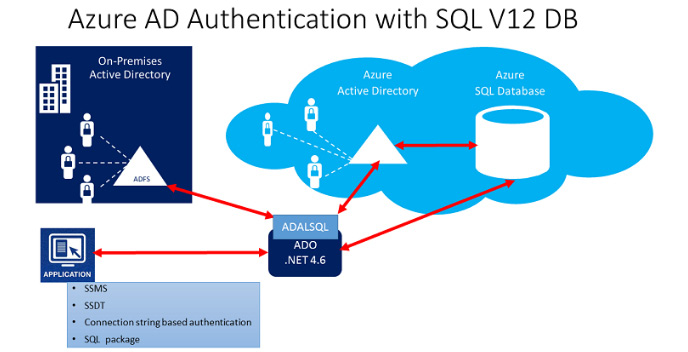
Figure 2.34: The trust architecture
Complete configuration steps can be found at https://docs.microsoft.com/en-us/azure/sql-database/sql-database-aad-authentication. Once configuration is complete, you will be able to issue the following code to create an Azure AD-based database user once you have connected to the "logical" SQL Server as the Azure AD Admin user:
CREATE USER [Anita.Holly@Adventureworks.com]
FROM EXTERNAL PROVIDER;
GRANT CONNECT TO [Anita.Holly@Adventureworks.com]
EXEC sp_addrolemember 'db_datareader', 'Anita.Holly@Adventureworks.com';
Advanced data security
Advanced Data Security (ADS) is a suite of advanced features that you can enable for a small cost. The cost of this is based on Azure Security Center standard tier pricing (it's free for the first 30 days). The cost includes Data Discovery & Classification, Vulnerability Assessment (similar to what we discussed previously for on-premises SQL servers), and Advanced Threat Protection for the server:
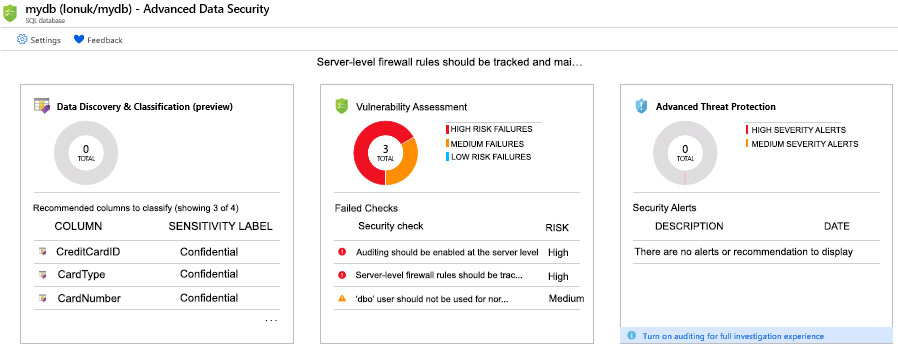
Figure 2.35: ADS suite dashboard
To enable this, you will need to navigate to the Security section of the database via the Azure portal:

Figure 2.36: Setting up a security alert on the Azure portal
Once you have selected the Advanced Data Security section, you will be prompted with the cost associated with the feature:
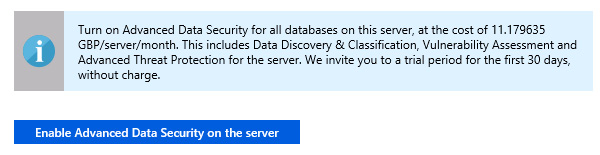
Figure 2.37: Cost prompt dialog
Finally, you will then have the option of enabling the setting as shown here:

Figure 2.38: Advanced Data Security dialog
Advanced threat detection
Threat detection is the only feature from the previous section that is not available with on-premises SQL Server 2019, but it is available with Azure SQL Database. This service detects anomalous activities that indicate unusual and potentially harmful attempts to access or exploit databases such as SQL injection, brute force attacks, and unknown IP address analysis. Microsoft analyzes a vast amount of telemetry regarding cloud network activity and uses advanced machine learning algorithms for this proactive service. It is best practice to enable this setting. There is a cost associated with it, but the benefit outweighs this minimal cost. Cyber attacks are becoming more sophisticated, and this is where threat prevention and detection tools form an important piece of your defense strategy. This setting can be applied to the server or the database.
Figure 2.48 shows a real-time email alert being sent to administrators:
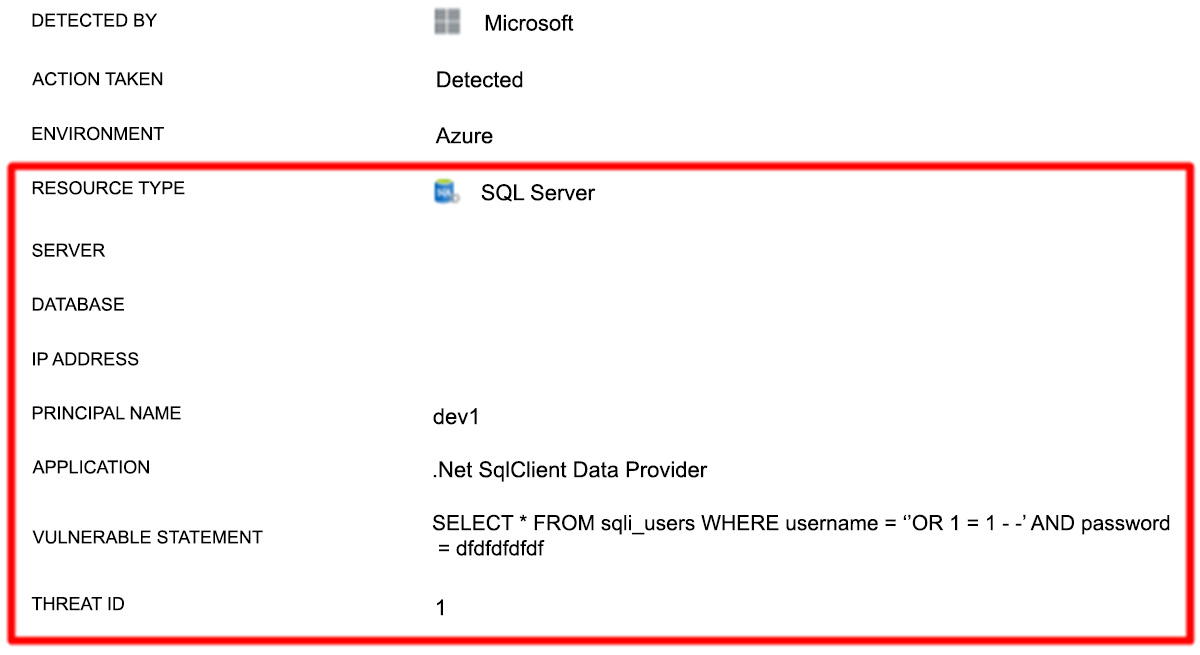
Figure 2.39: Real-time vulnerability alert
You can see the VULNERABLE STATEMENT that was used; a classic SQL injection-style attack was detected.
Hopefully, you can see the vast amount of effort that has gone into Azure SQL Database and SQL Server 2019 regarding security. All the tools and features discussed in this chapter, when put together, will help you create an enterprise-level data platform of trust.