Having discussed linear transformations in the last section, we step into logarithmic transforms now. You will notice that they are mathematically more involved than their linear counterparts. Again, we'll be discussing two different types of enhancement techniques under logarithmic transforms:
Simply put, the log transform takes the (scaled) logarithm of every input pixel intensity value. Let's put it down in terms of a mathematical equation:
First, note that the input intensity values have all been incremented by 1 (r+1). This is because our input values vary from 0 to 255  and the logarithm of 0 is not defined. Secondly, there has been no mention regarding the base of the logarithm. Although conceptually the value of the base doesn't really matter (as long as it's kept same throughout the computation), for all practical purposes, we will assume it to be 10. So, when we write log, we actually mean
  . Thirdly, you must be wondering about the constant c in the formula. What's it doing there? To answer that question, we need to know the range of output values for log(r+1) when
 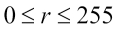 . To help us, I have plotted a graph of the function log(r+1):
As r varies from 0 to 255, log(r+1) ranges from 0 to 2.4. It's in the nature of a logarithmic function to compress the range of input data, as is evident here: an input range spanning 256 values has been compressed to a mere range of 2.4. Does this mean that the output image will have a grayscale range of merely two or three values? It had better not, otherwise, the only thing you'll be able to see is complete darkness! This is where the multiplicative constant c comes into the picture. The role of the multiplier is to make the log-transformed pixel values span the entire range of 256 grayscale levels available for the output image. The way it's done is by choosing a value of c so that the maximum intensity available in the input image gets mapped to 255 in the output. This means that 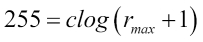 , further implies
  . Often, for sufficiently large and contrast-rich images, it so happens that the maximum intensity in the input image is 255, that is,
  . In such cases, the value of the multiplier is c=105.886.
So far, we have been treating the log transformation in a highly mathematical context. Let's see what happens if we actually apply it to images. The image is made up of two horizontal bands. The first band depicts the grayscale color space from 0 (black) on the left and all the way up to 255 (white) on the right end of the spectrum:
The next band depicts the log transform of the corresponding grayscale values (again, from 0 to 255, as we move from left to right). A comparison between the two should give you an idea of what the log transform does to the grayscale spectrum. A glance will tell you that the log-transformed band is much more brighter than its counterpart. Why does this happen?
To give you a better perspective, intensity values of 0 and 15 in the input are mapped to 0 and 127 in the output. This means that if there are two adjacent pixels with intensities 0 and 15 in the input image, both of them would be almost indistinguishable. Human eyes will not be able to perceive such a subtle change in the grayscale intensity. However, in the log-transformed image, the pixel with the intensity value of 15 gets converted to 127 (which lies in the middle of the grayscale spectrum). This would render it clearly distinguishable from its neighbor, which is still completely black!
The exact opposite phenomenon takes place at the other end of the spectrum. For example, pixels with intensities of 205 and 255 are mapped to 245 and 255 by the log transform. This means that a significant difference of 50 in the grayscale spectrum has been reduced to a mere gap of 10. So, the log transform essentially magnifies the differences in intensity of pixels in the lower (darker) end of the grayscale spectrum at the cost of diminishing differences at the higher (brighter) end (notice the steepness of the log curve in the beginning and how it flattens as it reaches the end). In other words, the log transform will magnify details (by enhancing contrast) in the darker ends of the spectrum at the cost of decreasing the information content held by the higher end of the spectrum.
Now that you have an idea of the kind of changes brought forth in grayscale by a log transform, it's time we take a look at some real examples. If you have ever used a camera, you would know that pictures, when taken against a source of light (such as the sun or an artificial source such as a bulb or a tube-light) appear darker. The following image is an example of an image taken under such lighting conditions:
Now try to think of what would happen if we applied the log transform to such an image. We know that a log transform would enhance details from the darker region at the cost of information from the brighter regions of the image. The log-transformed image is shown next. We can see that the darker regions in our original image such as the face and the back of the chair in the background have been rendered more rich in contrast. On the other hand, there has been a significant loss in detail from the brighter segments, such as the table behind the person. This proves that the log transform can be effective in editing pictures that have been captured against the light source by digging out contrast information from the darker regions of an image at the cost of the brighter segments
Before we move on to the implementation, let's see one more application where a log transform may be considered useful. There are some scientific disciplines where we might come across patterns such as the one depicted in the following image:
This image represents a pattern made by a light source on a dark background. More specifically, this is the representation of the Fourier transform of an image. As you can see, there definitely seems to be a pattern, but it's not clearly visible in its native form. We need a way to magnify and enhance these variations that are too subtle to be detected by the naked eye. Log transform to the rescue once more!
The log-transformed image is shown adjacent to the original one. We can observe the pattern quite clearly here:
Now that we have familiarized ourselves with the mathematics behind the log transform and seen it operate on and transform images, we come to the most exciting part where we attempt to mimic their behavior via our OpenCV/C++ code. In accordance with the protocol we have adhered to so far, we first show the code that generates a lookup table for the log transform:
#include <cmath>

vector<uchar> getLogLUT(uchar maxValue) {
  double C = 255 / log10(1 + maxValue);

vector<uchar> LUT(256, 0);
  for (int i = 0; i < 256; ++i)
    LUT[i] = (int) round(C * log10(1+i));
  return LUT;
}
We notice that the lookup table function is a bit different and slightly more involved than the ones we have discussed thus far. This is mainly because it requires a parameter to operate upon the maximum pixel intensity value in the input image. Recall the description of the log transform, where we discussed that the value of the multiplicative constant c is calculated on the basis of the maximum intensity value,  , among the input pixels--
 . Knowing this fact, the remainder of the function is similar in structure to what we have seen so far.
Now, since the function that returns our lookup table (getLogLUT()) requires an additional parameter, we would have to make appropriate changes to the code that makes calls to it, that is, our processImage() method. The code for our processImage() method is as follows:
void processImage(Mat& I) {
  double maxVal;
  minMaxLoc(inputImage, NULL, &maxVal);
  vector<uchar> LUT = getLUT((uchar) maxVal);

  for (int i = 0; i < I.rows; ++i) {
    for (int j = 0; j < I.cols; ++j)
      I.at<uchar>(i, j) = LUT[I.at<uchar>(i, j)];
  }
}
The one thing that is noteworthy in the preceding snippet is the use of a method named minMaxLoc(). As per the documentation, the function is used to find the minimum and maximum element values and their positions within the array (and by array here, we are referring to a Mat object). The first argument is, of course, the name of the Mat object. The second and the third arguments are the pointers to the minimum and maximum elements, as computed by the function. We have passed the second argument as null because we aren't really interested in the minimum value for now. Apart from the call to minMaxLoc(), the structure of the remainder of processImage() should be familiar to you.
The implementation technique that we have employed for implementing the log transform has followed the framework that we established early on: lookup tables and image traversals. However, as we progress through this book, you will come to appreciate the fact that often, there are multiple ways to reach the same endpoint while implementing your programs in OpenCV. Although this is true for programming in general, we want to focus on how OpenCV provides us with options that allow us to perform and (more often than not) simplify tasks that otherwise would take a lot of tedious steps (iterations) to achieve. To that end, we will present another technique using OpenCV to compute the log transformation for images.
Like always, we first begin by including the relevant headers and namespaces:
#include <opencv2/core/core.hpp>
#include <opencv2/highgui/highgui.hpp>
#include <opencv2/imgproc/imgproc.hpp>

using namespace std;
using namespace cv;
Barring the declarations, our code that initially spanned a couple of user-defined functions and a main() class has now been essentially reduced to five lines of code that do all the work! Nowhere do we explicitly traverse any data matrix to modify pixel values based on some predefined transformation functions. The native methods that we use do that in the background for us. Have a look at the following code:
int main() {
  Mat input_image = imread("lena.jpg", IMREAD_GRAYSCALE);
  Mat processed_image;

  input_image.convertTo(processed_image, CV_32F);
  processed_image = processed_image + 1;
  log(processed_image, processed_image);
  normalize(processed_image, processed_image, 0, 255, NORM_MINIMAX);
  convertScaleAbs(processed_image, processed_image);

  imshow("Input image", image);
  imshow("Processed Image", processed_image);
  waitKey(0);

  return 0;
}
The five major functions used have been described in detail as follows:
- The
convertTo() function converts all the pixel values in the source array (Mat object) into the target data type. The destination array (which will store the corresponding converted pixel values) is the first and the target data type is the second argument that is passed to the function. Since we will be dealing with logarithmic calculations, it is best to shift to float as our data type. - The next statement after the
convertTo() call increments all the pixel values by one. Recall that before applying the log operator, all pixel values have to be incremented by one as per the formula s=T(r)=clog(r+1). This is to avoid possible errors when a 0 is passed to a log function. The key thing to notice here is how operator overloading elegantly allows us to operate on entire data matrices with a single algebraic command. - The
log() function calculates the natural logarithm of all the pixel values. After this step, what we have calculated so far would be log(r+1) for all pixels. - The
normalize() method performs the same function as done by the multiplicative constant c in the formula T(r)=clog(r+1). That is, it makes sure that the output lies in the range of 0 to 255 (as specified in the arguments passed to it). The way it does that is by applying the MIN-MAX normalization (again, another argument passed to it) technique, which is nothing but linearly scaling the data while making sure that the minimum and maximum of the transformed data take certain fixed values (0 and 255, respectively). - Finally, we apply
convertScaleAbs(), which is the antithesis of convertTo(): it converts all the pixel values back to 8 bits (uchar).
One of the most prominent and striking differences that you will notice with this method is that it completely relies on the functions provided by the OpenCV API. What we have essentially done is avoid reinventing the wheel. Knowing how to traverse data matrices was, no doubt, an important skill to master. However, something as basic as iterating Mat objects becomes tedious, time consuming, and off-topic when we have big and complex computer vision systems to build. In such scenarios, it is good to utilize the features of the library if they have been made available to us. A classic example is the overloading of mathematical operators for the Mat class. Imagine if we had to implement a fully-fledged matrix traversal every single time we needed an operation as simple as increment all pixels by 1. To keep things concise and readable in our code and speed up the development cycle at the same time, the library has afforded us the luxury of writing I=I+1, even for the objects of the Mat class! Another advantage that we get if we rely on the OpenCV functions as much as possible is that we are guaranteed that the code that runs is heavily optimized and efficient in terms of memory and runtime.
The developers at OpenCV have built as many abstractions over such behind-the-scenes, plumbing operations as is required by programmers like us to seamlessly develop a varied set of applications that falls within the domain of computer vision and machine learning, without having to worry about the intricacies of implementation. This will be a recurrent theme in our book across most of the chapters.
Exponential or inverse-log transformation
Before we finish this section, we will visit our final transformation that goes by the name of exponential transform. What it does essentially is the complete opposite of the log transform (hence, it is also named inverse-log transform). While the log transform enhanced the pixels in the lower end of the spectrum, the exponential transform does the same for the pixels at the high intensity end of the spectrum. Mathematically, we have the following:
Just like computing the log operator essentially involves taking the logarithm of the intensity values of every input pixel, the exponential transform raises a base value b to the power of the input pixel's intensity value. We subtract  so that when the input is 0, the output gets mapped to 0 as well. The constant c plays the same role as in the case of log transform, ensuring that the output lies in the range of 0 to 255. The value of the constant b decides the shape of the transform. Typically, b is chosen to lie close to 1. The following graph depicts a plot of both the log and the exponential transform (b=1.02):
The shape of the plots brings out the complementary nature of both the transforms. On one hand, the log transform maps a narrow range of input intensity values at the lower end of the grayscale spectrum to a broader range at the output. On the other hand, the curve of the exponential transform becomes steep at the other end of the spectrum, thereby mapping a narrow range of input values to a much larger range at the output. To further illustrate the dichotomy between the two, the following figure demonstrates the changes that the exponential transform does to a grayscale spectrum. This is similar to the kind of grayscale comparisons that we did for the Log transformation. The following image depicts the original grayscale spectrum from 0 (on the left) all the way to 255 (on the right):
You'll find the corresponding spectrum for exponential transform in the following image. Note how the entire spectrum is darker (as opposed to lighter, in the case of log transforms) than the original grayscale band. Using the same line of reasoning that we presented in the section on log transforms, you can deduce why that happens:
As always, we share the code to compute the lookup table for the exponential transform:
const int BASE = 1.02;
vector<uchar> getExpLUT(uchar maxValue) {
  double C = 255.0 / (pow(BASE, maxValue) - 1);

vector<uchar> LUT(256, 0);
  for (int i = 0; i < 256; ++i)
    LUT[i] = (int) round(C * (pow(BASE, i) - 1));
  return LUT;
}
The code is exactly similar to the one for calculating log transforms except for the formula. We won't be going over the other functions, such as the traversal and the main() function once again. I would strongly suggest you to implement the exponential transform by using the OpenCV functions (and avoid reinventing the wheel by implementing matrix traversals) as we did in the case of log transforms. Take the help of online documentation (OpenCV has excellent online documentation) to find the function that would enable you to take the exponential of pixel values. This is an important skill to learn. There are so many different functions spread across different modules within OpenCV and the documentation is the only reliable and up-to-date source of information. As you go on to develop bigger and more powerful applications, the documentation will be your only ally to help you navigate your way through all the different functions.
Also, we show an example of how the exponential transformation works on images. The following is our original input image:
Applying an exponential transform leads us to the following:
The overall darkening of the input image is quite apparent!
We have discussed the advantages of using a lookup table-based approach for implementing grayscale transformations. In fact, we have also been implementing all our transformations using a framework based on a combination of computing the lookup table and traversing the data matrix. If this particular combination is so efficient as well as ubiquitous, haven't the OpenCV developers thought of implementing this for us already? If you've followed the trend of this chapter, you would've guessed the answer to the question by now! Yes, OpenCV does have a function that allows you to do exactly that: provide it with a lookup table and a Mat object, and it will transform each pixel of the Mat object on the basis of the rules laid down by the lookup table, and store the result in a new Mat object. What's even better is that the function is named LUT()! Let's look at a sample code snippet that uses the LUT() method to implement the negative transform.
As we hinted just now, the LUT() method requires three parameters:
- The input matrix
- The lookup table
- The output matrix
We have been dealing with the first and the third throughout the chapter. How do we pass the lookup table to the LUT() method? Remember that a lookup table is essentially an array (or a vector). We have been treating it as such in all our implementations so far, and we also know that the Mat class in OpenCV is more than equipped to handle the processing of one-dimensional arrays. Hence, we would be passing our lookup table as another Mat object. Since our LUT is essentially a Mat object, we change our getLUT() function as follows:
Mat getNegativeLUT() {
vector<uchar> lut_array(256, 0);
for (int i = 0; i < 256; ++i)
  lut_array[i] = (uchar)(255 - i);

Mat LUT(1, 256, CV_8U);
for (int j = 0; j < 256; ++j)
  LUT.at<uchar>(0, j) = lut_array[j];
return LUT;
}
Notice that the first three lines are identical to what we have been doing so far-initializing and constructing our lookup table as a C++ vector. Now, we take that vector and transform it into a Mat object having one row and 256 columns and type CV_8U (which makes it the perfect container for the elements of a C++ vector of uchar). The remainder of the function makes that transition and returns the Mat object as our LUT.
Once the LUT has been created, applying it is as simple as calling OpenCV's LUT() method with all the necessary arguments:
LUT(input_image, lookup_table, output_image);


 United States

 Great Britain
 India
India
 Germany
 France
 Canada
 Russia
 Spain
Spain
 Brazil
 Australia
 Singapore
 Canary Islands
 Hungary
 Ukraine
 Luxembourg
 Estonia
 Lithuania
 South Korea
 Turkey
 Switzerland
 Colombia
 Taiwan
 Chile
Chile
 Norway
 Ecuador
 Indonesia
 New Zealand
 Cyprus
 Denmark
 Finland
 Poland
 Malta
Malta
 Czechia
 Austria
 Sweden
 Italy
Italy
 Egypt
Egypt
 Belgium
 Portugal
 Slovenia
 Ireland
 Romania
 Greece
 Argentina
 Netherlands
 Bulgaria
 Latvia
 South Africa
 Malaysia
 Japan
Japan
 Slovakia
 Philippines
 Mexico
 Thailand