(For more resources related to this topic, see here.)
Getting ready
Let's start with the simple task of graphing a relationship between a student's eye and hair color. We can expect some results: brown eyes are more common for students with brown or black hair, and blue eyes are more common amongst blondes. Circos is able to show these relationships with more clarity than a traditional table. We will be using the hair and eye color data available in the book's supplemental materials (HairEyeColor.csv). The data contains the information about hair and eye color of University of Delaware students.
Create a folder C:Usersuser_nameCircos BookHairEyeColor, and place the data file into the location. Here, user_name denotes the user name that is used to log in to your computer.
The original data is in a size that can be typically stored in a data set. Each line represents a student and their respective hair (black, brown, blonde, or red) and eye (blue, brown, green, or hazel) color. The following table shows the first 10 lines of data:
|
Hair
|
Eye
|
|
Brown
Red
Blonde
Brown
Blonde
Brown
Black
Brown
Brown
|
Brown
Brown
Blue
Hazel
Blue
Blue
Brown
Brown
Hazel
|
Before we start creating the specific diagram, let's prepare the data into a table. If you wish, you can use Microsoft Excel's PivotTable or Data Pilots of OpenOffice to transform it into a table as follows:
|
|
Blue
|
Brown
|
Green
|
Hazel
|
|
Black
Blonde
Brown
Red
|
20
94
84
17
|
68
7
119
26
|
5
Unlock access to the largest independent learning library in Tech for FREE!
Get unlimited access to 7500+ expert-authored eBooks and video courses covering every tech area you can think of.
Renews at $19.99/month. Cancel anytime
15
29
14
|
15
11
54
14
|
In order to use the data for Circos, we need a simpler format. Open a text file and create a table only separated by spaces. We will also change the row and column titles to make it clearer, as follows:
X Blue_Eyes Brown_Eyes Green_Eyes Hazel_Eyes
Black_Hair 20 68 5 15
Blonde_Hair 94 7 15 11
Brown_Hair 84 119 29 54
Red_Hair 17 26 14 14
The X is simply a place holder. Save this file as HairEyeColorTable.txt as we are ready to use Circos.
You can skip the process of making the raw tables. We will be using the HairEyeColorTable.txt file to create the Circos diagram.
How to do it…
-
Open the Command Prompt and change the directory to the location of the tableviewer tools in the CircosCircos Toolstoolstableviewerbin, as follows:
cd C:Program Files (x86)CircosCircos Toolstoolstableviewerbin
-
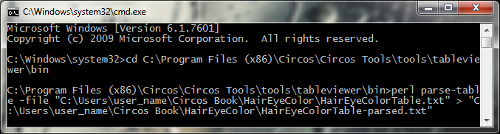
Parse the text table (HairEyeColorTable.txt). This will create a new file, HairEyeColorTable-parsed.txt, which will be refined into a Circos diagram as follows:
perl parse-table -file "C:Usersuser_nameCircos Book
HairEyeColorHairEyeColorTable.txt" > "C:Usersuser_nameCircos
BookHairEyeColorHairEyeColorTable-parsed.txt"
-
The parse command consists of a few parts. First, Perl's parse-table instructs Perl to execute the parse program on the HairEyeColorTable.txt file. Second, the > symbol instructs Windows to write the output into another text file called HairEyeColorTable-parsed.txt.
Linux Users
Linux users can use a simpler, shorter syntax. Steps 2 and 3 can be completed with this command:
cat "~/Documents/Circos Book/HairEyeColor/
HairEyeColorTable.txt" | bin/parse-table | bin/
make-conf -dir "~/Documents/user_name/Circos Book/
HairEyeColor/HairEyeColorTable-parsed.txt
Create the configuration files from the parsed table using the following command:
type "C:Usersuser_nameCircos BookHairEyeColor
HairEyeColorTable-parsed.txt" | perl make-conf -dir "C:Users
user_nameCircos BookHairEyeColor"
This will create 11 new configuration files. These files contain the data and style information which is needed to create the final diagram.
This command consists of two parts. We are instructing Windows to pass the text in the HairEyeColorTable-parsed.txt file to the make-conf command. The | (pipe) character separates what we want passed along and the actual command. After the pipe, we are instructing Perl to execute the make-conf command and store the output into a new directory.
-
We need to create a final file, which compiles all the information. This file will also tell Circos how the diagram should appear, such as size, labels, image style, and where the diagram will be saved. We will save the diagram as HairEyeColor.conf.
-
The make-conf command gave us the color.conf file, which associates colors with the final diagram. In addition, the Circos installation provides us with some other basic colors and fonts. The first several lines of code are:
<colors>
<<include colors.conf>>
<<include C:Program Files (x86)Circosetccolors.conf>>
</colors>
<fonts>
<<include C:Program Files (x86)Circosetcfonts.conf>>
</fonts>
-
The next segment is the ideogram. These are the parameters that set the details of the image. This first set of lines specifies the spacing, color, and size of the chromosomes:
<ideogram>
<spacing>
default=0.01r
break=200u
</spacing>
thickness = 100p
stroke_thickness = 2
stroke_color = black
fill = yes
fill_color = black
radius = 0.7r
show_label = yes
label_font = condensedbold
label_radius = dim(ideogram,radius) + 0.05r
label_size = 48
band_stroke_thickness = 2
show_bands = yes
fill_bands = yes
</ideogram>
-
Next, we will define the image, including where it is stored (this location is mentioned in the following code snippet as dir), the file name, whether we want an SVG or PNG file, size, background color, and any rotation:
dir = C:Usersuser_nameCircos BookHairEyeColor
file = HairEyeColor
svg = yes
png = yes
24bit = yes
radius = 800p
background = white
angle_offset = +90
-
Lastly, we will input the data and define how the links (ribbons) should look:
chromosomes_units = 1
karyotype = karyotype.txt
<links>
z = 0
radius = 1r – 150p
bezier_radius = 0.2r
<link cell_>
ribbon = yes
flat = yes
show = yes
color = black
thickness = 2
file = cells.txt
</link>
show_bands = yes
<<include C:Program Files (x86)Circosetchousekeeping.conf>>
Save this file as HairEyeColor.conf with the other configuration files. Have a look at the next diagram which explains all this procedure:
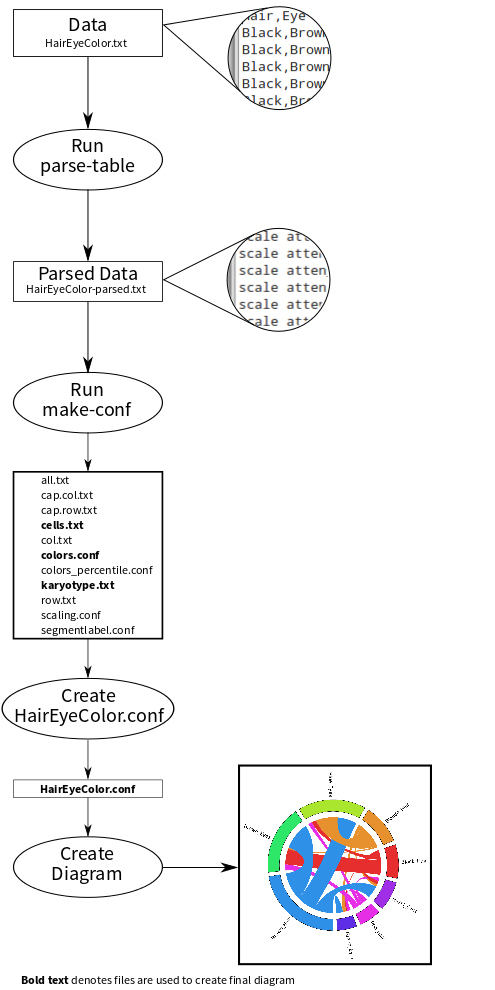
The make-conf command outputs a few very important files. First, karyotype.txt defines each ideogram band's name, width, and color. Meanwhile, cells.txt is the segdup file containing the actual data. It is very different from our original table, but it dictates the width of each ribbon. Circos links the karyotype and segdup files to create the image. The other configuration files are mostly to set the aesthetics, placement, and size of the diagram.
-
Return to the Command Prompt and execute the following command:
cd C:Usersuser_nameCircos BookHairEyeColor
perl "C:Program Files (x86)Circosbincircos" –conf
HairEyeColor.conf
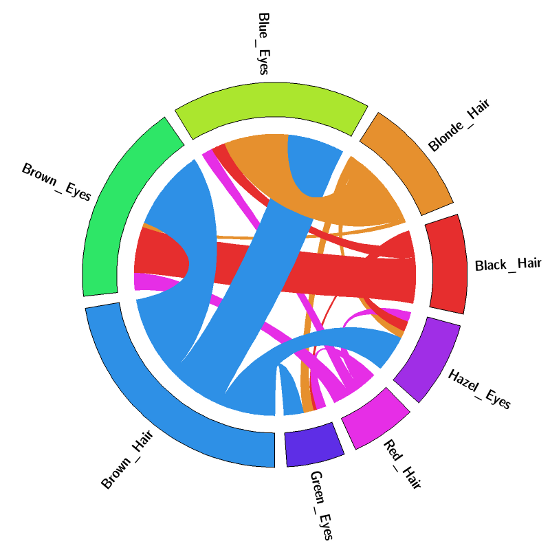
Several lines of text will scroll across the screen. At the conclusion, HairEyeColor.png and HairEyeColor.svg will appear in the folder as shown in the next diagram:


 United States

 Great Britain
 India
India
 Germany
 France
 Canada
 Russia
 Spain
Spain
 Brazil
 Australia
 Singapore
 Canary Islands
 Hungary
 Ukraine
 Luxembourg
 Estonia
 Lithuania
 South Korea
 Turkey
 Switzerland
 Colombia
 Taiwan
 Chile
Chile
 Norway
 Ecuador
 Indonesia
 New Zealand
 Cyprus
 Denmark
 Finland
 Poland
 Malta
Malta
 Czechia
 Austria
 Sweden
 Italy
Italy
 Egypt
Egypt
 Belgium
 Portugal
 Slovenia
 Ireland
 Romania
 Greece
 Argentina
 Netherlands
 Bulgaria
 Latvia
 South Africa
 Malaysia
 Japan
Japan
 Slovakia
 Philippines
 Mexico
 Thailand