Search icon CANCEL
Subscription
0
Cart icon
Your Cart (0 item)
Close icon
You have no products in your basket yet
Save more on your purchases! discount-offer-chevron-icon
Savings automatically calculated. No voucher code required.
Arrow left icon
Explore Products
Best Sellers
New Releases
Books
Videos
Audiobooks
Learning Hub
Newsletter Hub
Free Learning
Arrow right icon
timer SALE ENDS IN
0 Days
:
00 Hours
:
00 Minutes
:
00 Seconds
Arrow up icon
GO TO TOP
Learning RxJava

You're reading from   Learning RxJava Build concurrent applications using reactive programming with the latest features of RxJava 3

Arrow left icon
Product type Paperback
Published in Feb 2020
Publisher Packt
ISBN-13 9781789950151
Length 412 pages
Edition 2nd Edition
Languages
Tools
Arrow right icon
Authors (2):
Arrow left icon
Nick Samoylov Nick Samoylov
Author Profile Icon Nick Samoylov
Nick Samoylov
 Nield Nield
Author Profile Icon Nield
Nield
Arrow right icon
View More author details
Toc

Table of Contents (22) Chapters Close

Preface 1. Section 1: Foundations of Reactive Programming in Java
2. Thinking Reactively FREE CHAPTER 3. Observable and Observer 4. Basic Operators 5. Section 2: Reactive Operators
6. Combining Observables 7. Multicasting, Replaying, and Caching 8. Concurrency and Parallelization 9. Switching, Throttling, Windowing, and Buffering 10. Flowable and Backpressure 11. Transformers and Custom Operators 12. Section 3: Integration of RxJava applications
13. Testing and Debugging 14. RxJava on Android 15. Using RxJava for Kotlin 16. Other Books You May Enjoy Appendix A: Introducing Lambda Expressions 1. Appendix B: Functional Types 2. Appendix C: Mixing Object-Oriented and Reactive Programming 3. Appendix D: Materializing and Dematerializing 4. Appendix E: Understanding Schedulers

Setting up

Currently, there are three co-existing versions of RxJava: 1.x, 2.x, and 3.0. We will go through some of the major differences later in the section entitled RxJava 1.x, 2.x, 3.0 – which one do I use? and discuss which version you should use.

RxJava 3.0 is a fairly lightweight library and comes in at fewer than 4 megabytes (MBs) in size. This makes it practical for Android and other projects that require a low dependency overhead. RxJava 3.0 has only one dependency, called Reactive Streams ( http://www.reactive-streams.org/), which is a core library (made by the creators of RxJava) that sets a standard for asynchronous stream implementations, one of which is RxJava 3.0.

RxJava 2x is even smaller—closer to 2 MB—and has only one dependency on Reactive Streams too.

It may be used in other libraries beyond RxJava and is a critical effort in the standardization of reactive programming on the Java platform. Note that RxJava 1.x does not have any dependencies, including Reactive Streams, which was realized after 1.0.

If you are starting a project from scratch, try to use RxJava 3.0. This is the version we will cover in this book, but we will point out significant differences between versions 1.x and 2.x. While RxJava 1.x and 2.x will be supported for a good while due to the countless projects using it, innovation will likely only continue onward in RxJava 3.0. RxJava 1.x reached end-of-life on March 31, 2018, and RxJava 2.x will only be maintained by fixing bugs until February 28, 2021.

All RxJava versions can run on Java 1.6+. In this book, we will use Java 8, and it is recommended that you use a minimum of Java 8 so that you can use lambdas out of the box. For Android, there are ways to leverage lambdas in earlier Java versions that will be addressed later. But due to the fact that Android Nougat uses Java 8 and Java 8 has been out since 2014, we hope that you will not have to do any workarounds to leverage lambdas.
Navigating the central repository

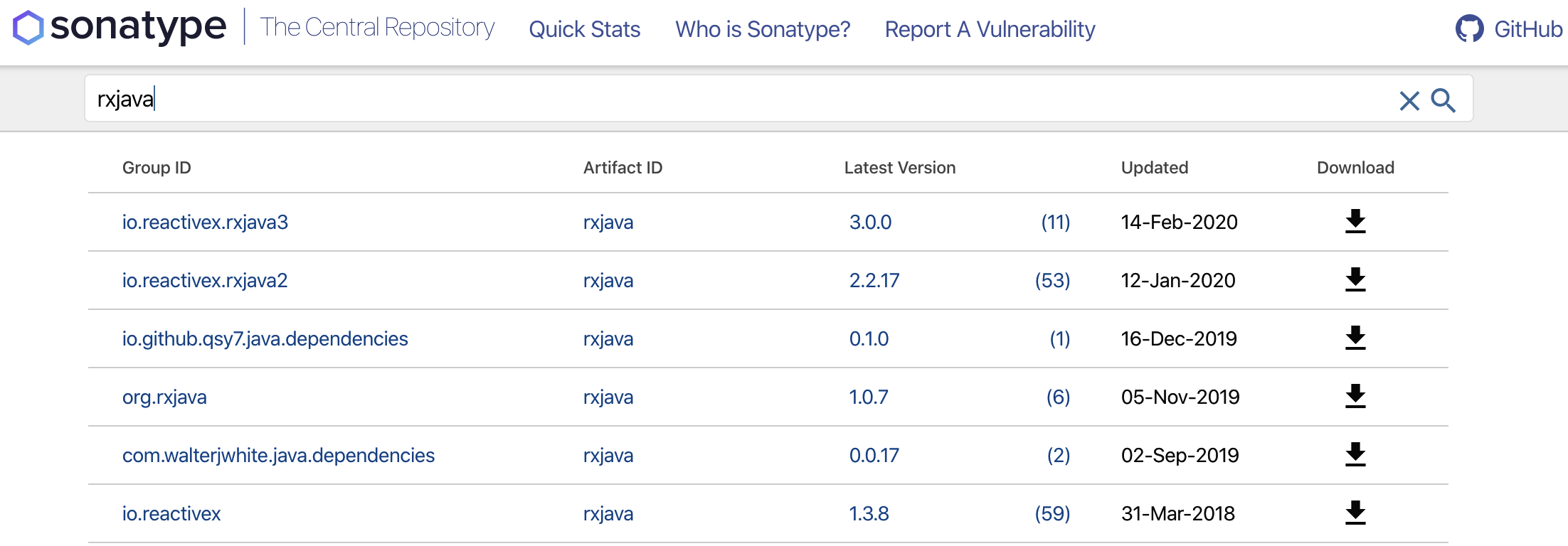
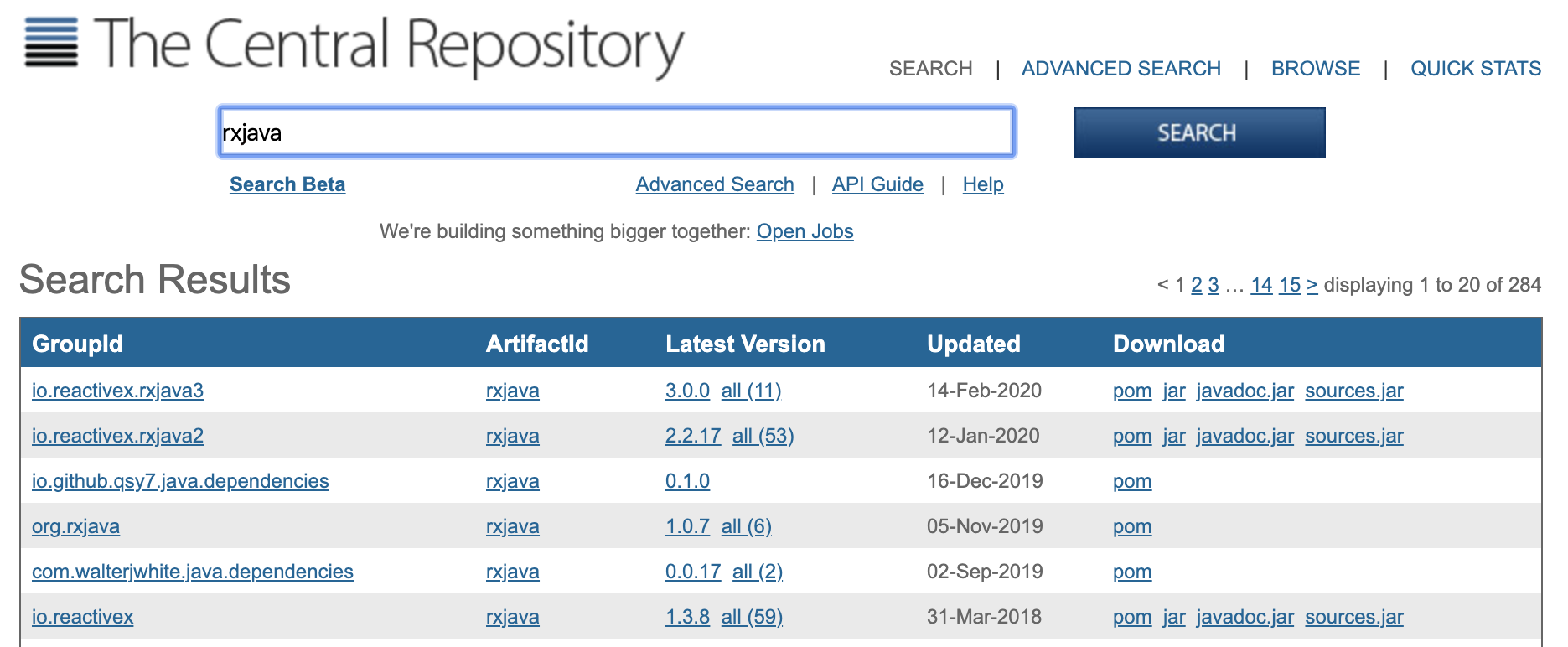
To bring in RxJava as a dependency, you have a number of options. The best place to start is to go to the Maven central repository, called The Central Repository (http://search.maven.org) and search for rxjava. You should see RxJava 3.0, 2.x, and 1.x as separate repositories at the top of the search results, as shown in the following screenshot:

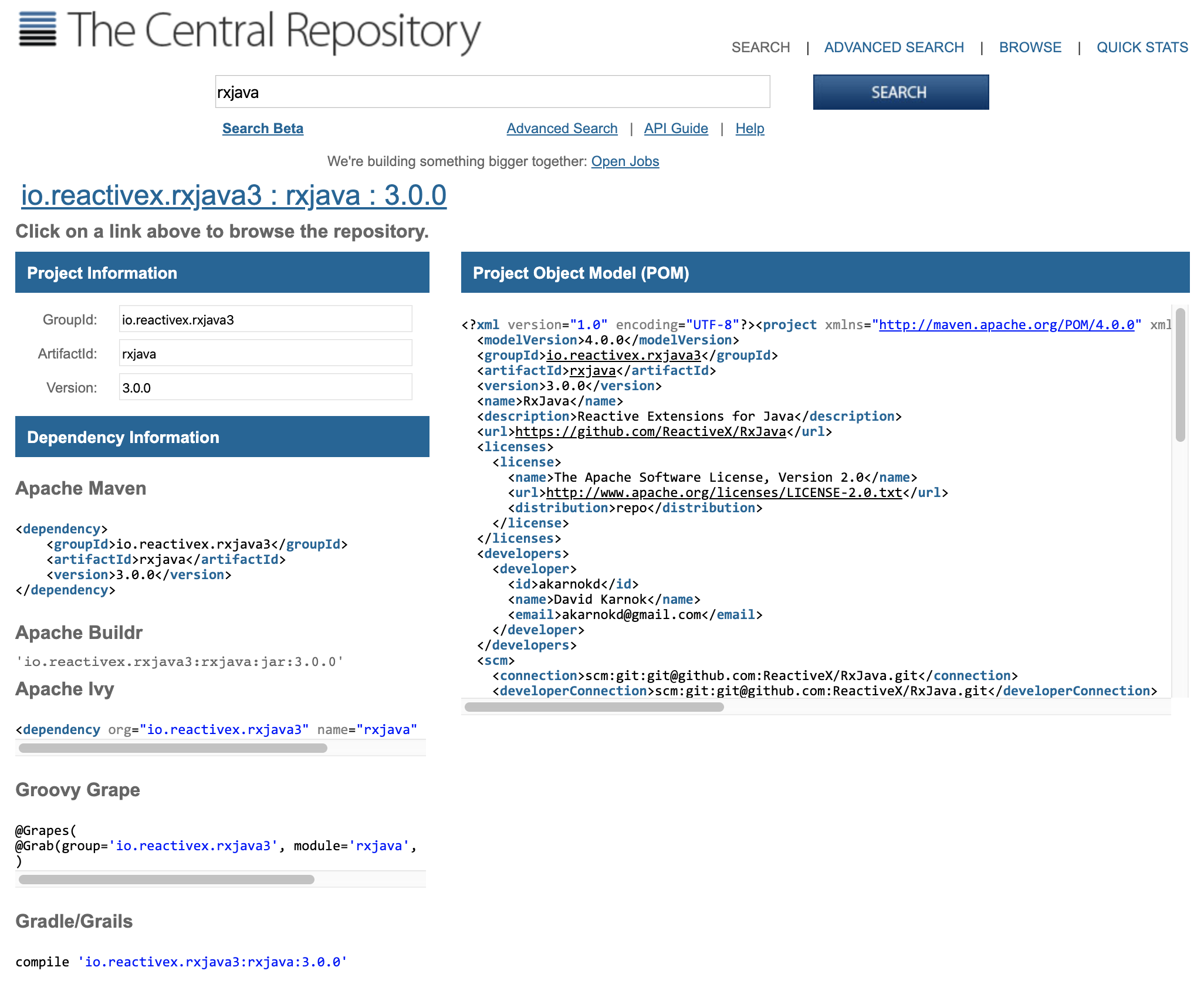
You can also use classic search, if you're already used to its look and feel, and get the same results as shown in the following screenshot:

At the time of writing, RxJava 3.0.0 is the latest version of RxJava 3.x, RxJava 2.2.17 is the latest version of RxJava 2.x, and RxJava 1.3.8 is the latest version of RxJava 1.x. You can download the latest JAR file by clicking the link on the far right under the Download column and then configuring your project using the downloaded JAR file.

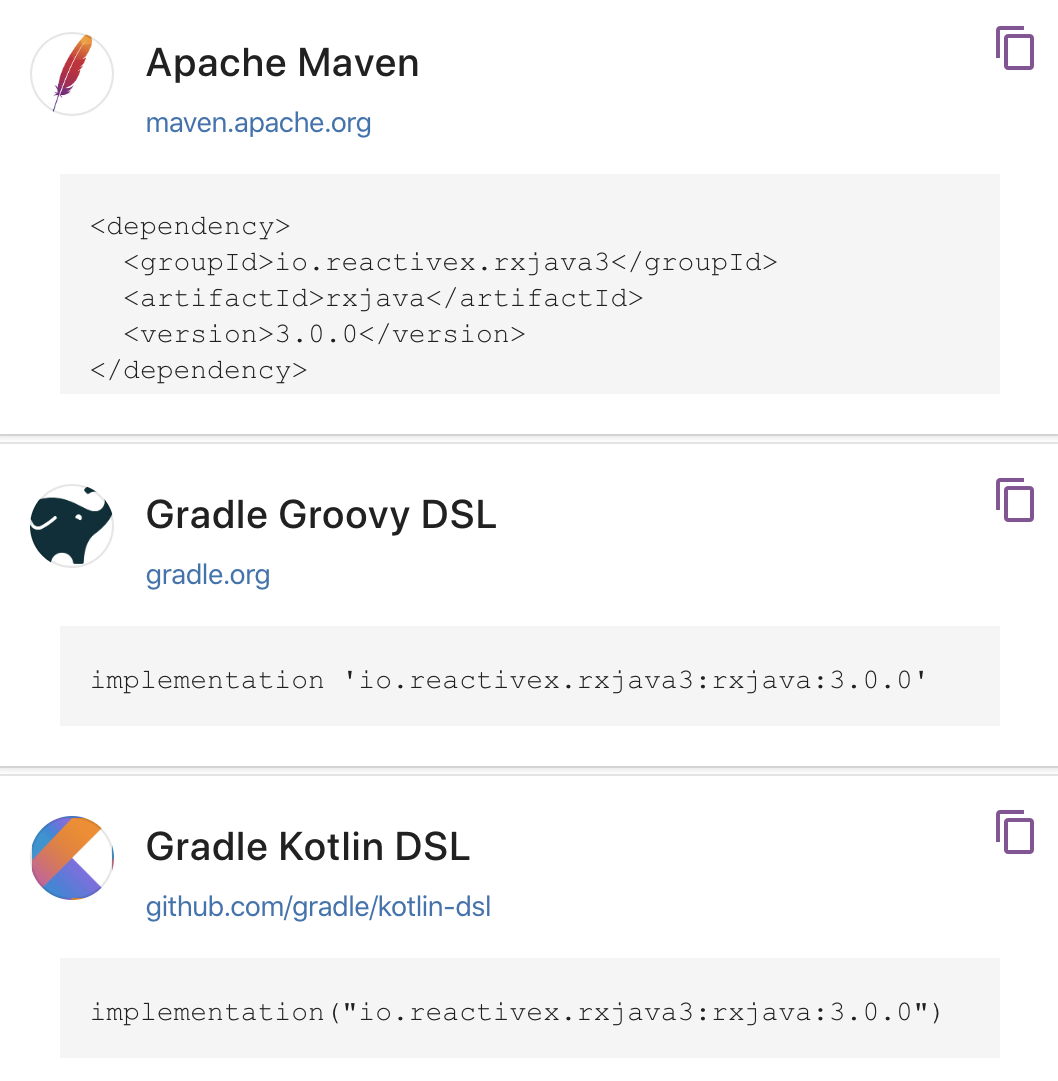
Alternatively, you can use Gradle or Maven to automatically import these libraries into your project. This way, you can easily share and store your project (through Git or other version control systems) without having to download and configure RxJava manually each time. To view the latest configurations for Maven, Gradle, and several other build automation systems, click on the Latest Version link and copy the dependency description provided into the pom.xml file (for Maven) or build.gradle file (for Gradle) of your project.

In the next two subsections, we will walk you through how to do it.

Using Gradle

There are several automated build systems available, but the two most popular ones are Gradle and Maven. Gradle is somewhat of a successor to Maven and used mostly for Android development. If you are not familiar with Gradle and would like to learn how to use it, check out the Gradle Getting Started guide (https://gradle.org/getting-started-gradle-java/).

There are also several books that cover Gradle in varying degrees of depth that you can find at https://gradle.org/books/. The following is the fragment of the above screenshot that contains Maven and Gradle configurations:

In your build.gradle script, ensure that you have declared mavenCentral() as one of your repositories. Type in or paste this dependency line, compile 'io.reactivex.rxjava2:rxjava:x.y.z', where x.y.z is the version number you want to use, as shown in the following code snippet:

apply plugin: 'java'
sourceCompatibility = 1.8
repositories {
mavenCentral()
}
dependencies {
compile 'io.reactivex.rxjava2:rxjava:x.y.z'
}

Build your Gradle project and you should be good to go! You will then have RxJava and its types available for use in your project.

Using Maven

You also have the option to use Maven, and you can view the appropriate configuration in The Central Repository by selecting the Apache Maven configuration information, as shown in the following screenshot:

You can then copy and paste the <dependency> block containing the RxJava configuration and paste it inside a <dependencies> block in your pom.xml file. Rebuild your project, and you should now have RxJava set up as a dependency. The x.y.z version number corresponds to the desired RxJava version that you want to use:

<project>
<modelVersion>4.0.0</modelVersion>
<groupId>org.nield</groupId>
<artifactId>mavenrxtest</artifactId>
<version>1.0</version>
<dependencies>
<dependency>
<groupId>io.reactivex.rxjava2</groupId>
<artifactId>rxjava</artifactId>
<version>x.y.z</version>
</dependency>
</dependencies>
</project>
CONTINUE READING
83
Tech Concepts
36
Programming languages
73
Tech Tools
Icon Unlimited access to the largest independent learning library in tech of over 8,000 expert-authored tech books and videos.
Icon Innovative learning tools, including AI book assistants, code context explainers, and text-to-speech.
Icon 50+ new titles added per month and exclusive early access to books as they are being written.
Learning RxJava
You have been reading a chapter from
Learning RxJava - Second Edition
Published in: Feb 2020
Publisher: Packt
ISBN-13: 9781789950151
Register for a free Packt account to unlock a world of extra content!
A free Packt account unlocks extra newsletters, articles, discounted offers, and much more. Start advancing your knowledge today.
Unlock this book and the full library FREE for 7 days
Get unlimited access to 7000+ expert-authored eBooks and videos courses covering every tech area you can think of
Renews at $19.99/month. Cancel anytime
Modal Close icon
Modal Close icon