Creativity is the power to connect the seemingly unconnected.
– William Plomer
Let's begin our journey by investigating what BizTalk Server actually is, why one would use it, and how to craft a running application. This article will be a refresher on BizTalk Server for those of you who have some familiarity with the product.
In this article by Mark Brimble coauthor of the book SOA Patterns with BizTalk Server 2013 and Microsoft Azure - Second Edition, you will learn:
- How to articulate BizTalk Server, when to use it, and how it works
- How to outline the role of BizTalk schemas, maps, and orchestrations
- BizTalk messaging configurations
What is BizTalk Server?
So what exactly is BizTalk Server, and why should you care about it? In a nutshell, Microsoft BizTalk Server 2013 uses adapter technology to connect disparate entities and enable the integration of data, events, processes, and services. An entity may be an application, department, or a different organization altogether that you need to be able to share information with. A software adapter is typically used when we need to establish communication between two components that do not natively collaborate. BizTalk Server adapters are built with a common framework; which results in system integration implemented via configuration, not coding.
Traditionally, BizTalk Server has solved problems in the following three areas:
- Enterprise Application Integration
- Business-to-Business
- Business Process Automation
First, BizTalk Server acts as an Enterprise Application Integration (EAI) server that connects applications that are natively incapable of talking to each other. The applications may have incompatible platforms, data structure formats, or security models. For example, when a new employee is hired, the employee data from the human resources application needs to be sent to the payroll application so that the new employee receives his/her paycheck on time. Nothing prevents you from writing the code necessary to connect these disparate applications with a point-to-point solution. However, using such a strategy often leads to an application landscape that looks like this:

Many organizations choose to insert a communication broker between these applications, as shown in the following figure:

Some of the benefits that you would realize from such an architectural choice include:
- Loose coupling of applications where one does not have a physical dependency on the other
- Durable infrastructure that can guarantee delivery and queue messages during destination system downtime
- Centralized management of system integration endpoints
- Message flow control such as in-order delivery
- Encouragement for the reuse of core components
- Insight into cross-functional business processes through business activity monitoring
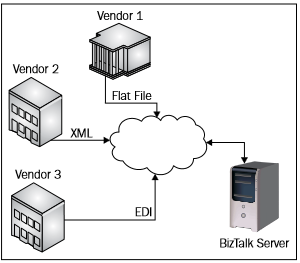
BizTalk Server solves a second problem by filling the role of a Business-to-Business (B2B) broker that facilitates communication across different organizations. BizTalk supports B2B scenarios by offering Internet-friendly adapters, industry standard EDI message schemas, and robust support for both channel- and message-based security.
The third broad area that BizTalk Server excels in is Business Process Automation (BPA). BPA is all about taking historically manual workflow procedures and turning them into executable processes. For example, consider an organization that typically receives a new order via e-mail, and the sales agent manually checks inventory levels prior to inserting the order into the fulfillment system. If the inventory is too low, then the sales agent has to initiate an order with their supplier and watch out for the response so that the inventory system can be updated. The inevitable problems of this scenario are as follows:
- Poor scalability when the number of orders increases
- Lack of visibility into the status of orders and supplier requests
- Multiple instances of redundant data entry, ripe for mistakes in one system and not the other
- Unreliable resources when a sales agent is sick
By deciding to automate this scenario, the company can reduce human error while streamlining communications between applications and organizations.

The beginning of the second decade of the 21st century saw the disruption of the traditional ways in which EAI and B2B problems were solved because of the rise of Software as Service (SaaS). SaaS is a software that is hosted external to your business, and is paid for on a subscription basis; its best known example is Salesforce.com. Many organizations have chosen to modify their EAI and B2B solutions with BizTalk Server to access SaaS applications using hybrid solutions, as shown in the following figure:

Four new adapters, the WCF-BasicHTTPRelay, WCF-WebHTTP, WCF-NetTCPRelay, and SB-Messaging adapter, have been added to BizTalk 2013 to support hybrid solutions, and are nicknamed the "cloud adapters". New chapters on RESTful services and the Azure Service Bus have been added to this edition of the book to describe how these cloud adapters enhance the BizTalk Server story.
Microsoft Azure BizTalk Service (MABS) has been created as a SaaS offering that can abstract B2B problems to Azure. We have added a chapter that shows how to use BizTalk Server 2013 with this new SaaS model. Examples of how to use all these new components to add new SOA capabilities to BizTalk Server have been added to this book.
Azure App Services is Microsoft's next generation SaaS offering that will supersede MABS. While the platform is still very fresh, we have outlined the underlying concepts for you in the final chapter of this book to help you get a head start on usage of this platform.
What's the one thing that all of these BizTalk Server cases have in common? They all depend on the real-time interchange and processing of discrete messages in an event-driven fashion. This partially explains why BizTalk Server is such a strong tool within a service-oriented architecture. We'll investigate many of BizTalk's service-oriented capabilities in later chapters, but it's important to note that the functionality that exists to support the three top-level scenarios mentioned earlier (EAI, B2B, and BPM) fits well into a service-oriented mindset. Concepts such as contract-first design, loose coupling, and reusability are soaked into the fabric of BizTalk Server.
BizTalk Server should be targeted for solutions that exchange real-time messages as opposed to Extract Transform Load (ETL) products that excel at bulky, batch-oriented exchanges between data stores.
BizTalk Server 2013 is the eighth release of the product, the first release being BizTalk Server 2000. Back in those days, developers had access to four native adapters (filesystem, MSMQ, HTTP, and SMTP). Development was done using a series of different tools, and the underlying engine had some fairly tight coupling between components. Since then, the entire product has been rebuilt and reengineered for .NET and a myriad of new services and features have become part of the BizTalk Server suite. The application continues to evolve and take greater advantage of the features of the Microsoft product stack, while still being the most interoperable and platform-neutral offering that Microsoft has ever produced.
BizTalk architecture
So how does BizTalk Server actually work? At its core, BizTalk Server is an event-processing engine based on a conventional publish-subscribe pattern. Wikipedia defines the publish-subscribe pattern as:
Unlock access to the largest independent learning library in Tech for FREE!
Get unlimited access to 7500+ expert-authored eBooks and video courses covering every tech area you can think of.
Renews at $19.99/month. Cancel anytime
"An asynchronous messaging paradigm where senders (publishers) of messages are not programmed to send their messages to specific receivers (subscribers). Rather, published messages are characterized into classes, without knowledge of what (if any) subscribers there may be. Subscribers express interest in one or more classes, and only receive messages that are of interest, without knowledge of what (if any) publishers there are."
This pattern enforces a natural loose coupling and provides more scalability than an engine that requires a tight connection between receivers and senders. In the first release of BizTalk Server, the product did have tightly coupled messaging components, but thankfully, the engine was completely redesigned for BizTalk Server 2004.
Once a message is received by a BizTalk adapter, it runs through any necessary preprocessing (such as decoding and validations) in BizTalk pipelines before being subjected to data transformation via BizTalk maps, and finally being published to a central database called the MessageBox. Then, the parties that have a corresponding subscription for that message can consume it as they see fit. While introducing a bit of unavoidable latency, the MessageBox database makes up for that by providing us with durability, reliability, and scalability. For instance, if one of our subscriber systems is offline for maintenance, outbound messages are not lost, but rather the MessageBox ensures that the messages are queued until the subscriber is ready to receive them. Worried about a large flood of inbound messages that steal processing threads away from other BizTalk activities? No problem! The MessageBox ensures that each and every message finds its way to its targeted subscriber, even if it must wait until the flood of inbound messages subsides.
There are really two ways to look at the way BizTalk is structured. The first is the traditional EAI view, which sees BizTalk receiving messages and routes them to the next system for consumption. The flow is very linear and BizTalk is seen as a broker between two applications, shown as follows:

However, the other way to consider BizTalk, and the focus of this book, is as a Service Bus, with numerous input/output channels that process messages in a very dynamic way. That is, instead of visualizing the data flow as a straight path through BizTalk to a destination system, consider BizTalk exposing services as on-ramps to a variety of destinations. Messages published to BizTalk Server may fan out to dozens of subscribers, who have no interest in what the publishing application actually was. Instead of thinking about BizTalk as a simple connector of systems, think of it as a message bus that coordinates a symphony of events between endpoints.
This concept is an exciting way to exploit BizTalk's engine in this modern world of service orientation. In the following figure, I've shown how the central BizTalk bus has receiver services hanging from it, and has a multitude of distinct subscriber services that are activated by relevant messages reaching the bus:

If the on-ramp concept is a bit abstract to understand, consider a simple analogy. In designing the transportation for a city, it would be foolish to create distinct roads between each and every destination. The design and maintenance of such a project would be lunacy. It would be smart to design a shared highway with on and off ramps, which enable people to use a common route to get to the numerous locations around town. As new destinations in the city emerge, the entire highway (or road system) doesn't need to undergo changes, but rather, only a new entrance/exit point needs to be appended to the existing shared infrastructure.
What exactly is a message anyway? A message is data processed through BizTalk Server's messaging engine, whether that data is transported as an XML document, a delimited flat file, or a Microsoft Word document. The message content may contain a command (for example, InsertCustomer), a document (for example, Invoice), or an event (for example, VendorAdded). A message has a set of properties associated with it. First and foremost, a message may have a type associated with it, which uniquely defines it within the messaging bus. The type is typically comprised of the XML namespace and the root node name (for example, http://CompanyA.Purchasing#PurchaseOrder). The message type is much like the class object in an object-oriented programming language; it uniquely identifies entities by their properties. The other critical attribute of a message in BizTalk Server is the property bag called the message context, as shown in the following screenshot:

The message context is a set of name/value properties that stay attached to the message as long as it remains within BizTalk Server. These context values include metadata about the transport used to publish the message and attributes of the message itself. Properties in the message context that are visible to the BizTalk engine, and therefore available for routing decisions, are called promoted properties.
How does a message actually get into BizTalk Server? A receive location is configured for the actual endpoint that receives messages. The receive location uses a particular adapter that knows how to absorb the inbound message. For instance, a receive location may be configured to use the FILE adapter, which polls a particular directory for XML messages. The receive location stores the file path to monitor, while the adapter provides transport connectivity. Upon receipt of a message, the adapter stamps a set of values into the message context. For the FILE adapter, values such as ReceivedFileName are added to that message's context property bag.
Note that BizTalk has both application adapters, such as SQL Server, Oracle, and SAP, as well as transport-level adapters, such as HTTP, MSMQ, and FILE. The key point is that the adapter configuration user experience is virtually identical regardless of the type of adapter chosen. Some of the adapters available are shown in the following figure:

Receive locations have a particular receive pipeline associated with them. A pipeline is a sequential set of optional operations that is performed on the message in preparation of being parsed and sent to the message box database by the BizTalk adapter. For instance, I would need a pipeline in order to decrypt, unzip, or validate the XML structure of my inbound message. One of the most critical roles of the pipeline is to identify the type of the inbound message and put the type into the message context as a promoted property. Custom pipelines can serve as preprocessing stages to make the message useful for processing. As discussed earlier, a message type is the unique characterization of a message. Think of a receive pipeline as performing all the preprocessing steps necessary for putting the message in to its most usable format.
A receive port contains one or more receive locations. Receive ports have XSLT maps associated with them that are applied to messages prior to publishing them to the MessageBox database. What value does a receive port offer? It acts as a grouping of receive locations where capabilities such as mapping and data tracking can be applied to all of the associated receive locations. It may also act as a container that allows us to publish a single entity to BizTalk Server regardless of how it came in, or what it looked like upon receipt. Let's say that my receive port contains three receive locations, which all receive slightly different "invoice" messages from three different external vendors. At the receive port level, I have three maps that take each unrelated message and maps it to a single, common format, before publishing it to BizTalk.
Now that we have a message cleaned up (by the pipeline) and in the final structure (via an XSLT map), it's published to the BizTalk Server MessageBox where message routing can begin. For our purposes, there are two types of subscribers that we care about. The first type of subscriber is a send port. A send port is conceptually the inverse of the receive location and is responsible for transporting messages out of the BizTalk "bus".
It has not only the adapter reference, adapter configuration settings, and pipeline (much like the receive location), but also the ability to apply XSLT maps to outbound messages. If a send port subscribes to a message, it first applies any XSLT map to the message, then processes it through a send pipeline, and finally uses the adapter to transmit the message out of BizTalk.
The other type of subscriber for a published message is a BizTalk orchestration. An orchestration is an executable business process that uses messages to complete operations in a workflow. We'll spend plenty of time working with orchestration subscribers throughout this book.
Summary
In this article, we looked at what BizTalk is, its core use cases, and how it works. In my experience, one of the biggest competitors to BizTalk Server is not another product, but custom-built solutions. Many organizations engage a "build versus buy" debate prior to committing to a commercial product. In this article, I highlighted just a few aspects of BizTalk that make it a compelling choice for usage. With BizTalk Server, you get a well-designed scalable messaging engine with a durable persistence tier, which guarantees that your mission-critical messages are not lost in transit. The engine also provides native support for message tracking, recoverability, and straightforward scalability. BizTalk provides you with more than 20 native application adapters that save weeks of custom development time and testing. We also got a glimpse of BizTalk's integrated workflow toolset, which enables us to quickly build executable business processes that run in a load-balanced environment. These features alone often tip the scales in BizTalk Server's favor, not to mention the multitude of features that we are yet to discuss, such as Enterprise Single Sign On, the Business Rules Engine, Business Activity Monitoring, and so on.
I hope that this article also planted some seeds in your mind with regards to thinking about BizTalk solutions in a service-oriented fashion. There are best practices for designing reusable, maintainable solutions that we will investigate throughout the rest of this book. In the next chapter, we'll explore one of the most important technologies for building robust service interfaces in BizTalk Server, which is Windows Communication Foundation.
Resources for Article:
Further resources on this subject:


 United States

 Great Britain
 India
India
 Germany
 France
 Canada
 Russia
 Spain
Spain
 Brazil
 Australia
 Singapore
 Canary Islands
 Hungary
 Ukraine
 Luxembourg
 Estonia
 Lithuania
 South Korea
 Turkey
 Switzerland
 Colombia
 Taiwan
 Chile
Chile
 Norway
 Ecuador
 Indonesia
 New Zealand
 Cyprus
 Denmark
 Finland
 Poland
 Malta
Malta
 Czechia
 Austria
 Sweden
 Italy
Italy
 Egypt
Egypt
 Belgium
 Portugal
 Slovenia
 Ireland
 Romania
 Greece
 Argentina
 Netherlands
 Bulgaria
 Latvia
 South Africa
 Malaysia
 Japan
Japan
 Slovakia
 Philippines
 Mexico
 Thailand