Microsoft Fabric Data Agents: Building AI-Powered, Conversational Analytics for Enterprise Data
Read more
Microsoft Fabric Data Agents: Building AI-Powered, Conversational Analytics for Enterprise Data
Christopher Maneu, Frederic Gisbert, Emilie Beau, Jean-Pierre Riehl, Romain Casteres
600 min read
2026-05-20 09:52:06
0 Likes
0 Comments
DataPro is a weekly, expert-curated newsletter trusted by 120k+ global data professionals. Built by data practitioners, it blends first-hand industry experience with practical insights and peer-driven learning.
Make sure to subscribe here so you never miss a key update in the data world.
Introduction
Data agents in Microsoft Fabric are redefining how organizations interact with enterprise data. Instead of relying only on dashboards, predefined reports, or technical query skills, users can ask questions in natural language and receive contextual, data-driven answers powered by generative AI.
This article explores how Fabric data agents connect to lakehouses, warehouses, semantic models, mirrored databases, Power BI, Microsoft Copilot Studio, AI Foundry, and real-time intelligence systems, turning organizational data into a conversational, governed, and actionable intelligence layer.
Data agents in Microsoft Fabric
Before diving into the h ands-on steps, let’s now move from the general overview of data agents to a practical example. The next section walks you through creating your fi rst data agent, showing how to connect it to your data and begin building a customized generative AI experience within Microsoft Fabric.
Microsoft Fabric now brings full CI/CD, ALM fl ow, and Git integration to Data Agents, providing a more structured and collaborative way to manage, version, and deploy Data Agent artifacts. These capabilities ensure better governance and scalability by introducing controlled development stages, change tracking, and auditability across the lifecycle. Git integration allows teams to branch, experiment independently, review code, and merge updates safely, with the ability to revert quickly if needed. Together, these enhancements make developing and maintaining Fabric Data Agents more reliable, transparent, and aligned with modern soft ware engineering practices.
Creating your first data agent
The data agent in Microsoft Fabric is a new type of artifact that allows creating customized generative AI experiences based on the organization’s data. Users can thus, on top of their data, activate an AI assistant that will translate questions posed by users in natural language directly into code and immediately return the answers.
Once created, the data agent must be associated with a data source. You will then need to select the specifi c tables from which the system will retrieve data. Currently supported sources include lakehouses, warehouses, KQL databases, and semantic models. The user can enhance the assistant by providing additional information about the data (instructions), the underlying models, or simply by detailing the context in which the assistant should operate.
Finally, it is possible to load a set of SQL queries linked to natural language questions to help the model fi nd the information. These queries are, for example, created by enterprise data analysts who are well acquainted with the business models as well as the data.
In the following example, we ask our conversational agent What are the key insights or most notable patterns in sales seasonality over time?.
Figure 11.20: A data agent in Microsoft Fabric analyzes seasonal sales trends, identifying monthly patterns in total sales, variance, and margins to support strategic planning and forecasting
Once the tables are selected, the context is validated, the examples are loaded, and the interaction is tested, it i s possible to publish this data agent in order to share it and retrieve an API to integrate it into enterprise applications.
Unlocking LLM-Driven Intelligence from Mirrored Databases in Microsoft Fabric
Microsoft Fabric introduces a new capability that connects large language models (LLMs) directly to mirrored databases through a Data Agent. This feature allows organizations to use their synchronized, real-time data without the need for complex duplication or manual integration. The Data Agent acts as an intelligent bridge between the mirrored databases and AI models, enabling natural language queries and automated insights based on live information.
The supported mirrored databases include:
• Mirrored Azure Cosmos DB
• Mirrored Azure Database for PostgreSQL
• Mirrored Azure Databricks catalog
• Mirrored Azure SQL Database
• Mirrored Azure SQL Managed Instance
• Mirrored Oracle
• Mirrored Snowfl ake
• Mirrored SQL Server Database
By integrating these sources, Fabric allows businesses to maintain data consistency, security, and freshness while making their information accessible to AI-driven analysis. Users can interact with their data conversationally, generate real-time insights, and make faster, more informed decisions. This seamless connection between enterprise databases and LLMs reduces latency, minimizes operational overhead, and strengthens confidence in AI-powered outcomes—turning mirrored databases into a live, intelligent foundation for modern analytics and decision-making.
Agent data source instructions
Microsoft Fabric h as introduced a new feature within its data agent framework called data source instructions. This feature allows data owners and developers to provide specific guidance on how AI agents should interpret and use each dataset. Instead of relying solely on the schema or raw content of a data source, agents now have access to structured context—such as explanations of tables, columns, relationships, and intended use cases. These instructions improve the agent’s ability to generate relevant, precise, and business-aligned responses when interacting with enterprise data.
Data source instructions can include natural language descriptions, key business definitions, column-level explanations, usage constraints, and examples of valid questions. This metadata acts as a knowledge layer that shapes how the agent interprets queries and formulates answers. For instance, when working with multiple datasets, the agent can prioritize certain fi elds, avoid unsupported queries, or follow business-specific logic as defined in the instructions.
The benefit is a noticeable improvement in response quality, consistency, and reliability, particularly in use cases such as semantic search, natural language querying, and generative AI experiences in dashboards or notebooks. By embedding domain expertise directly into the agent’s environment, data source instructions help bridge the gap between raw data and user intent—empowering AI systems to deliver answers that are not only technically correct but also contextually appropriate.
Figure 11.21: The interface provides a dedicated space for adding custom instructions to guide the
AI agent when using the LakeDBIA data source—covering table structures, column descriptions, metrics, and relationships
This development reflects a broader trend in enterprise AI: pairing large language models with curated, human-authored context to increase trust, precision, and usability in data-driven environments.
To begin configuring instructions for your data sources, please refer to the setup guide: https:// go.fabricbook.net/ch11-12. For tips on crafting clear and effective instructions, see the recommended guideline s: http://go.fabricbook.net/ch11-13.
The data agent SDK
Microsoft Fabric now off ers a Python SDK for data agents, enabling users to evaluate their agents programmatically and at scale. With this SDK, developers can defi ne a set of test questions paired with expected answers (ground truth) and run structured evaluations directly from notebooks or automation pipelines. The evaluation routine compares the agent’s responses against the expected results, logging detailed metrics and step-by-step reasoning in output tables. This enables validation of accuracy, error diagnosis, and confidence building before deploying the agent into production.
Setting up the evaluation is straightforward. You begin by installing the fabric-data-agent-sdk library, then prepare a pandas DataFrame containing your test queries and expected outcomes. Aft er calling the evaluate_data_agent() function, the SDK returns a unique evaluation ID and writes summary and step-level data to tables in your workspace. You can then retrieve overall accuracy and performance insights using the get_evaluation_summary() function.
This capability simplifies both quality control and continuous improvement of data agents. It supports tasks such as prompt tuning, regression tracking, and performance monitoring, helping ensure that AI-powered experiences remain accurate and reliable as they evolve.
Integrating data agents with Microsoft Copilot Studio and Microsoft AI Foundry
Integrating data agents with AI Foundry and Copilot Studio enables organizations to leverage enterprise data seamlessly within AI-driven workflows. This integration empowers conversational AI agents to dynamically access relevant data, enhancing both decision-making and user productivity.
Integration with AI Foundry occurs through the deployment of Fabric data agents as knowledge sources within Foundry’s agent framework. Foundry orchestrates the interaction, enabling AI agents to query these data agents directly. User identity and permissions fl ow securely through this integration, ensuring compliance and data governance at scale.
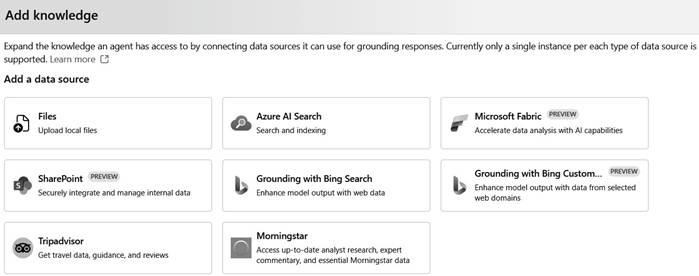
Figure 11.22: This panel allows users to expand an AI agent’s knowledge by connecting external data sources such as Microsoft Fabric, Azure AI Search, SharePoint, Bing Search, Tripadvisor, and others for grounding responses
When an AI Foundry agent receives a request, it intelligently delegates appropriate queries to a connected Fabric data agent, retrieves precise responses, and generates coherent outputs for end users.
In the following screenshot, we’ve connected SalesAgent from Microsoft Fabric to a broader agent called Market Agent. This connection allows us to cross-reference sales data with market insights, CRM information, and other external sources.
Figure 11.23: Existing Microsoft Fabric SalesAgent connection with custom authentication is ready for use
We can then interact with our agent in the playground and, within our context, ask the following question: What are the main takeaways or most significant trends in sales seasonality over time? Summarize in three key points. The result is then displayed in the agent’s interface.
Figure 11.24: The Market Agent in Azure AI Foundry summarizes key sales seasonality trends, using the connected SalesAgent knowledge source for context
Unlock access to the largest independent learning library in Tech for FREE!
Get unlimited access to 7500+ expert-authored eBooks and video courses covering every tech area you can think of.
Renews at ₹800/month. Cancel anytime
It is then possible to view the reasoning behind the model’s response, as well as the structure of its answer. In our example, we c an clearly see that the agent is interacting with the data agent, allowing it to retrieve as much relevant information as possible.
Figure 11.25: The run trace confirms a successful call to the fabric_dataagent tool, executed in
3 seconds as part of a thread session
AI agents integrated within Foundry can be seamlessly connected to Copilot Studio. Through this connection, agents created in Foundry become accessible within Microsoft Copilot applications and Microsoft 365. Users benefit from streamlined, multi-agent interactions, enabling AI assistants within familiar productivity tools to interact fluidly with enterprise data sources.
This integration leverages standardized protocols, allowing Copilot Studio agents to transparently discover, communicate, and collaborate with Foundry-based data agents, creating a unified conversational AI experience across various platforms.
By integrating Fabric data agents with AI Foundry and Copilot Studio, organizations can build sophisticated, interconnected AI agents that effortlessly access and deliver enterprise knowledge. The result is a powerful, cohesive system enabling intuitive and secure interactions between users, AI agents, and organizational data.
Integrating data agents with Power BI
In the evolving landscape of business analytics, the integration of Fabric data agents into Power BI
Copilot marks a significant leap forward. Microsoft is transforming the way users interact with enterprise data—moving beyond dashboards and static reports to a more fluid, conversational experience.
Traditionally, Power BI relied on structured datasets and semantic models to deliver insights. While powerful, this approach required users to know what data was available and how it was organized. With the arrival of Fabric data agents, that barrier begins to dissolve. These agents act as intelligent bridges, capable of querying data across Microsoft Fabric—including lakehouses, data warehouses, and real-time sources—without the user needing to understand their structure.
Once connected to Copilot, these agents enable a more dynamic and flexible form of analysis. Users can ask open-ended questions in natural language, and the system intelligently determines which data sources to consult. Rather than extracting predefi ned metrics, the agent interprets the user’s intent, formulates relevant queries, and returns synthesized answers. The interaction becomes adaptive, responsive, and deeply contextual.
The user experience has also evolved. Power BI now offers a full-screen Copilot interface that supports an ongoing dialogue with data. Users no longer jump between visualizations and filters; instead, they engage in natural, iterative conversation. Each question refines the context. Each response adds new understanding. The Fabric data agent is not just retrieving numbers—it’s helping users think.
This integration brings real advantages. First, it broadens analytical reach, allowing users to tap into previously disconnected datasets. Second, it lowers the technical barrier to insight, making advanced analysis accessible to users with no background in data modeling. And third, it shortens the path from question to answer, accelerating decision-making at every level of the business.
The Power BI home page offers a few suggested prompts, along with customization options such as adding agents, semantic models, or reports to better address the user’s query.
Figure 11.26: New Power BI Copilot experience
Once the agent is registered, you can submit the question to Copilot, which will rely on this agent to gather the data and generate a response for the user. In our example, the question asked is: What are the main takeaways or most significant trends in sales seasonality over time? Summarize in three key points.
Figure 11.27: Interaction between the new Power BI Copilot and Sales data agent
The most striking shift is not technical but conceptual. Business intelligence is becoming less about pulling data and more about interacting with it. With data agents embedded in Copilot, Power BI becomes a space where data and intent meet—where the analyst’s curiosity is answered by a system that listens, understands, and responds. It’s not just an evolution of to oling; it’s a new way of working with information.
MCP support for Real-Time Intelligence (RTI)
The promise of real-time intelligence has always been about immediacy—turning raw, fast-moving data into insight and action, as events unfold. With the introduction of Model Context Protocol (MCP) support for Real-Time Intelligence (RTI) in Microsoft Fabric, that promise takes a tangible form. AI agents, which once relied on static data or scheduled refreshes, can now engage directly with live event streams, unlocking entirely new use cases for operational awareness, anomaly detection, and conversational analytics.
At the heart of this evolution lies the concept of the MCP RTI server—an open source server built to act as a translator between natural language prompts and real-time query execution. This server supports queries against platforms such as Eventhouse and Azure Data Explorer, two foundational components of Fabric’s real-time architecture. The MCP server receives a user or agent’s query—phrased in everyday language—and transforms it into executable Kusto Query Language (KQL) or JSON-based expressions that access the most up-to-date data available.
The technical design is particularly elegant: the server offers features such as schema introspection, allowing agents to understand the structure of real-time tables and streams. It supports autocomplete, query optimization, query validation, and even natural language error explanations, enhancing usability for both developers and end users. In more advanced scenarios, it also supports anomaly detection patterns, vector-based semantic searches, and custom parameter bindings—critical capabilities when working with high-volume, high-velocity datasets.
From the user’s point of view, the experience is remarkably fluid. Imagine a business analyst interacting with Copilot in Microsoft Teams or Power BI, asking What unexpected traffic spikes occurred in the past five minutes? Instead of routing the question to a stale dataset, the AI agent communicates with the MCP RTI server, which accesses live telemetry from connected streams. The response is both immediate and context-aware—an intelligent snapshot of a moment in time, tailored to the user’s query.
This advancement is not just a technical milestone; it marks a shift in how we think about agents and data systems. MCP becomes the connective tissue between real-time data infrastructure and generative AI. It abstracts away the complexity of query languages and schema logic, giving agents the ability to operate as intuitive interfaces to complex real-time systems. These agents no longer need to be pre-programmed with rigid logic—they can now adapt, respond, and learn from live data in the flow of conversation.
Moreover, because MCP is standardized and extensible, this model is not confi ned to Microsoft tools. Any system or agent that speaks MCP can now tap into the RTI capabilities, whether it’s a third-party chatbot, an autonomous monitoring system, or a custom enterprise app. This composability ensures that real-time intelligence is not a siloed feature but part of a broader, interoperable ecosystem.
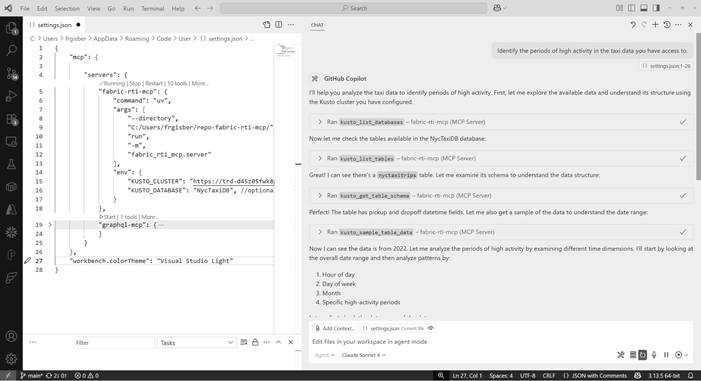
In the following example, after deploying the MCP RTI server, we have an MCP server connected to sample New York taxi data. The GitHub Copilot agent is linked to the Claude Sonnet 4 reasoning model, which responds to the following question: Identify the periods of high activity in the taxi data you have access to.
The agent begins its reasoning by listing the available databases and tables, discovers the taxi dataset, learns the schema, and then extracts a subset of the data to better understand its structure and content.
Figure 11.28: MCP RTI server configured as tools in the GitHub Copilot agent interface
The agent then continues its reasoning by extracting specific information from the database that will enable it to produce the final result of its analysis. A sequence of queries is sent to the database as part of this process.
• Now let me analyze monthly patterns
• Let me also look at specific high-activity periods and combine hour and day analysis
• Let me also analyze seasonal patterns by looking at different years
• Let me get a broader view of the recent data
• Now let me get the peak activity patterns for different time periods
For this final query, here is an example of the code generated by the agent and sent to the underlying database.
{
  "cluster_uri": "https://clustername.kusto.fabric.microsoft.com",
  "database": "NycTaxiDB",
  "query": "nyctaxitrips\n| where tpep_pickup_datetime >= datetime(2022-01-01) and tpep_pickup_datetime < datetime(2023-01-01)\n| extend pickup_date = bin(tpep_pickup_datetime, 1d)\n| summarize daily_trips = count() by pickup_ date\n| order by daily_trips desc\n| take 10"
}
At the end of its reasoning, the agent returns its analysis in the form of a formatted text, enriched with calculations derived from the knowledge base.
Figure 11.29: The setup in VS Code uses a custom Kusto query configuration to analyze NYC taxi data, revealing peak activity times—Wednesdays at noon lead with over 23 million trips
In a world increasingly driven by the speed of information, the ability to act on data as it happens is no longer a luxury—it’s a necessity. With MCP support for RTI, Microsoft is providing the infrastructure for that immediacy: a conversational layer over a real-time backbone, where AI agents don’t just analyze the past but live in the present.
Microsoft Fabric data agents represent a major step toward AI-first analytics, where users can query, reason over, and act on enterprise data through natural language. From creating a first data agent to integrating with mirrored databases, Power BI Copilot, Microsoft AI Foundry, Copilot Studio, and Real-Time Intelligence through MCP, the article shows how Fabric is evolving into a unified platform for governed, conversational, and real-time decision-making.
By combining structured data access, business context, SDK-based evaluation, and secure AI integrations, Fabric data agents help organizations move beyond static reporting toward intelligent, interactive analytics experiences. This article is an excerpt removed from The Definitive Guide to Microsoft Fabric book by Packt.
Author Bio
Christopher Maneu is a Principal Data Engineering Advocate at Microsoft, he focuses on data and analytics within the Azure platform. Christopher is part of the Azure Engineering team, working on Microsoft Fabric well before its launch. This early involvement has provided him with in-depth knowledge of the platform's development and capabilities. He has authored multiple books, including a reference book about Microsoft Fabric in French. Additionally, he has contributed to open-source projects related to Microsoft Fabric, such as the 'fabricnotes' repository on GitHub, which offers simple drawings illustrating the main concepts of Microsoft Fabric to empower users to build on the platform
Emilie BEAU is a technical specialist in data processing technologies. She has been at Microsoft for 15 years, enjoys sharing her knowledge, and engages in discussions about how advances in BI, Big Data, and Artificial Intelligence can help industries address new challenges. She spent years in the Microsoft Technology center, addressing CxOs at the intersection of business and technical needs.
Jean-Pierre is a Technology leader who combines data, innovation, and business value. Passionate about data, a fan of Power BI and Fabric, guided by innovation yet business-oriented, and "artificially intelligent," he has worked for more than 25 years on exciting projects-from the web to IoT-encompassing vast amounts of data and AI. A recognized Microsoft Most Valuable Professional (MVP) for the Data Platform since 2008, he has always been deeply involved in communities in France, both as an organizer and speaker. He leads the Microsoft Data community in France, notably through the Power BI Club and the Fabric Club.


 United States

 Great Britain
 India
India
 Germany
 France
 Canada
 Russia
 Spain
Spain
 Brazil
 Australia
 Singapore
 Canary Islands
 Hungary
 Ukraine
 Luxembourg
 Estonia
 Lithuania
 South Korea
 Turkey
 Switzerland
 Colombia
 Taiwan
 Chile
Chile
 Norway
 Ecuador
 Indonesia
 New Zealand
 Cyprus
 Denmark
 Finland
 Poland
 Malta
Malta
 Czechia
 Austria
 Sweden
 Italy
Italy
 Egypt
Egypt
 Belgium
 Portugal
 Slovenia
 Ireland
 Romania
 Greece
 Argentina
 Netherlands
 Bulgaria
 Latvia
 South Africa
 Malaysia
 Japan
Japan
 Slovakia
 Philippines
 Mexico
 Thailand